8 Best HP All-In-One Desktops for Business, Compared
As an Amazon Associate we earn from qualifying purchases. Links on this page are affiliate links.
Finding the best HP all in one desktops for business requires looking closely at the hardware. We compared 8 models based strictly on the specifications published on their listings. The top pick, the HP OmniStudio 27-Inch Ryzen 5 All-in-One, leads because it includes 16GB of DDR5 RAM. This memory capacity ensures smooth performance for everyday office productivity and video conferencing. Other options offer higher RAM or larger storage for specific needs. This guide helps you decide which configuration fits your workspace and workflow.
Quick picks
The best fit for you
- You need the best overall business workstation HP OmniStudio 27-Inch Ryzen 5 All-in-One It features 16GB DDR5 memory and a 27-inch anti-glare display for reliable daily use.
- You require maximum RAM for heavy multitasking HP 22-Inch All-in-One PC with 32GB DDR5 This 22-inch model includes 32GB of RAM to handle intensive business applications efficiently.
- You want a large touchscreen with premium specs HP OmniStudio 27 Touchscreen All-in-One PC It pairs a Core Ultra 7 processor with 2TB of SSD storage and a touchscreen.
- You need high-end performance and large storage HP 27-Inch Core Ultra 7 Touchscreen All-in-One This 27-inch unit offers 32GB of RAM and a 2TB SSD for heavy workloads.
- You seek a compact setup with ample storage HP 21.5" Celeron All-in-One Desktop It provides 1TB of SSD storage in a small footprint suitable for basic office tasks.
Our 8 picks

HP OmniStudio 27-Inch Ryzen 5 All-in-One
Best for: everyday office productivity and video conferencing
- Use
- Business (what this guide is about)
- Processor
- AMD Ryzen AI 5 330
- System Memory
- 16 GB DDR5
- Storage Capacity
- 512 GB SSD
- Screen Size
- 27"
- Display Resolution
- Full HD
View on Amazon: HP OmniStudio 27-Inch Ryzen 5 All-in-One Affiliate link
This all-in-one desktop pairs a 27-inch Full HD anti-glare display with an AMD Ryzen AI 5 330 processor and 16GB of DDR5 memory. You get a built-in Full HD webcam, dual speakers, and Wi-Fi 6 connectivity, backed by 512GB of NVMe SSD storage. It suits your everyday office multitasking, spreadsheet work, and remote meetings if you want a clean desk setup with a large screen.
Pros
- AMD Ryzen AI 5 330 processor paired with 16GB DDR5 memory
- 27-inch Full HD display with anti-glare coating
- Fast Wi-Fi 6 connectivity and built-in FHD webcam with dual speakers
- 512GB NVMe solid state drive
Cons
- Full HD resolution yields lower pixel density on a 27-inch panel
- No touchscreen support listed
Good fit if
- You want a large 27-inch anti-glare screen for everyday business multitasking.
- You need modern DDR5 memory and Wi-Fi 6 for remote office duties.
- You prefer an integrated FHD camera and dual speakers for video calls.
Skip if
- You require a 1440p or 4K resolution panel on a 27-inch monitor.
- You need touchscreen capability for your daily workflow.
Verdict: HP OmniStudio 27" Ryzen AI 5 All-in-One delivers dependable business performance with fast DDR5 memory, modern Wi-Fi 6, and a roomy anti-glare display. It provides an efficient, clutter-free workstation for general productivity and video conferencing.

HP 22-Inch All-in-One PC with 32GB DDR5
Best for: Business users needing high RAM and privacy
- Use
- Business (what this guide is about)
- Processor
- Intel N100
- System Memory
- 32 GB
- Storage Capacity
- 128 GB UFS
- Screen Size
- 21.5"
- Display Resolution
- Full HD
View on Amazon: HP 22-Inch All-in-One PC with 32GB DDR5 Affiliate link
This HP 22-inch all-in-one desktop pairs a 21.5-inch Full HD display with an Intel N100 processor. It includes 32GB of DDR5 RAM and 128GB of UFS storage. The system runs Windows 11 and includes a Microsoft Office 365 web bundle. It features WiFi 6 and a built-in webcam with a privacy shutter. This configuration suits business users who prioritize multitasking capacity and secure video conferencing over raw processing power.
Pros
- 32GB DDR5 RAM for efficient multitasking
- Intel N100 processor with integrated UHD Graphics
- Built-in HD webcam with privacy shutter
- Microsoft Office 365 web included
- WiFi 6 and Bluetooth 5.3 connectivity
Cons
- Intel N100 processor is entry-level for heavy workloads
- 128GB UFS storage is limited for large files
- 21.5-inch display is smaller than the 24-inch and 27-inch options on this list
Good fit if
- You need high RAM for smooth office multitasking
- You require a webcam with a physical privacy shutter
- You want a compact 22-inch form factor for small desks
Skip if
- You need a touchscreen for interactive presentations
- You require a larger 24-inch or 27-inch screen
- You need high-end graphics for creative work
Verdict: HP 22" AIO with 32GB RAM is a solid choice for business professionals who prioritize memory capacity and secure communication tools over screen size or processing speed. It fits users with limited desk space who need reliable office productivity.

HP 21.5-inch All-in-One 16GB DDR5 Desktop
Best for: compact desks running daily web business tasks
- Use
- Business (what this guide is about)
- Processor
- Intel N200
- System Memory
- 16 GB
- Storage Capacity
- 128 GB UFS
- Screen Size
- 21.5"
- Display Resolution
- Full HD
View on Amazon: HP 21.5-inch All-in-One 16GB DDR5 Desktop Affiliate link
This HP all-in-one desktop pairs a 21.5-inch 1080p display with an entry-level Intel N200 four-core processor. You get 16GB of DDR5 memory alongside 128GB of internal UFS storage and a 512GB external drive. It features an anti-glare screen, an HD webcam with a privacy shutter, Wi-Fi 6, and Windows 11. It suits you if you handle standard office software, basic multitasking, and web apps in a compact workspace.
Pros
- 16GB DDR5 system memory for smooth multitasking
- Anti-glare 21.5-inch Full HD display
- Built-in HD webcam with a physical privacy shutter
- Wi-Fi 6, Bluetooth 5.3, and RJ-45 Ethernet connectivity
Cons
- Low-capacity 128GB internal UFS storage
- Entry-level Intel N200 processor with four threads
- USB Type-C port supports data transfer only
Good fit if
- You need a compact 21.5-inch all-in-one for small office desks.
- You rely on web-based business tools and lightweight office applications.
- You want 16GB of DDR5 RAM paired with physical webcam privacy controls.
Skip if
- You require high-capacity internal SSD storage instead of UFS and external drives.
- You run intensive computational workloads or demanding creative software.
Verdict: HP 21.5" FHD All-in-One Intel N200 Desktop delivers dependable daily office performance with ample RAM and a compact footprint. Its limited internal storage and entry-level quad-core CPU keep it focused strictly on light business tasks.

HP OmniStudio 27 Touchscreen All-in-One PC
Best for: ergonomic office setups needing high-speed connectivity
- Use
- Business (what this guide is about)
- Processor
- Intel Core Ultra 7 355U
- System Memory
- 16 GB
- Storage Capacity
- 2 TB SSD
- Screen Size
- 27-inch
- Display Resolution
- Full HD
View on Amazon: HP OmniStudio 27 Touchscreen All-in-One PC Affiliate link
This HP OmniStudio all-in-one desktop combines an Intel Core Ultra 7 355U processor with 16GB of DDR5 memory and a 1TB SSD for business multitasking. You get a 27-inch 1080p touchscreen mounted on a height-adjustable stand, alongside dual USB-C 4 ports and Wi-Fi 7. It runs Windows 11 Pro out of the box, making it a strong fit if you need high-speed connectivity and modern processing for office workloads.
Pros
- Intel Core Ultra 7 355U processor with integrated NPU
- Dual USB-C 4 ports supporting up to 40Gbps transfer speeds
- Height-adjustable stand moving up to 20.69 inches
- Wi-Fi 7 and Bluetooth wireless connectivity
- Ships with Windows 11 Pro preinstalled
Cons
- 1080p resolution provides lower pixel density on a 27-inch screen
- No dedicated graphics card listed
Good fit if
- You need 40Gbps USB-C 4 connectivity and Wi-Fi 7 networking.
- You want an integrated height-adjustable stand for better ergonomics.
- You require Windows 11 Pro for business network management.
Skip if
- You need higher than 1080p resolution on a 27-inch display.
- You require a dedicated GPU for intensive graphical tasks.
Verdict: HP OmniStudio 27" Touchscreen All-in-One delivers fast connectivity, an adjustable stand, and modern processing power for demanding office desks. The 1080p resolution limits fine detail on a screen this size, but the system handles daily business multitasking with ease.

HP 24" Touchscreen All-in-One Desktop
Best for: everyday office tasks needing touchscreen input
- Use
- Business (what this guide is about)
- Processor
- Intel Core i3-N300
- System Memory
- 8GB RAM
- Storage Capacity
- 256GB PCIe SSD
- Screen Size
- 23.8"
- Display Resolution
- Full HD (1920 x 1080)
View on Amazon: HP 24" Touchscreen All-in-One Desktop Affiliate link
This HP all-in-one desktop brings an eight-core Intel Core i3-N300 processor, 8GB of system memory, and a 256GB PCIe SSD to your workspace. The 23.8-inch Full HD anti-glare IPS touchscreen lets you interact directly with business software and spreadsheets. It suits you if your daily work centers on email, cloud applications, web research, and standard office tools without needing high-memory configurations or dedicated graphics.
Pros
- 23.8-inch Full HD IPS anti-glare touchscreen
- 8-core Intel Core i3-N300 processor
- Dedicated USB-C port along with four USB-A ports
- Built-in 720p HD privacy camera and dual microphones
Cons
- Modest 256GB SSD storage capacity
- 8GB RAM limits intensive business multitasking
- Pre-installed with Windows 11 Home rather than Pro
Good fit if
- You need a compact touchscreen display for everyday office tasks.
- You want an 8-core CPU for email, web apps, and video meetings.
- You connect external peripherals using USB-C, USB-A, and HDMI-out.
Skip if
- You run memory-heavy data sets that require more than 8GB of RAM.
- You need extensive internal storage for large local files.
- You require Windows 11 Pro management features for corporate domain networks.
Verdict: HP 23.8" Touchscreen All-in-One Desktop balances an eight-core Intel processor and a responsive touchscreen for streamlined daily office workflows. Its 8GB memory and 256GB SSD make it an efficient fit for basic business software.
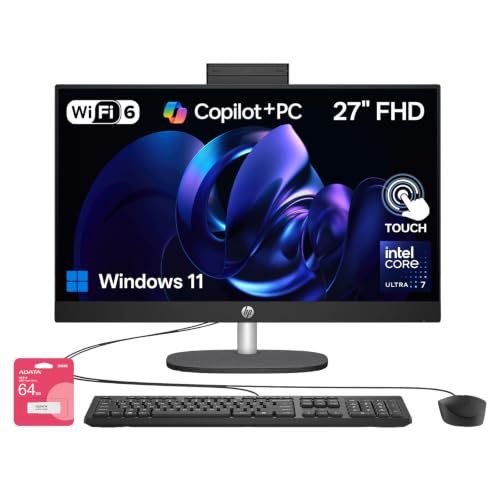
HP 27-Inch Core Ultra 7 Touchscreen All-in-One
Best for: heavy business multitasking and large file storage
- Use
- Business (what this guide is about)
- Processor
- Intel Core Ultra 7 255U
- System Memory
- 32GB DDR5
- Storage Capacity
- 2TB SSD
- Screen Size
- 27"
- Display Resolution
- Full HD
View on Amazon: HP 27-Inch Core Ultra 7 Touchscreen All-in-One Affiliate link
This HP all-in-one desktop combines a 27-inch Full HD touchscreen with an Intel Core Ultra 7 155U processor, 32GB of system memory, and a 2TB solid-state drive. You get ample storage for business files and high memory capacity for heavy multitasking across workplace applications. It includes wired peripherals, Ethernet, and multiple USB ports, making it suitable if you need expansive memory without a separate tower.
Pros
- 32GB RAM handles heavy multitasking
- Large 2TB SSD storage capacity
- Intel Core Ultra 7 155U processor
- 27-inch Full HD touchscreen display
Cons
- Ships with Windows 11 Home rather than Windows 11 Pro
- Third-party upgraded components split the warranty coverage
Good fit if
- You need 32GB of RAM for demanding business workflows.
- You want a 27-inch touchscreen with 2TB of fast internal storage.
Skip if
- You need Windows 11 Pro for centralized business network features.
- You require an entirely factory-sealed machine with unified manufacturer warranty.
Verdict: HP 27" Core Ultra 7 Touchscreen All-in-One pairs generous memory with large internal storage in an integrated workspace setup. It suits users who prioritize high RAM capacity and screen space over a traditional desktop case.
HP 24-inch FHD Touchscreen All-in-One PC
Best for: touchscreen office multitasking and daily business workflows
- Use
- Business (what this guide is about)
- Processor
- Intel Core i3-N300
- System Memory
- 16GB RAM
- Storage Capacity
- 512GB PCIe SSD
- Screen Size
- 23.8"
- Display Resolution
- Full HD (1920 x 1080)
View on Amazon: HP 24-inch FHD Touchscreen All-in-One PC Affiliate link
This HP all-in-one desktop integrates an Intel Core i3-N300 8-core processor, 16GB of DDR4 memory, and a 512GB PCIe SSD into a single 23.8-inch display unit. You get a Full HD 1080p IPS touchscreen with anti-glare coating and a 720p privacy webcam. It suits you if you need a compact, cable-managed business workstation for daily office apps, document editing, and regular video calls.
Pros
- 23.8-inch Full HD 1080p IPS touchscreen with anti-glare
- 8-core, 8-thread Intel Core i3-N300 processor
- 16GB DDR4 RAM and 512GB PCIe NVMe SSD
- Five total USB ports, including one 5 Gbps USB-C connection
- Built-in 720p HD camera with integrated privacy shutter
Cons
- Ships with Windows 11 Home rather than Windows 11 Pro
- Integrated webcam is limited to 720p resolution
- Uses DDR4 system memory instead of newer DDR5
Good fit if
- You need an interactive touchscreen interface for office software and navigation.
- You want 16GB of memory for running office applications alongside multiple browser tabs.
- You require an integrated webcam with physical privacy protection for video calls.
Skip if
- You require Windows 11 Pro for enterprise-level device management.
- You need a sharp 1080p or 4K integrated webcam for high-resolution video meetings.
Verdict: HP 24-Inch FHD Touchscreen All-in-One delivers dependable everyday productivity with an 8-core processor, 16GB of memory, and an anti-glare touch display. It handles standard office workloads efficiently, though it lacks Windows 11 Pro.

HP 21.5" Celeron All-in-One Desktop
Best for: compact office spaces handling basic administrative tasks
- Use
- Business (what this guide is about)
- Processor
- Intel Celeron J4025
- System Memory
- 16 GB
- Storage Capacity
- 1 TB SSD
- Screen Size
- 21.5"
- Display Resolution
- Full HD
View on Amazon: HP 21.5" Celeron All-in-One Desktop Affiliate link
This HP all-in-one desktop combines a 21.5-inch Full HD display with an Intel Celeron J4025 processor, 16GB of system memory, and a 1TB solid-state drive. It arrives with Windows 11 Pro and a pre-installed permanent Microsoft Office license, making it ready for business tasks immediately. You get Wi-Fi 6, Bluetooth, and Ethernet connectivity in a compact white chassis. It suits office spaces needing document editing and web browsing.
Pros
- Pre-installed Windows 11 Pro and permanent Microsoft Office license
- Spacious 1TB solid-state drive for business files
- Equipped with modern Wi-Fi 6, Bluetooth, and wired Ethernet
Cons
- Intel Celeron J4025 processor limits heavy computing tasks
- Smaller 21.5-inch screen offers less viewable area than larger models
Good fit if
- You need pre-installed business software including Windows 11 Pro and Office.
- You work at a small desk that benefits from a 21.5-inch footprint.
- You want 1TB of fast internal storage for files and records.
Skip if
- You run compute-heavy applications that demand higher-tier processors.
- You require a screen larger than 21.5 inches for split-screen multitasking.
Verdict: HP 22" All-in-One Celeron Desktop pairs Windows 11 Pro and 1TB of solid-state storage in a space-saving design for daily office workflows. Its Celeron processor provides adequate capability for basic administrative tasks, spreadsheets, and web applications.
Specifications side by side
| Spec | HP OmniStudio 27-Inch Ryzen 5 All-in-One | HP 22-Inch All-in-One PC with 32GB DDR5 | HP 21.5-inch All-in-One 16GB DDR5 Desktop | HP OmniStudio 27 Touchscreen All-in-One PC | HP 24" Touchscreen All-in-One Desktop | HP 27-Inch Core Ultra 7 Touchscreen All-in-One | HP 24-inch FHD Touchscreen All-in-One PC | HP 21.5" Celeron All-in-One Desktop |
|---|---|---|---|---|---|---|---|---|
| Processor | AMD Ryzen AI 5 330 | Intel N100 | Intel N200 | Intel Core Ultra 7 355U | Intel Core i3-N300 | Intel Core Ultra 7 255U | Intel Core i3-N300 | Intel Celeron J4025 |
| System Memory | 16 GB DDR5 | 32 GB | 16 GB | 16 GB | 8GB RAM | 32GB DDR5 | 16GB RAM | 16 GB |
| Storage Capacity | 512 GB SSD | 128 GB UFS | 128 GB UFS | 2 TB SSD | 256GB PCIe SSD | 2TB SSD | 512GB PCIe SSD | 1 TB SSD |
| Screen Size | 27" | 21.5" | 21.5" | 27-inch | 23.8" | 27" | 23.8" | 21.5" |
| Display Resolution | Full HD | Full HD | Full HD | Full HD | Full HD (1920 x 1080) | Full HD | Full HD (1920 x 1080) | Full HD |
| Graphics | not stated | Intel UHD Graphics | Intel UHD Graphics | not stated | not stated | not stated | not stated | not stated |
| Touchscreen | not stated | not stated | not stated | Touchscreen | Touch Screen | Touchscreen | Touch Screen | not stated |
| Operating System | not stated | Windows 11 | Windows 11 | Windows 11 Pro | Windows 11 Home | Windows 11 Home | Windows 11 Home | Windows 11 Pro |
| Memory | 16GB RAM | 32GB RAM | 16GB RAM | 16GB RAM | 8GB RAM | 32GB RAM | 16GB RAM | 16GB RAM |
| Storage | 512GB SSD | not stated | not stated | 2TB SSD | not stated | 2TB SSD | 512GB SSD | 1TB SSD |
| Use | Business | Business | Business | Business | Business | Business | Business | Business |
| Display Feature | not stated | not stated | not stated | Touchscreen | Touchscreen | Touchscreen | Touchscreen | not stated |
| Weight | not stated | 9.19 pounds | not stated | not stated | 18 pounds | 12.2 pounds | not stated | 9.19 pounds |
| Dimensions | not stated | not stated | 7.33 × 24.1 × 17.3 inches | not stated | 7.33 × 21.3 × 19.1 inches | 7.34 × 24.1 × 20.4 inches | 7.33 × 21.3 × 19.1 inches | 15.1 × 19.4 × 6.69 inches |
| Model | ZK-DM-AOS27R5 | 22 aio | 22aio | 27-cy0074 | CR0014 | TPC-Q095-27 | CR0014 | HP 22 All-in-One |
| Color | not stated | White | Black | White | not stated | Black | Intel 8 Core i3-N300 | White |
| Size | not stated | not stated | not stated | not stated | 8GB RAM | 256GB SSD | 32GB RAM | 2TB SSD | 16GB RAM | 512GB SSD | not stated |
If you need dedicated graphics in a portable form factor, compare the best HP gaming laptops for business.
How to Choose the Right HP AIO
-
Check RAM for Multitasking
Memory determines how many applications run simultaneously. The HP 22-Inch model includes 32GB DDR5 RAM, which suits users managing heavy workloads or large spreadsheets. Most business models offer 16GB, sufficient for standard office tasks. If your workflow involves multiple browser tabs and software, prioritize higher RAM. The 8GB option on the HP 24-inch touchscreen model is adequate only for basic, single-task operations. Ensure your chosen machine has enough memory to prevent slowdowns during peak usage hours.
-
Select Storage Capacity
Storage holds your files and operating system. The HP OmniStudio 27 Touchscreen model provides 2TB of SSD space, ideal for storing large datasets or media files. Other models, like the entry-level HP 21.5-inch, offer 512GB or less, which fits typical document work. The HP 21.5-inch Celeron model includes 1TB, balancing cost and capacity. Fast SSDs improve boot times and file access. If you archive many records, choose a model with at least 1TB. For minimalists, 512GB may suffice.
-
Evaluate Screen Size
Screen size affects workspace and desk footprint. The 27-inch displays on the top pick and the Core Ultra 7 model offer ample room for split-screen workflows. Smaller 22-inch or 21.5-inch models fit compact desks better. The HP 22-inch AIO weighs just 9.19 pounds, making it easy to position in tight spaces. Larger screens require more desk depth. Consider your available surface area before choosing. A 24-inch model, like the HP 24-inch FHD, provides a middle ground between visibility and space efficiency.
-
Consider Operating System
The OS dictates security features and management tools. Several HP models, including the OmniStudio 27 Touchscreen and the Celeron desktop, ship with Windows 11 Pro. This version offers enhanced security and remote management capabilities essential for business environments. The HP 24-inch FHD Touchscreen model lacks Windows 11 Pro, which may limit administrative control. If your company requires specific enterprise features, verify the OS version. Standard Home editions may not meet all corporate compliance or IT management standards.
-
Assess Display Features
Touchscreens and anti-glare coatings change usability. The HP OmniStudio 27-inch top pick features an anti-glare display, reducing eye strain in bright offices. Touchscreen models, like the HP 24-inch and 27-inch Core Ultra 7, allow direct interaction, useful for presentations or collaborative work. However, touchscreens can reflect more light. The HP 24-inch touchscreen model includes an anti-glare finish, combining both benefits. Choose based on your lighting conditions and whether direct input improves your daily workflow efficiency.
Frequently asked questions
Which HP all-in-one desktop offers the most RAM for business use?
The HP 22-Inch All-in-One PC with 32GB DDR5 provides the highest memory capacity in this lineup. This 32GB configuration suits professionals who run heavy multitasking workloads or manage large spreadsheets without slowdowns. It prioritizes memory over screen size, making it ideal for users with limited desk space who need reliable office productivity.
Do any of these HP business all-in-ones include a touchscreen display?
Yes, several models feature responsive touchscreens for ergonomic office setups. The HP OmniStudio 27 Touchscreen, the 24-Inch Touchscreen Desktop, and the 27-Inch Core Ultra 7 Touchscreen all include this feature. Touch input streamlines daily office workflows and allows for direct interaction with business software, though standard models without touch are also available for traditional use.
Which HP all-in-one has the largest internal storage drive?
The HP OmniStudio 27 Touchscreen and the HP 27-Inch Core Ultra 7 Touchscreen both offer 2TB SSD storage. This large capacity supports heavy business multitasking and storing extensive file libraries. If you prioritize high RAM capacity and screen space over a traditional desktop case, these models provide ample room for data and applications.
Are any of these HP desktops equipped with Windows 11 Pro?
Yes, the HP OmniStudio 27 Touchscreen and the HP 21.5" Celeron Desktop both include Windows 11 Pro. This operating system version is designed for business environments, offering enhanced security and management features. Other models in the list run standard Windows versions, so check the specifications if you require the Pro edition for your specific business needs.
What is the smallest screen size available on these HP business all-in-ones?
The smallest display size is 21.5 inches, found on the HP 21.5-inch All-in-One 16GB DDR5 Desktop and the HP 21.5" Celeron Desktop. These compact units are designed for tight office spaces or basic administrative tasks. They deliver dependable daily office performance with a small footprint, making them efficient fits for desks where space is at a premium.
Which HP all-in-one is best for video conferencing and general productivity?
The HP OmniStudio 27-Inch Ryzen 5 All-in-One is the top pick for everyday office productivity and video conferencing. It features a roomy anti-glare display and fast DDR5 memory for smooth performance. This model delivers dependable business performance with modern Wi-Fi 6, providing an efficient, clutter-free workstation for general tasks and clear communication.