8 Best Dell All-In-One Desktops Under $2000, Compared
As an Amazon Associate we earn from qualifying purchases. Links on this page are affiliate links.
We compared 8 models to help you find the best dell all in one desktops under $2000. Our top pick is the Dell 27 Touchscreen All-in-One PC because it pairs 32GB of RAM with a 1TB SSD for smooth multitasking. These selections rely strictly on the specifications published on the listings. You will see how screen size, memory, and storage vary across brands. This guide helps you decide which all-in-one fits your workspace and workflow needs.
Quick picks
The best fit for you
- You want the best overall productivity machine Dell 27 Touchscreen All-in-One PC It features 32GB RAM and a 1TB SSD for smooth multitasking.
- You need maximum storage in a compact size Dell 24 AIO 32GB 2TB This model includes 32GB RAM and a 2TB SSD in a 24-inch frame.
- You require a large touchscreen for business work Dell 27" AIO Ultra 5 32GB It offers a 27-inch display, 32GB RAM, and Windows 11 Pro.
- You prioritize onsite warranty support and compactness Dell Pro 24 Core Ultra 7 All-in-One This 24-inch unit uses a Core Ultra 7 processor for standard tasks.
- You need high color accuracy for creative tasks Dell 27-inch Core 7 All-in-One Desktop It provides 32GB RAM, 2TB storage, and 99% sRGB color accuracy.
Our 8 picks

Dell 27 Touchscreen All-in-One PC
Best for: Productivity and media consumption
- Processor
- Intel Core 7 150U
- System Memory
- 32GB
- Storage Capacity
- 1TB SSD
- Screen Size
- 27"
- Display Resolution
- FHD
- Graphics
- Intel Graphics
View on Amazon: Dell 27 Touchscreen All-in-One PC Affiliate link
This Dell 27-inch all-in-one desktop pairs an Intel Core 7 150U processor with 32 GB of system memory. It features an FHD IPS touchscreen display with 99% sRGB coverage and a 5MP+IR camera. The design includes an innovative stand for cable management and dual Bluetooth speakers with Dolby Atmos. It runs Windows 11 Home and includes one year of onsite service.
Pros
- 32 GB DDR5 RAM for multitasking
- Intel Core 7 150U processor
- 27-inch FHD IPS touchscreen with 99% sRGB
- 5MP+IR pop-up camera with privacy cover
- One year onsite service included
Cons
- Integrated UHD Graphics limits heavy gaming
- Windows 11 Home lacks advanced security features
- No dedicated GPU for professional workloads
Good fit if
- You need high RAM for productivity tasks
- You want a touchscreen for navigation
- You prefer onsite support for repairs
Skip if
- You require Windows 11 Pro
- You need dedicated graphics for gaming
- You want a 4K display resolution
Verdict: Dell 27" AIO Core 7 150U 32GB suits users who prioritize multitasking capacity and visual clarity over graphical performance. It is ideal for home offices that value integrated support and screen quality.

Dell 24 AIO 32GB 2TB
Best for: compact home offices needing high storage
- Processor
- Ultra 7 355
- System Memory
- 32 GB
- Storage Capacity
- 2 TB SSD
- Screen Size
- 23.8"
- Display Resolution
- FHD
- Graphics
- Intel Graphics Integrated Graphics
View on Amazon: Dell 24 AIO 32GB 2TB Affiliate link
This Dell 24 All-in-One pairs a 23.8-inch FHD touchscreen with an Intel Core 7 150U processor. It includes 32GB of DDR5 RAM and a 2TB NVMe SSD. The compact 24-inch form factor saves desk space while delivering strong multitasking performance. It suits home offices and business users who need responsive daily workflow efficiency and intuitive touch control for spreadsheets or media viewing.
Pros
- 32GB DDR5 RAM for smooth multitasking
- 2TB M.2 PCIe NVMe SSD storage
- 23.8-inch FHD IPS touchscreen display
- Intel Core 7 150U processor
Cons
- 24-inch screen is smaller than the 27-inch models on this list
- FHD resolution is lower than potential 4K options
- Windows 11 Home lacks advanced business security features
Good fit if
- You want a compact desktop that saves desk space
- You need high RAM and large storage for daily productivity
- You prefer intuitive touchscreen interaction for media or design
Skip if
- You require a larger 27-inch or bigger display
- You need Windows 11 Pro for business management
- You prioritize 4K resolution over screen size
Verdict: Dell 24 AIO 32GB 2TB offers strong performance in a compact frame for users who value storage and RAM over screen real estate. It fits home offices needing responsive multitasking and touch control without the bulk of larger monitors.

Dell 27" AIO Ultra 5 32GB
Best for: Large touchscreen productivity and business use
- Processor
- Intel Core Ultra 5 325
- System Memory
- 32 GB DDR5
- Storage Capacity
- 1 TB SSD
- Screen Size
- 27"
- Display Resolution
- 1920 x 1080 Full HD
- Graphics
- Intel Graphics
View on Amazon: Dell 27" AIO Ultra 5 32GB Affiliate link
This Dell all-in-one features a 27-inch FHD IPS touchscreen and an Intel Core Ultra 5 325 processor. It comes with 32GB of DDR5 RAM and a 1TB PCIe NVMe SSD. The system runs Windows 11 Pro and includes Copilot+ PC capabilities. Wi-Fi 7 and Bluetooth 6.0 provide modern connectivity. It suits users who need a spacious display and strong multitasking performance for business or home office tasks.
Pros
- 27-inch FHD IPS touchscreen display
- Intel Core Ultra 5 325 processor
- 32GB DDR5 RAM and 1TB SSD
- Windows 11 Pro with Copilot+ PC
- Wi-Fi 7 and Bluetooth 6.0 connectivity
Cons
- FHD resolution is lower than the 4K options available in the guide
- 15.1-pound weight is heavier than the 24-inch models on the list
Good fit if
- You need a large 27-inch touchscreen for detailed work
- You require Windows 11 Pro for business features
- You want high RAM capacity for heavy multitasking
Skip if
- You prefer a 4K display for sharper visuals
- You want a more compact 24-inch form factor
- You need a higher-end Ultra 7 processor
Verdict: Dell 27 Touch AIO Ultra 5 offers a balanced mix of screen size and processing power. It fits buyers who prioritize a large touchscreen and professional operating system for daily productivity tasks.

Dell Pro 24 Core Ultra 7 All-in-One
Best for: Users prioritizing onsite warranty and compact size
- Processor
- Intel Core Ultra 7 265
- System Memory
- 16 GB
- Storage Capacity
- 512 GB SSD
- Screen Size
- 23.8 inches
- Display Resolution
- Full HD
- Graphics
- Integrated Intel Graphics
View on Amazon: Dell Pro 24 Core Ultra 7 All-in-One Affiliate link
This Dell Pro 24 All-in-One pairs a 23.8-inch FHD 100 Hz display with an Intel Core Ultra 7 265 processor and 16GB of DDR5 RAM. It includes 512GB of SSD storage and runs Windows 11 Pro. The unit features a pop-up Full HD HDR camera, Wi-Fi 6E, and a 3-year onsite warranty with accidental damage service. It suits users who need a capable desktop with reliable support.
Pros
- Intel Core Ultra 7 265 20-Core processor
- 16GB DDR5 RAM for multitasking
- 512GB M.2 SSD for storage
- 23.8-inch 100 Hz IPS FHD display
- 3-year onsite warranty with accidental damage service
Cons
- 16GB RAM is lower than the 32GB found in most competitors
- 512GB SSD is smaller than the 1TB or 2TB options available elsewhere
- 23.8-inch screen is smaller than the 27-inch models on this list
Good fit if
- You want a compact 24-inch desktop for office or light creative work
- You value onsite support and accidental damage coverage for peace of mind
- You need Windows 11 Pro with strong security features
Skip if
- You require a larger 27-inch display for immersive viewing
- You need 32GB or more RAM for heavy multitasking
- You want 1TB or 2TB of storage without upgrading later
Verdict: Dell Pro 24 AIO Core Ultra 7 offers a balanced mix of performance and support for standard desktop tasks. It is ideal for users who prioritize warranty coverage and a smaller footprint over maximum screen size or storage capacity.

Dell 27" Core Ultra 7 Touch All-in-One
Best for: Office tasks and touch-driven workflows
- Processor
- Intel Ultra 7 355
- System Memory
- 16 GB DDR5
- Storage Capacity
- 1 TB SSD
- Screen Size
- 27"
- Display Resolution
- Full HD (1920 x 1080)
- Touchscreen
- Touchscreen
View on Amazon: Dell 27" Core Ultra 7 Touch All-in-One Affiliate link
The Dell 27 All-in-One pairs a 27-inch Full HD touchscreen with an Intel Ultra 7 355 processor and 16GB of DDR5 RAM. It includes a 1TB SSD and runs Windows 11 Pro. The display supports a variable 60Hz to 100Hz refresh rate for smooth interaction. This setup suits users who need responsive touch controls and solid multitasking performance in a compact, space-saving design.
Pros
- Intel Ultra 7 355 8-core processor
- 27-inch Full HD touchscreen with 60-100Hz refresh
- 16GB DDR5 RAM and 1TB SSD
- Windows 11 Pro operating system
- Wi-Fi 7 and Bluetooth 6.0 connectivity
Cons
- Only 16GB RAM compared to 32GB or 64GB options in this category
- Full HD resolution on a 27-inch screen reduces pixel density
- No dedicated graphics card listed for heavy gaming
Good fit if
- You want a responsive touchscreen interface for intuitive navigation
- You need Windows 11 Pro for professional features
- You prefer a single-unit design that saves desk space
Skip if
- You require high-resolution 4K displays for detailed creative work
- You need more than 16GB of RAM for heavy multitasking
- You are looking for a dedicated GPU for gaming
Verdict: Dell 27 Touch AIO Ultra 7 offers a balanced mix of modern processing power and touch interaction for office and home use. It fits professionals who value Windows 11 Pro and responsive controls over raw graphical horsepower.
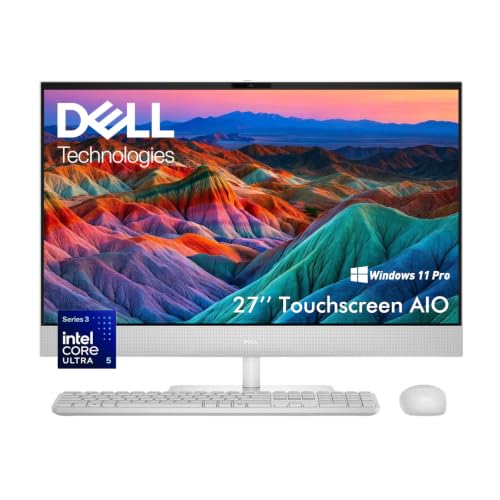
Dell 27-inch Core 7 All-in-One Desktop
Best for: Users needing 2TB storage and 99% sRGB color accuracy
- Processor
- Intel Ultra 5 325
- System Memory
- 32 GB
- Storage Capacity
- 2 TB SSD
- Screen Size
- 27"
- Display Resolution
- Full HD
- Touchscreen
- Touchscreen
View on Amazon: Dell 27-inch Core 7 All-in-One Desktop Affiliate link
This Dell 27-inch all-in-one desktop pairs a Core 7 150U processor with 32GB of DDR5 RAM and a 2TB SSD. The 27-inch FHD IPS display covers 99% sRGB for accurate color work. It includes a 5MP pop-up privacy camera and Dolby Atmos audio. This configuration suits users who need substantial storage and memory for multitasking or creative projects without a dedicated tower.
Pros
- 32GB DDR5 system memory for smooth multitasking
- 2TB SSD provides ample high-speed storage
- 27-inch FHD IPS display with 99% sRGB coverage
- 5MP IR pop-up privacy camera with HDR
Cons
- Full HD resolution is lower than 4K options
- Non-touch screen limits interaction methods
- Core 7 150U is less powerful than Ultra 7 chips
Good fit if
- You need large local storage for media or projects
- You prioritize color accuracy for design work
- You want a clean desk with wireless peripherals
Skip if
- You require a touchscreen for direct input
- You need 4K display resolution for detailed work
- You want the highest tier Intel Ultra processors
Verdict: Dell 27 AIO Core 7 32GB 2TB is a solid choice for users who prioritize storage capacity and color accuracy over touch interaction or 4K resolution. It fits those who need a capable, non-touch workstation for creative or business tasks.

Dell 27-Inch Touchscreen All-in-One
Best for: Business multitasking and touch interface
- Processor
- Intel Core Ultra 7 355
- System Memory
- 32 GB DDR5
- Storage Capacity
- 1 TB SSD
- Screen Size
- 27"
- Display Resolution
- Full HD (1920 x 1080)
- Touchscreen
- Touchscreen
View on Amazon: Dell 27-Inch Touchscreen All-in-One Affiliate link
This Dell 27-inch all-in-one desktop features an Intel Core Ultra 7 355 processor and 32GB of DDR5 memory. It includes a 1TB PCIe NVMe SSD and runs Windows 11 Pro. The 27-inch Full HD touchscreen offers 100Hz refresh and 99% sRGB coverage. It supports Wi-Fi 7 and Bluetooth 6.0. This setup suits business users and multitaskers who need responsive performance and a streamlined workspace.
Pros
- Intel Core Ultra 7 355 processor with AI capabilities
- 32GB DDR5 memory for smooth multitasking
- 27-inch FHD touchscreen with 100Hz refresh rate
- 1TB PCIe NVMe SSD storage
- Windows 11 Pro with Copilot Plus PC features
Cons
- 250 nits brightness is lower than typical premium displays
- Full HD resolution on a 27-inch screen reduces pixel density
- No dedicated graphics card listed for heavy gaming
Good fit if
- You need a large touchscreen for intuitive navigation
- You require 32GB RAM for heavy multitasking
- You want Windows 11 Pro for business features
Skip if
- You need 4K resolution for detailed work
- You require high brightness for bright rooms
- You want a dedicated GPU for gaming
Verdict: Dell 27 Touch AIO Ultra 7 delivers strong multitasking performance with 32GB RAM and a large touchscreen. It fits professionals who need Windows 11 Pro and ample storage in a compact form factor.

Dell Inspiron 27 Touchscreen All-in-One
Best for: Multitasking and large storage needs
- Processor
- Intel Core i7-1165G7
- System Memory
- 32GB
- Storage Capacity
- 1TB SSD + 1TB HDD
- Screen Size
- 27-inch
- Display Resolution
- FHD (1920 x 1080)
- Graphics
- NVIDIA GeForce MX330
View on Amazon: Dell Inspiron 27 Touchscreen All-in-One Affiliate link
The Dell Inspiron 27 7000 Series pairs an 11th Gen Intel Core i7-1165G7 processor with 32GB of RAM. It features a 27-inch FHD touchscreen and a hybrid storage setup with 1TB SSD and 1TB HDD. This configuration supports multitasking and large file storage. It suits users who need a responsive desktop with ample memory and a clear display for everyday computing.
Pros
- Intel Core i7-1165G7 processor with up to 4.7 GHz boost
- 32GB high-bandwidth system memory for smooth multitasking
- 27-inch FHD touchscreen display for interactive use
- 1TB SSD paired with 1TB HDD for large storage capacity
Cons
- NVIDIA GeForce MX330 graphics are entry-level and not for heavy gaming
- Older 11th Gen Intel processor compared to newer Core 7 or Ultra options
- Includes a 1TB hard disk drive which is slower than SSD-only storage
Good fit if
- You need 32GB of RAM for heavy multitasking
- You want a large 27-inch touchscreen for easy navigation
- You require hybrid storage with both SSD speed and HDD capacity
Skip if
- You need dedicated high-end graphics for gaming
- You prefer the latest generation Intel processors
- You want a purely SSD storage system for maximum speed
Verdict: Dell Inspiron 27 7000 i7 AIO delivers strong multitasking performance with 32GB RAM and ample hybrid storage. It fits users who prioritize memory and screen size over cutting-edge processor generations or dedicated graphics.
Specifications side by side
| Spec | Dell 27 Touchscreen All-in-One PC | Dell 24 AIO 32GB 2TB | Dell 27" AIO Ultra 5 32GB | Dell Pro 24 Core Ultra 7 All-in-One | Dell 27" Core Ultra 7 Touch All-in-One | Dell 27-inch Core 7 All-in-One Desktop | Dell 27-Inch Touchscreen All-in-One | Dell Inspiron 27 Touchscreen All-in-One |
|---|---|---|---|---|---|---|---|---|
| Processor | Intel Core 7 150U | Ultra 7 355 | Intel Core Ultra 5 325 | Intel Core Ultra 7 265 | Intel Ultra 7 355 | Intel Ultra 5 325 | Intel Core Ultra 7 355 | Intel Core i7-1165G7 |
| System Memory | 32GB | 32 GB | 32 GB DDR5 | 16 GB | 16 GB DDR5 | 32 GB | 32 GB DDR5 | 32GB |
| Storage Capacity | 1TB SSD | 2 TB SSD | 1 TB SSD | 512 GB SSD | 1 TB SSD | 2 TB SSD | 1 TB SSD | 1TB SSD + 1TB HDD |
| Screen Size | 27" | 23.8" | 27" | 23.8 inches | 27" | 27" | 27" | 27-inch |
| Display Resolution | FHD | FHD | 1920 x 1080 Full HD | Full HD | Full HD (1920 x 1080) | Full HD | Full HD (1920 x 1080) | FHD (1920 x 1080) |
| Graphics | Intel Graphics | Intel Graphics Integrated Graphics | Intel Graphics | Integrated Intel Graphics | not stated | not stated | not stated | NVIDIA GeForce MX330 |
| Touchscreen | not stated | Touchscreen | Touchscreen | not stated | Touchscreen | Touchscreen | Touchscreen | Touchscreen |
| Operating System | Windows 11 Home | Windows 11 Home | Windows 11 Pro | Windows 11 Pro | Windows 11 Pro | Windows 11 Pro | Windows 11 Pro | Windows 11 Home |
| Memory | not stated | 32GB RAM | 32GB RAM | not stated | not stated | 32GB RAM | 32GB RAM | 32GB RAM |
| Storage | 1TB SSD | 2TB SSD | 1TB SSD | 512GB SSD | not stated | 2TB SSD | 1TB SSD | 1TB SSD |
| Use | not stated | not stated | Business | not stated | not stated | Business | Business | not stated |
| Display Feature | Touchscreen | Touchscreen | Touchscreen | not stated | Touchscreen | Touchscreen | Touchscreen | Touchscreen |
| Dimensions | 1.64 × 24.2 × 15.5 inches | not stated | 11.5 × 12.8 × 6.06 inches | not stated | 18.2 × 24.2 × 8.27 inches | not stated | not stated | 17.8 × 24.1 × 1.65 inches |
| Weight | 14.8 pounds | 15.6 pounds | 15.1 pounds | 1.06 ounces | 17.7 pounds | not stated | not stated | not stated |
| Size | UHD Graphics | 32GB RAM|2TB SSD | not stated | 23.8 inches | not stated | not stated | not stated | not stated |
| Color | Touch | not stated | not stated | Black | White | White | not stated | not stated |
| Model | DEC27250-7564WHT-PUS | DEC24260-7157WHT-PUS | DEC27260 | X45TH | EC27260 | Dell 27 Touch AIO | DEC27260 | Dell Inspiron 27 |
If you need portable graphics processing rather than a fixed desktop display, review the best dell gaming laptops under 2000.
How to choose the right Dell AIO
-
Check processor generation
You must verify the processor model to ensure adequate performance. The Dell 27 Touchscreen All-in-One PC uses a Core 7 150U chip. This processor handles daily tasks efficiently without excessive power draw. Other models feature Core Ultra 7 or standard Core i7 chips. You should compare these specific identifiers rather than generic labels. A higher-tier processor generally supports more background applications simultaneously. Check the listing to confirm the exact CPU variant matches your workload requirements.
-
Verify RAM capacity
Memory size directly impacts your ability to run multiple programs. Several listed models include 32GB of RAM for heavy multitasking. This amount allows you to keep many browser tabs and office apps open. The Dell 24 Touchscreen Core 7 All-in-One also offers this capacity. If you only perform basic browsing, less memory may suffice. However, for professional workflows, 32GB provides a significant buffer against slowdowns. Always check the specifications sheet to confirm the installed memory amount.
-
Evaluate storage volume
Storage space determines how much data you can keep locally. The Dell 24 Touchscreen Core 7 All-in-One includes a 2TB SSD. This large capacity suits users who store many files or media libraries. Other models may offer 512GB or 1TB options. You should match the storage size to your file management habits. A solid-state drive ensures faster boot times and application loading. Verify the exact terabyte rating in the specs to avoid unexpected storage constraints later.
-
Confirm operating system
The operating system affects software compatibility and security features. Most listed Dell desktops run Windows 11. Some models include the Pro version, which adds business-focused tools. The Dell 27 Core Ultra 7 Touch All-in-One features Windows 11 Pro. You should choose Pro if you need advanced security or remote desktop capabilities. Home editions are sufficient for casual personal use. Check the OS listing to ensure it aligns with your specific software needs and administrative requirements.
-
Assess physical dimensions
All-in-one desktops vary in footprint and weight. The Dell 27 Touchscreen All-in-One PC measures 24.2 inches wide. The Dell Pro 24 Core Ultra 7 All-in-One is notably lighter at 1.06 ounces. You must measure your desk space before purchasing. Larger screens like the 27-inch models require more surface area. Consider the height and depth as well as the width. Ensuring the physical dimensions fit your workspace prevents placement issues after delivery.
Frequently asked questions
Which Dell all-in-one has the best overall performance?
The Dell 27 Touchscreen All-in-One PC is the top pick. It features a Core 7 150U processor and 32GB of RAM. This combination supports smooth multitasking for productivity and media consumption. The 1TB SSD provides ample storage. It also includes a touchscreen for easier navigation.
What is the best budget Dell all-in-one desktop?
The Dell 24 AIO 32GB 2TB offers strong value. It includes 32GB of RAM and a 2TB SSD for high storage capacity. The 24-inch touchscreen display fits compact home offices. This model prioritizes responsive multitasking and storage over larger screen real estate.
Does Dell offer an all-in-one with Windows 11 Pro?
Yes, several models include Windows 11 Pro. The Dell 27 AIO Ultra 5 32GB features this operating system for business use. The Dell Pro 24 Core Ultra 7 and the 27-inch Core 7 models also run Windows 11 Pro. These are suitable for professional workflows.
Which Dell AIO has the most storage space?
The Dell 24 AIO 32GB 2TB and the Dell 27-inch Core 7 All-in-One Desktop both include 2TB SSDs. These models provide the highest storage capacity among the listed options. They are ideal for users who need to store large files or extensive media libraries.
Are all Dell all-in-one desktops touchscreen enabled?
Most models in this list feature touchscreen displays. The Dell 27 Touchscreen All-in-One PC, the Dell 24 AIO, and the Dell Inspiron 27 all include touch capability. However, the Dell 27-inch Core 7 All-in-One Desktop is noted as a non-touch workstation for creative tasks.
Which model is best for business multitasking?
The Dell 27 Touch AIO Ultra 7 is excellent for business multitasking. It combines a Core Ultra 7 processor with 32GB of RAM. The 27-inch touchscreen and Windows 11 Pro support professional workflows. It also includes a 1TB SSD for efficient data management.
What is the smallest screen size available?
The smallest screen size is 24 inches. The Dell 24 AIO 32GB 2TB and the Dell Pro 24 Core Ultra 7 All-in-One both feature 24-inch displays. These compact frames are suitable for users with limited desk space who still need responsive performance and touch controls.