Best ACEMAGIC Mini PCs with Windows 11 Pro: 2 Spec-Based Picks
As an Amazon Associate we earn from qualifying purchases. Links on this page are affiliate links.
We compared 2 best ACEMAGIC mini PCs with Windows 11 Pro to find the right fit for your needs. The ACEMAGIC Retro X3 Ryzen 7 Mini PC leads the list because its Ryzen 7 processor and 1TB storage handle retro gaming and video editing well. Our picks are based strictly on the specifications published on the listings. You will find clear comparisons of processors, memory, and storage sizes. This guide helps you decide which compact desktop matches your workflow and space constraints.
Quick picks
| # | Product | Best for | Price |
|---|---|---|---|
| 1 | ACEMAGIC Retro X3 Ryzen 7 Mini PC Best overall | Retro gaming, video editing, and compact office setups | Check price of ACEMAGIC Retro X3 Ryzen 7 Mini PC on Amazon |
| 2 | ACEMAGIC Core i5-12600H Mini PC Best budget | office multitasking and RAM upgrades | Check price of ACEMAGIC Core i5-12600H Mini PC on Amazon |
The best fit for you
- You need strong CPU power for retro gaming ACEMAGIC Retro X3 Ryzen 7 Mini PC The Ryzen 7 processor provides the multi-core performance needed for demanding tasks.
- You want the most compact model on the list ACEMAGIC Core i5-12600H Mini PC This unit is only 1.59 inches high, making it the smallest option here.
- You require upgradeable RAM for office multitasking ACEMAGIC Core i5-12600H Mini PC The K1 model supports RAM upgrades, allowing you to expand memory as needed.
Our 2 picks
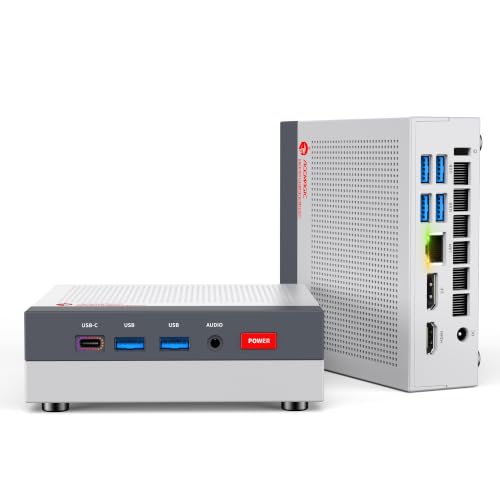
ACEMAGIC Retro X3 Ryzen 7 Mini PC
Best for: Retro gaming, video editing, and compact office setups
- Operating System
- Windows 11 Pro (what this guide is about)
- Processor
- AMD Ryzen 7 H 255
- Graphics Card
- AMD Radeon 780M
- RAM Capacity
- 16GB
- RAM Type
- LPDDR5
- Storage Capacity
- 1TB
View on Amazon: ACEMAGIC Retro X3 Ryzen 7 Mini PC Affiliate link
The ACEMAGIC X3 uses an AMD Ryzen 7 H 255 processor with 16GB of soldered LPDDR5 RAM and a 1TB NVMe SSD. It runs Windows 11 Pro and features Radeon 780M integrated graphics. This compact unit supports triple displays and includes WiFi 6E. It suits users who need strong multi-core performance for editing or emulation in a small form factor.
Pros
- AMD Ryzen 7 H 255 processor with 8 cores and 16 threads
- 16GB LPDDR5 6400MT/s RAM for fast data transfer
- 1TB NVMe PCIe 4.0 SSD with tool-free access
- Radeon 780M iGPU supports 1080p gaming and emulation
- Triple display output via DP 2.0, HDMI 2.1, and USB4
Cons
- 16GB RAM is soldered and cannot be upgraded
- Integrated graphics limit performance for heavy AAA titles
- No mention of discrete GPU support for high-end gaming
Good fit if
- You need strong CPU performance for video editing or 3D modeling
- You want a compact PC with Windows 11 Pro
- You play retro games or light esports titles
Skip if
- You require upgradeable RAM beyond 16GB
- You need high-end discrete graphics for modern AAA games
- You prefer a larger tower for easier internal maintenance
Verdict: The ACEMAGIC X3 Ryzen 7 H 255 Mini PC delivers strong multi-core processing and fast storage in a compact chassis. It is ideal for creators and retro gamers who prioritize CPU power and portability over high-end graphics performance.

ACEMAGIC Core i5-12600H Mini PC
Best for: office multitasking and RAM upgrades
- Processor
- Intel Core i9-11900H
- Graphics Card
- Intel UHD Graphics
- RAM Capacity
- 32GB
- RAM Type
- DDR4
- Storage Capacity
- 1TB
- Operating System
- 11 Pro
View on Amazon: ACEMAGIC Core i5-12600H Mini PC Affiliate link
This ACEMAGIC K1 mini PC pairs an Intel Core i5-12600H processor with 16GB of DDR4 RAM. It runs Windows 11 Pro and includes a 256GB SSD. The system supports dual-channel memory expansion up to 64GB. You get WiFi 6 and Bluetooth 5.2 for connectivity. It fits well for users needing solid multitasking performance in a compact form factor.
Pros
- Intel Core i5-12600H processor with 12 cores
- 16GB DDR4 RAM, expandable to 64GB
- Windows 11 Pro operating system
- WiFi 6 and Bluetooth 5.2 connectivity
Cons
- 256GB SSD storage is limited for large libraries
- DDR4 RAM is older than DDR5 standards
- No mention of Thunderbolt 4 support
Good fit if
- You need Windows 11 Pro for business tasks
- You want expandable RAM for future upgrades
- You prefer a compact desktop for office work
Skip if
- You require maximum gaming performance with a dedicated GPU
- You need more than 256GB of storage out of the box
- You want the latest DDR5 memory technology
Verdict: ACEMAGIC K1 i5-12600H Mini PC delivers reliable multitasking for office users who value Windows 11 Pro and upgradeable RAM. It suits those who prioritize processor cores over raw storage capacity.
Specifications side by side
| Spec | ACEMAGIC Retro X3 Ryzen 7 Mini PC | ACEMAGIC Core i5-12600H Mini PC |
|---|---|---|
| Processor | AMD Ryzen 7 H 255 | Intel Core i9-11900H |
| Graphics Card | AMD Radeon 780M | Intel UHD Graphics |
| RAM Capacity | 16GB | 32GB |
| RAM Type | LPDDR5 | DDR4 |
| Storage Capacity | 1TB | 1TB |
| Storage Interface | NVMe PCIe 4.0 | not stated |
| Operating System | Windows 11 Pro | 11 Pro |
| Wireless Connectivity | WiFi 6E, Bluetooth 5.2 | WiFi 6, Bluetooth 5.2 |
| Memory | not stated | 32GB RAM |
| Storage | not stated | 1TB SSD |
| Use | not stated | Business |
| Dimensions | 5.03 × 1.73 × 5.03 inches | 4.87 × 5.03 × 1.59 inches |
| Size | H 255 16GB+1TB | 11900H+32GB+1TB |
| Color | Grey | Silver |
| Model | Retro X3 | K1 |
How to Choose the Right ACEMAGIC Mini PC
-
Match Processor to Workload
Your processor choice defines what tasks the machine can handle efficiently. If you edit videos or play retro games, look for a Ryzen 7 chip. This processor offers strong multi-core performance that keeps your workflow smooth. For basic office work, a Core i5 is sufficient. Check the specific model number to ensure it meets your performance needs. Higher core counts help when running multiple applications at once. Always verify the processor type before buying to avoid slowdowns.
-
Prioritize Storage Capacity
Storage size determines how many files you can keep locally. If you need space for video projects or game libraries, aim for at least 1TB of SSD storage. Fast storage reduces load times for your operating system and applications. Smaller drives, like 256GB, fill up quickly with modern software. Consider whether you will use external drives later. A larger internal drive saves you from managing extra hardware. Compare the terabyte ratings to find the best value for your data habits.
-
Check Memory for Multitasking
Memory, or RAM, allows you to run several programs simultaneously. If you switch between tabs and apps often, 16GB is a safe minimum. This amount prevents your computer from slowing down during heavy use. Some models offer upgradeable RAM, which extends the life of your PC. Check if the slots are accessible if you plan to add more later. Adequate memory ensures smooth performance when editing or browsing. Verify the RAM type and speed to match your usage requirements.
-
Verify Operating System
Ensure the device comes with Windows 11 Pro installed. This version offers business features and enhanced security for your data. It provides a familiar interface for most users. Verify the license is genuine and activated upon arrival. An included OS saves you from buying separate software. Check for pre-installed utilities that might aid your workflow. Confirm the version matches your needs for remote access or domain joining. A proper OS setup ensures immediate usability after unboxing.
-
Assess Physical Dimensions
Measure your desk space before purchasing a mini PC. These units vary in height and width. Some models are under two inches tall, fitting easily behind monitors. Others are slightly larger but offer more ports. Check the exact dimensions in inches to ensure a proper fit. Consider whether you will mount it to a VESA stand. Compact sizes improve portability if you move the device often. Accurate measurements prevent compatibility issues with your existing workspace.
Frequently asked questions
Which ACEMAGIC mini PC is best for retro gaming and video editing?
The ACEMAGIC Retro X3 Ryzen 7 Mini PC is the best choice for these tasks. It features a Ryzen 7 processor that delivers strong multi-core processing power. This CPU handles demanding creative workloads efficiently. The system also includes 1TB of storage, which is ideal for large video files and game libraries. Its compact chassis makes it suitable for tight office setups.
Does the ACEMAGIC K1 Mini PC have enough RAM for office multitasking?
Yes, the ACEMAGIC K1 Mini PC comes with 16GB of RAM. This memory capacity allows for smooth multitasking in office environments. You can run multiple applications simultaneously without significant slowdowns. The device pairs this memory with an Intel Core i5-12600H processor. This combination prioritizes processor cores and memory over raw storage capacity.
What is the smallest ACEMAGIC mini PC on this list?
The ACEMAGIC K1 Mini PC is the most compact option. It measures only 1.59 inches in height. The width is 4.87 inches, and the length is 5.03 inches. This small footprint makes it easy to mount behind a monitor or place in a tight desk space. The ACEMAGIC Retro X3 is slightly larger at 1.73 inches high.
Which ACEMAGIC model offers the most storage space?
The ACEMAGIC Retro X3 Ryzen 7 Mini PC offers the most storage. It includes a 1TB drive for your files. This is significantly more than the ACEMAGIC K1, which provides 256GB of SSD storage. If you need space for video editing projects or large game archives, the Retro X3 is the better fit.
Are these ACEMAGIC mini PCs pre-installed with Windows 11 Pro?
Yes, both models on this list come with Windows 11 Pro pre-installed. The ACEMAGIC Retro X3 and the ACEMAGIC K1 both include this operating system. You do not need to purchase or install the OS separately. Windows 11 Pro provides additional features for business and advanced users.
What color options are available for these ACEMAGIC mini PCs?
The ACEMAGIC Retro X3 Ryzen 7 Mini PC is available in Grey. The ACEMAGIC K1 Mini PC comes in Silver. These neutral colors help the devices blend into professional office environments or home setups. The specific color is tied to the model you choose.
Is the ACEMAGIC K1 good for users who need upgradeable RAM?
The ACEMAGIC K1 is designed for users who value upgradeable RAM. It comes with 16GB of memory, which supports reliable multitasking. The product description highlights its suitability for those who prioritize processor cores and memory flexibility. This makes it a practical choice for office workers who may need to expand memory later.