Best ACEMAGIC Mini PCs with Ryzen 7: 2 Spec-Based Picks
As an Amazon Associate we earn from qualifying purchases. Links on this page are affiliate links.
We compared 2 models to find the best ACEMAGIC mini PCs with Ryzen 7. We selected these picks based strictly on the specifications published on the listings. The ACEMAGIC Retro X3 Ryzen 7 Mini PC leads the list. It offers strong processing power and fast storage in a compact design. This makes it ideal for productivity and light esports gaming. You get Windows 11 Pro and a small footprint. Use this guide to decide which mini PC fits your workflow.
Quick picks
| # | Product | Best for | Price |
|---|---|---|---|
| 1 | ACEMAGIC Retro X3 Ryzen 7 Mini PC Best overall | Productivity and light esports gaming | Check price of ACEMAGIC Retro X3 Ryzen 7 Mini PC on Amazon |
| 2 | ACEMAGIC Ryzen 7 Radeon 780M Gaming Mini PC Also great | compact office work and multi-display setups | Check price of ACEMAGIC Ryzen 7 Radeon 780M Gaming Mini PC on Amazon |
The best fit for you
- You want the best overall performance for light gaming ACEMAGIC Retro X3 Ryzen 7 Mini PC This model offers strong CPU performance and fast storage in a compact design.
- You need ample storage for office work and multitasking ACEMAGIC Ryzen 7 Radeon 780M Gaming Mini PC It includes a 1TB SSD to handle large files and multi-display setups.
- You prefer a grey finish for your desk setup ACEMAGIC Retro X3 Ryzen 7 Mini PC The Retro X3 features a grey color option to match various environments.
Our 2 picks
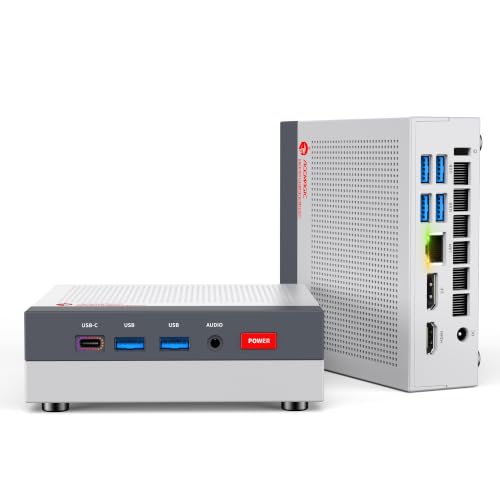
ACEMAGIC Retro X3 Ryzen 7 Mini PC
Best for: Productivity and light esports gaming
- Processor
- Ryzen 7 (what this guide is about)
- Graphics Card
- AMD Radeon 780M
- RAM Capacity
- 16GB
- RAM Type
- LPDDR5
- Storage Capacity
- 1TB
- Storage Interface
- NVMe PCIe 4.0
View on Amazon: ACEMAGIC Retro X3 Ryzen 7 Mini PC Affiliate link
The ACEMAGIC Retro X3 Mini PC features an AMD Ryzen 7 H 255 processor and AMD Radeon 780M integrated graphics. It includes 16GB of LPDDR5 RAM and a 1TB NVMe PCIe 4.0 SSD. This unit runs Windows 11 Pro and offers robust connectivity with WiFi 6E and a 2.5Gbps Ethernet port. It suits users needing strong CPU performance and decent integrated graphics in a compact form factor.
Pros
- AMD Ryzen 7 H 255 processor with up to 4.9GHz boost
- 16GB LPDDR5 RAM running at 6400MT/s
- 1TB NVMe PCIe 4.0 SSD for fast storage
- AMD Radeon 780M integrated graphics with 12 Compute Units
- 2.5Gbps RJ45 Ethernet port for low-latency networking
Cons
- LPDDR5 RAM is soldered and cannot be upgraded
- Integrated graphics may struggle with demanding AAA titles at high settings
- WiFi 6E requires a compatible router for full speeds
Good fit if
- You need a powerful CPU for productivity tasks like video editing
- You want a compact desktop with Windows 11 Pro pre-installed
- You play esports titles like League of Legends or CS2
Skip if
- You require user-upgradable RAM for future expansion
- You need a discrete graphics card for heavy 3D rendering
- You prioritize silent operation over sustained high performance
Verdict: The ACEMAGIC Retro X3 Ryzen 7 H 255 Mini PC delivers strong processing power and fast storage for users who prioritize CPU performance and compact design. It is ideal for productivity and light gaming, provided you accept the non-upgradeable memory.

ACEMAGIC Ryzen 7 Radeon 780M Gaming Mini PC
Best for: compact office work and multi-display setups
- Processor
- Ryzen 7 (what this guide is about)
- Graphics Card
- AMD Radeon 780M Graphics
- RAM Capacity
- 16GB
- RAM Type
- LPDDR5
- Storage Capacity
- 1TB
- Storage Interface
- PCIe 4.0 M.2
View on Amazon: ACEMAGIC Ryzen 7 Radeon 780M Gaming Mini PC Affiliate link
This ACEMAGIC mini PC features an AMD Ryzen 7 H 255 processor and 16GB of LPDDR5 RAM. It includes a 1TB PCIe 4.0 SSD for fast storage and AMD Radeon 780M graphics. The system supports triple 8K displays and offers extensive connectivity via USB4 and WiFi 6E. It suits users needing a compact, powerful station for office work or light gaming.
Pros
- AMD Ryzen 7 H 255 processor with up to 4.9GHz boost
- 16GB LPDDR5 RAM running at 6400MT/s
- 1TB PCIe 4.0 M.2 SSD storage
- Triple 8K display support via HDMI, DP, and USB4
- WiFi 6E and Bluetooth 5.2 connectivity
Cons
- LPDDR5 RAM is soldered and cannot be upgraded
- Only one M.2 slot is available for storage expansion
- Graphics performance relies on integrated Radeon 780M
Good fit if
- You need a compact PC for office tasks or media centers
- You require high-speed data transfer via USB4 Type-C
- You want to drive multiple 8K displays simultaneously
Skip if
- You need dedicated graphics for heavy gaming
- You plan to upgrade RAM capacity later
- You require more than one internal storage slot
Verdict: ACEMAGIC Ryzen 7 H255 Mini PC delivers strong multi-core performance and ample storage in a small form factor. It is a solid choice for users prioritizing connectivity and display output over gaming power or RAM upgradability.
Specifications side by side
| Spec | ACEMAGIC Retro X3 Ryzen 7 Mini PC | ACEMAGIC Ryzen 7 Radeon 780M Gaming Mini PC |
|---|---|---|
| Processor | AMD Ryzen 7 H 255 | AMD Ryzen 7 H 255 |
| Graphics Card | AMD Radeon 780M | AMD Radeon 780M Graphics |
| RAM Capacity | 16GB | 16GB |
| RAM Type | LPDDR5 | LPDDR5 |
| Storage Capacity | 1TB | 1TB |
| Storage Interface | NVMe PCIe 4.0 | PCIe 4.0 M.2 |
| Operating System | Windows 11 Pro | not stated |
| Wireless Connectivity | WiFi 6E, Bluetooth 5.2 | WiFi 6E, Bluetooth 5.2 |
| Storage | not stated | 1TB SSD |
| Dimensions | 5.03 × 1.73 × 5.03 inches | not stated |
| Size | H 255 16GB+1TB | H255 16GB 1TB |
| Color | Grey | Silver |
| Model | Retro X3 | W1 |
Check Specs for Your Needs
-
Match CPU to Tasks
Ryzen 7 processors handle demanding workloads well. If you need strong multi-core performance for productivity, this series fits. The top pick, the Retro X3, emphasizes processing speed. You should verify if the specific model meets your computational needs. Higher core counts benefit heavy multitasking. Light users might find ample power here. Check the exact processor variant to ensure it aligns with your software requirements. This ensures you get the right balance of speed and efficiency for your daily workflow.
-
Verify Memory Upgradability
Memory configuration varies significantly between models. The Retro X3 features non-upgradeable memory. You must check if the installed RAM suffices for your long-term use. Fixed memory limits future expansion. If you plan to run many applications simultaneously, ensure the base amount is adequate. Some users prioritize raw speed over flexibility. Others need the ability to add more RAM later. Review the specifications carefully to avoid surprises. Understanding this constraint helps you select a machine that will remain usable over time.
-
Assess Storage Capacity
Storage space determines how much data you can keep locally. One model in this list includes a 1TB SSD. This capacity suits users who store large files or media libraries. Fast solid-state drives improve boot times and application loading. You should compare storage sizes across different options. A 1TB drive offers more room than smaller alternatives. Consider your typical file usage habits. If you work with videos or large datasets, prioritize higher storage. This ensures you do not run out of space quickly.
-
Confirm Operating System
Pre-installed software affects your initial setup experience. Most models in this guide include Windows 11 Pro. This operating system offers advanced features for professional use. You should verify the OS version before purchasing. Some users prefer specific editions for compatibility reasons. Windows 11 Pro provides enhanced security and management tools. Check the listing details to confirm the exact version. This avoids confusion upon arrival. Ensuring the correct OS is installed saves time during your initial configuration process.
-
Evaluate Physical Dimensions
Size matters for desk space and portability. The Retro X3 measures approximately 5 by 5 inches. Its height is around 2 inches. You should measure your intended workspace before buying. Compact designs fit easily on small desks. Check the width, height, and length specifications. These dimensions determine if the unit fits your monitor stand or shelf. Smaller footprints offer greater flexibility in placement. Ensure the physical size aligns with your ergonomic preferences and available surface area.
Frequently asked questions
Which ACEMAGIC Ryzen 7 mini PC is best for productivity?
The ACEMAGIC Retro X3 Ryzen 7 Mini PC is the top choice for productivity. It features a Ryzen 7 processor designed for strong multi-core performance. This model runs Windows 11 Pro, which supports professional multitasking. Its compact design fits easily on a desk. You get fast storage to handle daily tasks efficiently without lag.
Does the ACEMAGIC Retro X3 have an upgradeable RAM slot?
No, the memory in the ACEMAGIC Retro X3 is not upgradeable. The specifications list it as a fixed configuration with 16GB of RAM. You must ensure this capacity meets your long-term needs before purchasing. This limitation is a key trade-off for its compact size and processing speed focus.
What operating system comes with the ACEMAGIC Ryzen 7 models?
Most models in this list include Windows 11 Pro. This operating system is pre-installed on the top-rated Retro X3. Windows 11 Pro offers enhanced security and management features for business users. You do not need to purchase a separate license. It is ready to use out of the box for professional workflows.
Which ACEMAGIC mini PC offers the largest storage capacity?
The ACEMAGIC Ryzen 7 Radeon 780M Gaming Mini PC offers a 1TB SSD. This makes it the best option for users needing ample space for files. The storage capacity supports large datasets and multi-display setups. You benefit from fast load times and plenty of room for applications and media libraries.
Is the ACEMAGIC Retro X3 suitable for light gaming?
Yes, the ACEMAGIC Retro X3 is suitable for light esports gaming. The Ryzen 7 processor provides the necessary processing power for these titles. While it is not a high-end gaming rig, it handles lighter games well. You get a balance of CPU performance and compact design for casual play sessions.
What is the size of the ACEMAGIC Retro X3?
The ACEMAGIC Retro X3 measures 5.03 inches in length and width, with a height of 1.73 inches. This compact form factor allows it to fit in tight spaces. You can mount it behind a monitor or place it discreetly on a desk. The small footprint saves valuable desk space compared to traditional towers.
Does the ACEMAGIC W1 model support multiple displays?
Yes, the ACEMAGIC W1 is designed for multi-display setups. It is ideal for users who need connectivity for office work. The model supports various display outputs to expand your workspace. You can connect multiple monitors for enhanced productivity. This makes it a solid choice for professional environments requiring extensive screen real estate.