32GB RAM or 8GB RAM Mini PCs? Compared by Specs
As an Amazon Associate we earn from qualifying purchases. Links on this page are affiliate links.
This guide compares a 32GB RAM mini PC against an 8GB RAM mini PC. You see the Dell OptiPlex 3070 Micro with 32GB of RAM and the Dell OptiPlex 7080 SFF with 8GB of RAM. Both units are Dell business desktops designed for reliable daily use. The main difference lies in memory capacity and processor generation. We analyze the specs to help you decide which configuration fits your workflow.
Key differences
| Aspect | Dell OptiPlex Micro Core i5 Desktop | Dell OptiPlex SFF Core i7 Desktop |
|---|---|---|
| Memory | 32GB DDR4 | 8GB RAM |
| Processor | Intel Core i5-9500 | Intel Core i7-10700 |
| Storage | 1TB SSD | 256GB SSD |
| Form Factor | Micro | Small Form Factor (SFF) |
| Operating System | Windows 11 Pro | not listed |
Which one should you choose?
Choose Dell OptiPlex Micro Core i5 Desktop if
- You need ample space for large files and multiple applications.
- You want a compact Micro chassis for tight desk spaces.
- You require Windows 11 Pro for advanced business features.
Choose Dell OptiPlex SFF Core i7 Desktop if
- You prioritize a newer 10th Gen Intel Core i7 processor.
- You prefer a standard Small Form Factor chassis.
- You have basic productivity needs that fit in 8GB RAM.
Verdict: Choose the 32GB model if you need extensive multitasking, large storage, and a smaller footprint. Pick the 8GB model if you value a newer generation i7 processor for standard office tasks. Your choice depends on whether you prioritize memory capacity or processing speed.
Memory and Storage Comparison
memory capacity
Memory is the most critical difference between these two machines. The Dell OptiPlex 3070 Micro comes with 32GB of DDR4 RAM. This large amount of memory allows you to run many applications at once without slowing down. It handles heavy multitasking with ease. In contrast, the Dell OptiPlex 7080 SFF has only 8GB of RAM. While sufficient for basic tasks, it fills up quickly if you open many browser tabs or programs. For users who need to keep multiple windows open, the 32GB option is clearly superior. The 8GB model is better suited for single-task workflows.
storage space
Storage capacity affects how many files and programs you can keep on the device. The OptiPlex 3070 Micro includes a 1TB SSD. This provides ample room for documents, photos, and large software installations. You will not need to manage space frequently. The OptiPlex 7080 SFF offers a 256GB SSD. This is much smaller and may require you to use external drives or cloud storage sooner. Both drives are solid state, so they boot quickly. However, the larger capacity in the Micro model gives you more flexibility for future growth without needing upgrades.
processor speed
Processing power determines how fast the computer handles calculations and tasks. The OptiPlex 7080 SFF uses an Intel Core i7-10700 processor. This is a newer 10th Gen chip with higher clock speeds, reaching up to 4.8GHz. It is generally more powerful for intensive single-core tasks. The OptiPlex 3070 Micro uses an Intel Core i5-9500, a 9th Gen hexa-core processor. While it has more cores, it is an older generation with lower peak speeds. For pure processing speed, the i7 in the SFF model has the advantage, though the i5 is still capable for daily work.
operating system
Both computers run Windows 11, ensuring you get the latest features and security updates. The OptiPlex 3070 Micro comes with Windows 11 Pro. This version includes advanced business features like BitLocker encryption and Remote Desktop, which are useful for professional environments. The OptiPlex 7080 SFF also runs Windows 11 Pro. Since both units share the same operating system version, there is no difference in software capabilities or user interface. You will have the same experience regarding system tools, updates, and compatibility with enterprise software on either machine.
physical size
The physical footprint matters if you have limited desk space. The OptiPlex 3070 Micro is a Micro form factor, measuring 13.3 x 12.1 x 4 inches. It is very compact and can be mounted behind a monitor. The OptiPlex 7080 SFF is a Small Form Factor, which is taller at 10.1 inches high. While still smaller than a standard tower, it takes up more vertical space. If you want the smallest possible device that fits easily in tight spots, the Micro model is the better choice. The SFF is slightly larger but still saves significant space compared to full-size towers.
Which mini PC fits your needs best
Users needing heavy multitasking and large storage
The Dell OptiPlex 3070 Micro includes 32GB of DDR4 RAM and a 1TB SSD. This configuration allows you to run multiple applications simultaneously without slowdowns. The large storage capacity holds extensive files and programs. It is ideal for users who require efficient performance and ample space for their data.
Users prioritizing faster processor speed for daily tasks
The Dell OptiPlex 7080 SFF features an Intel Core i7-10700 processor. This chip offers higher base and boost speeds than the i5 model. It provides smooth performance for office work, web browsing, and video calls. The 256GB SSD ensures quick boot times and responsive application loading for everyday productivity.
Users who want Windows 11 Pro and wireless connectivity
The Dell OptiPlex 3070 Micro comes pre-installed with Windows 11 Pro. It also includes 5G WiFi and Bluetooth adapters for convenient wireless connections. These features support advanced security and easy pairing with peripherals. This setup is perfect for creating a clean, minimal workstation with reliable business-class operating system features.
Users who prefer a traditional small form factor
The Dell OptiPlex 7080 SFF uses a Small Form Factor chassis. This design saves desk space while maintaining a standard desktop footprint. It supports common peripherals like monitors and external storage. The compact build is suitable for home or office setups where you need a reliable workstation without the ultra-compact micro dimensions.
Quick picks
| # | Product | Best for | Price |
|---|---|---|---|
| 1 | Dell OptiPlex Micro Core i5 Desktop | Office multitasking and space-saving setups | Check price of Dell OptiPlex Micro Core i5 Desktop on Amazon |
| 2 | Dell OptiPlex SFF Core i7 Desktop | compact office work and multitasking | Check price of Dell OptiPlex SFF Core i7 Desktop on Amazon |
The products compared
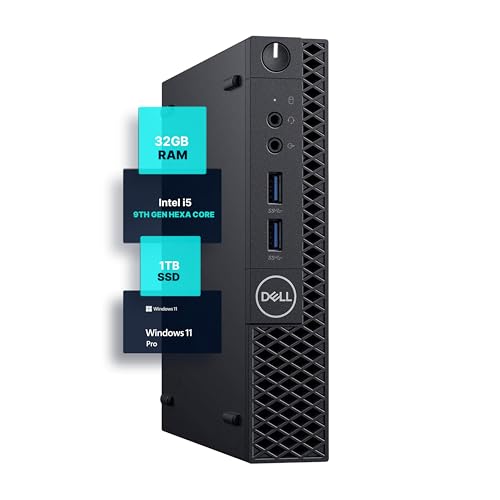
Dell OptiPlex Micro Core i5 Desktop
Best for: Office multitasking and space-saving setups
- Memory
- 32GB RAM (what this guide is about)
- Processor
- Intel Core i5-9500
- RAM Capacity
- 32GB
- RAM Type
- DDR4
- Storage Capacity
- 1TB
- Operating System
- Windows 11 Pro
View on Amazon: Dell OptiPlex Micro Core i5 Desktop Affiliate link
This Dell OptiPlex 3070 Micro is a compact desktop built for multitasking. It features an Intel Core i5-9500 processor and 32GB of DDR4 RAM. You get 1TB of SSD storage and Windows 11 Pro. The 5G WiFi and Bluetooth keep you connected. Its small footprint fits tight desks. This setup handles office work and media without slowing down.
Pros
- 32GB DDR4 RAM for heavy multitasking
- 1TB SSD for ample storage
- Intel Core i5-9500 hexa-core processor
- Compact 4-inch tall micro form factor
Cons
- Older 9th Gen Intel processor
- No dedicated graphics card listed
- Limited to integrated graphics performance
Good fit if
- You need high RAM for many browser tabs
- You want a small desktop for a tight desk
- You require Windows 11 Pro for work
Skip if
- You need high-end gaming performance
- You want the latest CPU generation
- You require a dedicated GPU for video editing
Verdict: Dell OptiPlex 3070 Micro 32GB RAM Mini PC suits users who prioritize memory and storage over raw processing speed. It is a solid choice for office tasks and home use where space is limited.

Dell OptiPlex SFF Core i7 Desktop
Best for: compact office work and multitasking
- Memory
- 8GB RAM (what this guide is about)
- Processor
- Intel Core i7-10700
- RAM Capacity
- 8GB
- Storage Capacity
- 256GB
- Use
- Business
View on Amazon: Dell OptiPlex SFF Core i7 Desktop Affiliate link
This Dell OptiPlex 7080 SFF desktop features an Intel Core i7-10700 processor and 8GB of RAM. The 256GB SSD ensures quick boot times and responsive performance for everyday tasks. Its small form factor saves desk space while delivering reliable business-class performance. It is well-suited for web browsing, office work, and general productivity. You get a compact machine that handles multitasking efficiently without taking up much room.
Pros
- Intel Core i7-10700 processor up to 4.8GHz
- 8GB RAM for smooth multitasking
- 256GB SSD for fast boot times
- Compact SFF design saves desk space
Cons
- Only 8GB RAM limits heavy multitasking
- 256GB SSD offers limited storage space
- No mention of included peripherals or monitor
Good fit if
- You need a compact desktop for office work
- You prioritize processor speed over large storage
- You want a reliable machine for everyday productivity
Skip if
- You require 32GB RAM for heavy workloads
- You need large storage for media libraries
- You want a pre-configured gaming setup
Verdict: Dell OptiPlex 7080 SFF Desktop is a solid choice for users who need a powerful processor in a small package. It fits buyers who prioritize speed and space efficiency over high memory and storage capacity.
Specifications side by side
| Spec | Dell OptiPlex Micro Core i5 Desktop | Dell OptiPlex SFF Core i7 Desktop |
|---|---|---|
| Processor | Intel Core i5-9500 | Intel Core i7-10700 |
| RAM Capacity | 32GB | 8GB |
| RAM Type | DDR4 | not stated |
| Storage Capacity | 1TB | 256GB |
| Operating System | Windows 11 Pro | not stated |
| Wireless Connectivity | 5G WiFi, Bluetooth | not stated |
| Memory | 32GB RAM | 8GB RAM |
| Storage | 1TB SSD | 256GB SSD |
| Use | not stated | Business |
| Dimensions | 12.1 × 13.3 × 4 inches | not stated |
| Size | 13.3 x 12.1 x 4 inches | not stated |
| Color | Black | not stated |
| Model | 3070 5070 7070 | 7080 |
Frequently asked questions
Is 32GB RAM overkill for a mini PC?
It depends on your workload. For general office tasks, 32GB is more than enough. The Dell OptiPlex 3070 Micro offers this capacity, allowing you to run many applications simultaneously. If you only browse the web and use basic software, 8GB suffices. However, heavy multitasking or virtual machines benefit from the extra memory headroom.
Can I upgrade the RAM on these Dell desktops?
The data provided does not specify upgrade paths for these specific models. The Dell OptiPlex 3070 Micro ships with 32GB, while the 7080 SFF has 8GB. You should check the manufacturer service manual for your exact model number. Business desktops often allow memory expansion, but you must verify compatibility with your specific unit before purchasing additional modules.
Which is better for running multiple browser tabs?
The unit with 32GB RAM is superior for this task. The Dell OptiPlex 3070 Micro includes 32GB of RAM, which prevents slowdowns when you keep dozens of tabs open. The 8GB model may struggle with heavy tab loads. More memory ensures your system remains responsive even when you switch between many open windows and web applications.
Does the processor matter more than the RAM size?
Both are important, but they serve different roles. The 8GB OptiPlex 7080 SFF features a Core i7 processor, offering strong processing speed. The 32GB OptiPlex 3070 Micro uses a Core i5. If you need raw calculation power, the i7 helps. If you need to keep many programs open at once, the 32GB RAM is the deciding factor.
Is a 1TB SSD necessary with 32GB RAM?
They work together for a balanced system. The OptiPlex 3070 Micro pairs 32GB RAM with a 1TB SSD. This combination allows fast application loading and ample space for large files. The 8GB OptiPlex 7080 SFF includes only a 256GB SSD. If you store many documents or media, the larger storage capacity complements the high memory for a smoother experience.
Will Windows 11 Pro run better on 32GB?
Windows 11 Pro runs on both systems. The OptiPlex 3070 Micro includes Windows 11 Pro with 32GB RAM. This setup provides ample resources for the operating system and background services. The extra memory ensures the OS has free space for caching, which can improve overall system fluidity compared to the 8GB model, which has fewer resources available for the OS itself.
Which mini PC is smaller in size?
The OptiPlex 3070 Micro is compact. It measures 13.3 x 12.1 x 4 inches. The OptiPlex 7080 SFF is a Small Form Factor desktop, which is typically larger than a Micro model. If you need the smallest footprint for a tight desk space, the Micro version is the better choice. It fits easily in limited areas while offering high memory capacity.