16GB RAM or 64GB RAM All-In-One Desktops? Compared by Specs
As an Amazon Associate we earn from qualifying purchases. Links on this page are affiliate links.
This guide compares two distinct all-in-one desktops: the Apple 24-inch iMac with 16GB RAM and the Lenovo IdeaCentre 27-inch with 64GB RAM. We examine the 16GB RAM vs 64GB RAM all in one desktop options to help you decide. Both units integrate the display and computer components into a single chassis. The main difference lies in memory capacity and processor architecture. One uses Apple’s unified memory system, while the other offers massive DDR5 RAM and a larger touchscreen.
Key differences
| Aspect | Apple 24-inch iMac M1 16GB 1TB | Lenovo IdeaCentre 27-Inch Ryzen 5 AIO |
|---|---|---|
| Processor | Apple M1 (8-core CPU) | AMD Ryzen 5 8645HS (6-core, up to 5 GHz) |
| System Memory | 16GB unified memory | 64GB DDR5 RAM |
| Storage | 1TB SSD | 4TB SSD |
| Screen Size | 24-inch 4.5K Retina | 27-inch FHD Touchscreen |
| Operating System | macOS | Windows 11 Home |
Which one should you choose?
Choose Apple 24-inch iMac M1 16GB 1TB if
- You prefer a compact 24-inch display with high-resolution 4.5K clarity.
- You want the efficiency of Apple’s unified memory architecture for general tasks.
- You are already invested in the Apple ecosystem and macOS software.
Choose Lenovo IdeaCentre 27-Inch Ryzen 5 AIO if
- You need substantial 64GB RAM for heavy multitasking or virtualization.
- You require a large 27-inch touchscreen for direct interaction.
- You need extensive 4TB storage for large media libraries or files.
Verdict: The Lenovo IdeaCentre is the better choice if you require maximum memory capacity and a large touchscreen interface for Windows-based work. The Apple iMac suits users who prioritize display sharpness and energy-efficient performance in a smaller footprint. Your decision depends on whether you need raw memory headroom or a polished, high-resolution visual experience.
16GB vs 64GB RAM AIO Specs
Memory capacity
Memory is the primary difference between these two machines. The Lenovo IdeaCentre comes equipped with 64GB of DDR5 RAM. This large amount of system memory allows you to run many applications at once without slowing down. It handles heavy multitasking and large datasets with ease. In contrast, the Apple iMac has 16GB of unified memory. While sufficient for standard tasks, it offers less headroom for demanding workloads. If you need to keep dozens of browser tabs and professional software open simultaneously, the Lenovo provides significantly more capacity. The extra 48GB makes a clear difference in system responsiveness under load.
Storage volume
Storage space determines how much data you can keep on the device. The Lenovo IdeaCentre includes a 4TB SSD. This vast amount of space is ideal for storing large video files, extensive game libraries, or massive photo archives. The Apple iMac provides 1TB of SSD storage. This is a generous amount for most users, but it is only a quarter of the Lenovo's capacity. If you frequently work with large media files or need to store years of data locally, the Lenovo's 4TB drive offers superior longevity. You will likely need external storage for the iMac if your library grows beyond one terabyte.
Screen size
The physical display size affects your workspace and viewing comfort. The Lenovo IdeaCentre features a 27-inch screen. This larger footprint provides more room for side-by-side windows and detailed work. The Apple iMac has a 24-inch display. While still substantial, it offers less horizontal and vertical space than the Lenovo. If you prefer a compact desk setup or do not need extra screen real estate, the iMac is smaller. However, for users who want a larger canvas for editing or multitasking, the Lenovo's 27-inch panel is the better choice. The size difference is noticeable when moving windows around.
Display resolution
Resolution impacts the sharpness of text and images. The Apple iMac boasts a 4.5K Retina display with a resolution of 4480x2520. This high pixel density makes text look incredibly crisp and images appear detailed. The Lenovo IdeaCentre has a Full HD (1920x1080) display. While adequate for general use, the pixel density is much lower than the iMac's. On a 27-inch screen, 1080p can appear less sharp than the iMac's 4.5K panel. If visual clarity and sharp text are your top priorities, the iMac wins. The Lenovo prioritizes other features over pixel density.
Operating system
The software environment defines your daily computing experience. The Lenovo IdeaCentre runs Windows 11 Home. This is the standard operating system for most desktop users, offering broad compatibility with PC software and games. The Apple iMac runs macOS. This system is known for its stability and integration with other Apple devices. Your choice depends on your software needs. If you rely on specific Windows-only applications or play PC-exclusive games, the Lenovo is necessary. If you prefer macOS or use Apple-centric workflows, the iMac is the correct choice. They serve different ecosystems.
Which all-in-one desktop fits your needs
Windows users needing massive multitasking power
The Lenovo IdeaCentre offers 64GB of DDR5 RAM and a 4TB SSD. This configuration supports heavy multitasking and large file storage. You get Windows 11 Home and an AMD Ryzen 5 processor. The 27-inch touchscreen provides ample workspace. This setup is ideal if you run many applications simultaneously or manage large datasets.
Creative professionals seeking high-resolution visuals
The Apple iMac features a 24-inch 4.5K Retina display with 4480x2520 resolution. This sharp screen is excellent for design and photo editing. The Apple M1 chip with an 8-core GPU delivers efficient performance. You also get 16GB of unified memory and a 1TB SSD. The compact 11-pound design saves desk space.
Users wanting versatile connectivity options
The Lenovo IdeaCentre includes four USB ports, HDMI-In, HDMI-Out, and Ethernet. These ports allow you to connect multiple peripherals and external displays. The wireless keyboard and mouse are included. The 27-inch FHD touchscreen adds touch control. This connectivity makes it easier to build a complete desktop setup without extra adapters.
Quick picks
| # | Product | Best for | Price |
|---|---|---|---|
| 1 | Apple 24-inch iMac M1 16GB 1TB | Users needing 16GB RAM and a 4.5K display | Check price of Apple 24-inch iMac M1 16GB 1TB on Amazon |
| 2 | Lenovo IdeaCentre 27-Inch Ryzen 5 AIO | Heavy multitasking and large storage needs | Check price of Lenovo IdeaCentre 27-Inch Ryzen 5 AIO on Amazon |
The products compared

Apple 24-inch iMac M1 16GB 1TB
Best for: Users needing 16GB RAM and a 4.5K display
- Memory
- 16GB RAM (what this guide is about)
- Processor
- Apple M1
- System Memory
- 16 GB
- Storage Capacity
- 1 TB SSD
- Screen Size
- 24-inch
- Display Resolution
- 4.5K Retina
View on Amazon: Apple 24-inch iMac M1 16GB 1TB Affiliate link
This 24-inch all-in-one desktop uses the Apple M1 chip with 16GB of unified memory and a 1TB SSD. The 4.5K Retina display offers high resolution for sharp visuals. It includes a 1080p camera and Wi-Fi 6. This configuration suits users who need solid performance for everyday tasks and media consumption without requiring the heavy memory capacity of 64GB systems.
Pros
- Apple M1 8-core CPU and GPU
- 16GB unified memory for smooth multitasking
- 24-inch 4.5K Retina display
- 1TB SSD storage capacity
Cons
- 16GB RAM is lower than the 64GB option
- 24-inch screen is smaller than 27-inch models
- Renewed condition may vary in cosmetic wear
Good fit if
- You want a compact 24-inch desktop
- You need 16GB RAM for general use
- You prefer a high-resolution Retina display
Skip if
- You require 64GB RAM for heavy workloads
- You need a larger 27-inch screen
- You prefer a brand-new condition unit
Verdict: Apple M1 24-inch iMac 16GB RAM fits users who prioritize display quality and efficient performance over maximum memory capacity. It is ideal for those who do not need the extensive 64GB RAM found in other list options.
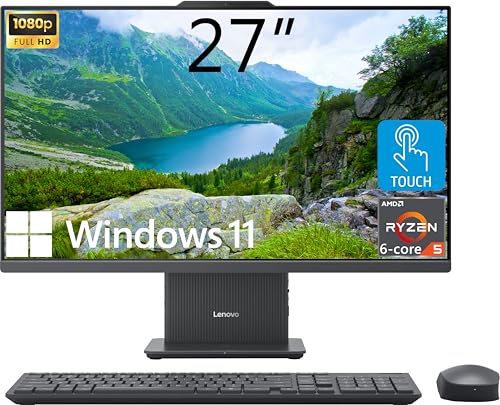
Lenovo IdeaCentre 27-Inch Ryzen 5 AIO
Best for: Heavy multitasking and large storage needs
- Memory
- 64GB RAM (what this guide is about)
- Processor
- AMD Ryzen 5 8645HS
- System Memory
- 64GB DDR5
- Storage Capacity
- 4TB SSD
- Screen Size
- 27"
- Display Resolution
- FHD (1920x1080)
View on Amazon: Lenovo IdeaCentre 27-Inch Ryzen 5 AIO Affiliate link
This Lenovo IdeaCentre is a 27-inch all-in-one desktop with a 64GB DDR5 RAM and 4TB SSD. It features an AMD Ryzen 5 8645HS processor and a 27-inch FHD touchscreen. The large memory and storage capacity make it suitable for heavy multitasking. You get Windows 11 Home and a wireless keyboard and mouse included.
Pros
- 64GB DDR5 RAM for heavy multitasking
- 4TB PCIe M.2 SSD for large storage
- 27-inch FHD touchscreen with 99% sRGB
- AMD Ryzen 5 8645HS 6-core processor
Cons
- FHD resolution on a 27-inch screen
- No 4K display option in this configuration
- Windows 11 Home lacks advanced features
Good fit if
- You need 64GB RAM for professional workloads
- You require 4TB of storage space
- You want a touchscreen all-in-one desktop
Skip if
- You need 4K display resolution
- You prefer Windows 11 Pro
- You want a smaller 24-inch screen
Verdict: Lenovo IdeaCentre 27" 64GB RAM AIO suits users who need maximum RAM and storage in an all-in-one form factor. It is ideal for heavy multitasking and large file management.
Specifications side by side
| Spec | Apple 24-inch iMac M1 16GB 1TB | Lenovo IdeaCentre 27-Inch Ryzen 5 AIO |
|---|---|---|
| Processor | Apple M1 | AMD Ryzen 5 8645HS |
| System Memory | 16 GB | 64GB DDR5 |
| Storage Capacity | 1 TB SSD | 4TB SSD |
| Screen Size | 24-inch | 27" |
| Display Resolution | 4.5K Retina | FHD (1920x1080) |
| Graphics | 8-core GPU | not stated |
| Touchscreen | not stated | Touchscreen |
| Operating System | not stated | Windows 11 Home |
| Memory | 16GB RAM | 64GB RAM |
| Storage | 1TB SSD | 4TB SSD |
| Display Feature | not stated | Touchscreen |
| Dimensions | 6 × 23 × 19 inches | 24.1 × 7.55 × 18.6 inches |
| Weight | 11 pounds | not stated |
| Size | 16GB | 1TB | 64GB RAM | 4TB SSD |
| Color | Green | not stated |
| Model | A2438 | IdeaCentre |
Frequently asked questions
Can 16GB RAM handle everyday tasks like web browsing and office work?
Yes, 16GB RAM is sufficient for standard daily activities. The Apple iMac with 16GB RAM and an M1 chip delivers efficient performance for these loads. It prioritizes display quality and speed over massive memory capacity. You will not experience slowdowns during typical use.
Is 64GB RAM necessary for heavy multitasking and large file management?
It depends on your specific workflow. The Lenovo IdeaCentre with 64GB RAM supports heavy multitasking and large file storage without slowing down. If you run many applications simultaneously or manage large files, this higher capacity ensures smooth operation. Standard users may not need this extra power.
Which all-in-one desktop has a larger screen?
The Lenovo IdeaCentre features a 27-inch display. The Apple iMac has a 24-inch screen. Both sizes offer integrated displays in an all-in-one form factor. Choose the 27-inch model if you prefer more screen real estate for your workspace.
Does the 64GB RAM model include a touchscreen?
Yes, the Lenovo IdeaCentre 27-inch includes a touchscreen feature. The Apple iMac does not list touchscreen capabilities in its specifications. If touch interaction is important for your usage, the Lenovo option provides this functionality directly on the display.
What operating system comes with the 64GB RAM all-in-one?
The Lenovo IdeaCentre with 64GB RAM ships with Windows 11 Home. This operating system supports the AMD Ryzen 5 processor and the large memory configuration. It is designed for users who need a familiar Windows environment for their computing tasks.
How much storage does the 16GB RAM iMac offer?
The Apple 24-inch iMac with 16GB RAM includes 1TB of SSD storage. This provides ample space for applications, photos, and documents. The storage is integrated into the all-in-one design, keeping your setup clean and compact without external drives.
Is the 64GB RAM desktop suitable for video editing or 3D rendering?
The high memory capacity makes it suitable for demanding creative tasks. The Lenovo IdeaCentre’s 64GB RAM allows you to run resource-intensive applications like video editors or 3D software alongside other programs. The 4TB SSD also helps manage large project files efficiently.
What is the weight difference between the two all-in-one desktops?
The Apple iMac weighs 11 pounds. The Lenovo IdeaCentre weighs approximately 25.5 pounds based on its dimensions. The Apple model is lighter and easier to move. The Lenovo unit is heavier, likely due to its larger chassis and internal components for higher performance.