16GB RAM vs 32GB RAM Mini PCs in 2026: Key Differences
As an Amazon Associate we earn from qualifying purchases. Links on this page are affiliate links.
This comparison examines the 16GB RAM vs 32GB RAM mini PC options available in 2026. Both systems are compact business desktops designed for space-saving efficiency. They share key similarities, including Windows 11 Pro and Intel Core i5 processors. The main difference lies in memory capacity. The HP model provides 16GB of RAM, while the Dell unit offers 32GB. You also need to consider storage and physical dimensions when deciding which machine fits your workflow.
Key differences
| Aspect | HP EliteDesk Mini Core i5 PC | Dell OptiPlex Micro Core i5 Desktop |
|---|---|---|
| Processor | Intel Core i5-8500T | Intel Core i5-9500 |
| Memory | 16GB DDR4 RAM | 32GB DDR4 RAM |
| Storage | 256GB NVMe SSD | 1TB SSD |
| Dimensions | 7 x 1.25 x 7 inches | 13.3 x 4 x 12.1 inches |
Which one should you choose?
Choose HP EliteDesk Mini Core i5 PC if
- You need the smallest possible footprint for tight desk spaces.
- You primarily run standard office applications and web browsing.
- You prefer a lighter system that is easier to move.
Choose Dell OptiPlex Micro Core i5 Desktop if
- You require more memory for heavy multitasking or virtual machines.
- You need substantial storage for large files or media libraries.
- You want a newer generation processor for improved performance.
Verdict: Choose the HP EliteDesk if your priority is a compact form factor and basic productivity tasks. Select the Dell OptiPlex if you need double the memory, more storage, and a more powerful processor for demanding workloads.
Memory and Storage Comparison
Memory Capacity
The HP EliteDesk Mini Core i5 PC comes equipped with 16GB of DDR4 RAM. This amount of memory handles standard multitasking and office applications smoothly. The Dell OptiPlex Micro Core i5 Desktop offers 32GB of DDR4 RAM. This double the capacity allows for heavier workloads, such as running multiple virtual machines or editing large files without slowdowns. If you need to keep many browser tabs and programs open simultaneously, the 32GB option provides significantly more headroom. For basic web browsing and document editing, 16GB is sufficient. However, the extra memory in the Dell system ensures better longevity as software demands increase over time. You will notice less reliance on virtual memory paging with the larger configuration.
Processor Speed
Both systems use Intel Core i5 processors, but they differ in generation and clock speed. The HP model features the i5-8500T, which boosts up to 3.5GHz. The Dell system uses the i5-9500, a 9th Gen hexa-core chip. While the HP has a slightly higher boost clock, the Dell processor is from a newer generation with more cores. This generational leap often translates to better efficiency and performance in multi-threaded tasks. The Dell i5-9500 is designed for consistent performance in business environments. The HP i5-8500T is a low-power variant optimized for efficiency. For most users, the difference in raw processing power is negligible for everyday tasks. However, the Dell’s newer architecture may offer slight advantages in newer software compatibility.
Storage Capacity
Storage options vary significantly between the two mini PCs. The HP EliteDesk includes a 256GB NVMe SSD. This fast storage type ensures quick boot times and application loading. However, 256GB fills up quickly with modern operating systems and updates. The Dell OptiPlex provides a 1TB SSD. This fourfold increase in storage space allows you to store more files, photos, and large applications without needing external drives. Both use solid-state drives, so read and write speeds are generally fast. The 1TB drive in the Dell system is a major advantage for users who keep large datasets or media libraries locally. If you rely on cloud storage, the smaller HP drive might suffice. For local file retention, the Dell offers far more utility.
Physical Size
Form factor is critical for desk space management. The HP EliteDesk is a true tiny PC with dimensions of 7 x 7 x 1.25 inches. It is extremely compact and can easily mount behind a monitor or fit in tight spaces. The Dell OptiPlex is larger, measuring 13.3 x 12.1 x 4 inches. While still considered a micro or mini desktop, it takes up more desk footprint than the HP. The HP’s smaller chassis is ideal for users with limited desk real estate or those who prefer a minimalist setup. The Dell’s larger size may accommodate slightly better cooling or expansion options internally, though this is not explicitly stated. If your primary goal is to save physical space, the HP model is the clear winner. The Dell is still compact but requires more room.
Connectivity
Both systems offer essential wireless connectivity features for modern office use. Each includes Bluetooth support for connecting peripherals like mice, keyboards, and headphones. The HP EliteDesk lists standard WiFi connectivity. The Dell OptiPlex specifies 5G WiFi. This likely refers to 5GHz band support, which reduces interference and offers faster speeds in congested wireless environments. Both systems run Windows 11 Pro, providing advanced security and management features suitable for business use. The Dell’s emphasis on 5G WiFi suggests a focus on stable, high-speed wireless connections. The HP’s connectivity is standard and reliable for typical office tasks. If you have a crowded wireless network, the Dell’s 5G capability might provide a more stable connection. Otherwise, both offer comparable wireless functionality.
Which Mini PC Fits Your Needs
Budget-conscious office users
You need reliable performance without excess capacity. The HP EliteDesk provides 16GB of DDR4 RAM and an Intel Core i5-8500T processor. This configuration handles standard business tasks and multitasking efficiently. The compact 7-inch chassis saves desk space. It runs Windows 11 Pro for professional tools. This setup meets core requirements for everyday productivity.
Heavy multitaskers needing storage
You require maximum memory and large storage for demanding workflows. The Dell OptiPlex includes 32GB of DDR4 RAM, allowing seamless handling of numerous applications simultaneously. The 1TB SSD offers ample room for files and projects. Powered by an Intel Core i5-9500, it ensures smooth operation. This system is built for users who prioritize capacity and speed.
Users wanting latest hardware
You prefer newer components for better longevity. The Dell OptiPlex features a 9th Gen Intel Core i5-9500 processor, which is a generation ahead of the HP model. It also includes 5G WiFi for faster wireless connectivity. The larger 32GB RAM capacity future-proofs the system. These specs provide a more robust foundation for modern software demands and intensive computing tasks.
Quick picks
| # | Product | Best for | Price |
|---|---|---|---|
| 1 | HP EliteDesk Mini Core i5 PC | compact business computing with 16GB RAM | Check price of HP EliteDesk Mini Core i5 PC on Amazon |
| 2 | Dell OptiPlex Micro Core i5 Desktop | Office multitasking and storage-heavy workflows | Check price of Dell OptiPlex Micro Core i5 Desktop on Amazon |
The products compared

HP EliteDesk Mini Core i5 PC
Best for: compact business computing with 16GB RAM
- Memory
- 16GB RAM (what this guide is about)
- Processor
- Intel Core i5-8500T
- RAM Capacity
- 16GB
- RAM Type
- DDR4
- Storage Interface
- NVMe
- Operating System
- Windows 11 Pro
View on Amazon: HP EliteDesk Mini Core i5 PC Affiliate link
This HP EliteDesk 800 G4 Mini is a compact business PC featuring an Intel Core i5-8500T processor and 16GB of DDR4 RAM. It includes a 256GB NVMe SSD and runs Windows 11 Pro. The small chassis measures 7 x 7 x 1.25 inches. It suits users who need reliable multitasking in a space-saving form factor. The renewed condition ensures it performs like new.
Pros
- Intel Core i5-8500T hexa-core processor for smooth multitasking
- 16GB DDR4 RAM handles multiple applications efficiently
- 256GB NVMe SSD provides fast startup and load times
- Compact 7 x 7 x 1.25 inch chassis saves desk space
Cons
- 16GB RAM is lower than the 32GB option on this list
- Renewed condition may show minor cosmetic wear
- Older generation processor compared to newer models
Good fit if
- You need a compact PC for business tasks
- You prefer Windows 11 Pro for professional tools
- You want a reliable system with fast SSD storage
Skip if
- You require 32GB RAM for heavy multitasking
- You want a brand-new unit without cosmetic wear
- You need the latest generation processor
Verdict: HP EliteDesk 800 G4 Mini 16GB RAM is a solid choice for users who prioritize compact size and business features over maximum memory capacity. It fits those who need a reliable, space-saving PC for everyday professional work.
Dell OptiPlex Micro Core i5 Desktop
Best for: Office multitasking and storage-heavy workflows
- Memory
- 32GB RAM (what this guide is about)
- Processor
- Intel Core i5-9500
- RAM Capacity
- 32GB
- RAM Type
- DDR4
- Storage Capacity
- 1TB
- Operating System
- Windows 11 Pro
View on Amazon: Dell OptiPlex Micro Core i5 Desktop Affiliate link
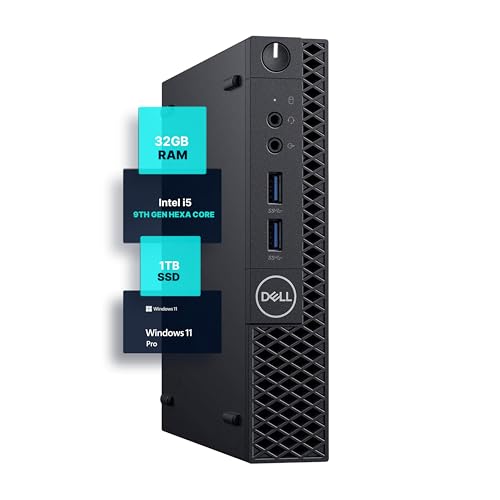
This Dell OptiPlex 3070 Micro mini PC features an Intel Core i5-9500 processor and 32GB of DDR4 RAM. It includes a 1TB SSD and runs Windows 11 Pro. The compact 4-inch chassis saves desk space while offering 5G WiFi and Bluetooth connectivity. You get reliable multitasking performance for office tasks or home use without bulky hardware taking up room.
Pros
- 32GB DDR4 RAM for heavy multitasking
- 1TB SSD for ample storage
- Intel Core i5-9500 hexa-core processor
- Windows 11 Pro pre-installed
Cons
- 9th Gen Intel processor is older than current standards
- No dedicated graphics card listed
- Limited to integrated graphics performance
Good fit if
- You need 32GB RAM for demanding office applications
- You want a compact desktop with Windows 11 Pro
- You prioritize storage capacity over latest CPU generation
Skip if
- You require the newest 13th or 14th Gen Intel CPUs
- You need dedicated graphics for gaming or video editing
- You prefer a smaller footprint than 4 inches high
Verdict: Dell OptiPlex 3070 Micro 32GB RAM Mini PC suits professionals who need ample memory and storage in a small form factor. It is ideal for office workloads rather than graphics-intensive tasks.
Specifications side by side
| Spec | HP EliteDesk Mini Core i5 PC | Dell OptiPlex Micro Core i5 Desktop |
|---|---|---|
| Processor | Intel Core i5-8500T | Intel Core i5-9500 |
| RAM Capacity | 16GB | 32GB |
| RAM Type | DDR4 | DDR4 |
| Storage Capacity | not stated | 1TB |
| Storage Interface | NVMe | not stated |
| Operating System | Windows 11 Pro | Windows 11 Pro |
| Wireless Connectivity | WiFi, Bluetooth | 5G WiFi, Bluetooth |
| Memory | 16GB RAM | 32GB RAM |
| Storage | not stated | 1TB SSD |
| Use | Business | not stated |
| Dimensions | 7 × 7 × 1.25 inches | 12.1 × 13.3 × 4 inches |
| Weight | 2.93 pounds | not stated |
| Color | Black | Black |
| Model | 800G4 | 3070 5070 7070 |
| Size | not stated | 13.3 x 12.1 x 4 inches |
Frequently asked questions
Is 16GB RAM enough for a mini PC in 2026?
Yes, 16GB is sufficient for standard business tasks. The HP EliteDesk Mini uses this amount to handle office applications smoothly. It is ideal for users who prioritize a compact size and reliable performance for everyday professional work. This configuration avoids excess capacity while maintaining efficiency.
Can 32GB RAM mini PCs handle heavy multitasking?
Yes, 32GB allows for extensive multitasking. The Dell OptiPlex Micro offers this capacity to support storage-heavy workflows. It suits professionals who need ample memory for complex office workloads. This setup ensures smooth operation even when running multiple demanding applications simultaneously.
What is the size difference between these mini PCs?
The HP EliteDesk is significantly more compact. It measures 7 by 7 by 1.25 inches and weighs 2.93 pounds. The Dell OptiPlex Micro is larger, measuring 13.3 by 12.1 by 4 inches. You should choose based on your available desk space and portability needs.
Do these mini PCs come with Windows 11 Pro?
Yes, both systems include Windows 11 Pro. This operating system provides enhanced security and management features for business environments. You get a consistent software experience regardless of whether you choose the 16GB or 32GB model. This ensures compatibility with professional tools and enterprise policies.
Are these mini PCs suitable for gaming?
No, these models are not designed for gaming. Both feature Intel Core i5 processors intended for office workloads. The Dell OptiPlex is explicitly described as ideal for office work rather than graphics-intensive tasks. They lack the dedicated graphics power required for modern gaming.
Which mini PC is better for business use?
The HP EliteDesk is best for compact business computing. It offers 16GB RAM in a small form factor for reliable daily use. The Dell OptiPlex is better for storage-heavy workflows with 32GB RAM. Choose the HP for portability and the Dell for expanded memory capacity.
Is the storage capacity the same on both models?
No, the storage capacity differs between the models. The Dell OptiPlex Micro includes a 1TB SSD for ample storage. The HP EliteDesk Mini does not list specific storage details in its attributes. You should verify storage needs carefully, as the Dell offers confirmed high-capacity storage.