Best RTX 5070 Gaming Desktops in 2026: 15 Picks Ranked by Specs
As an Amazon Associate we earn from qualifying purchases. Links on this page are affiliate links.
Finding the right system means matching processor tiers and storage configurations directly to your graphical workload. A dedicated RTX 5070 gaming desktop provides modern graphics performance for demanding titles in 2026.
The Alienware Aurora RTX 5070 Gaming Desktop leads the list by pairing the GPU with an Intel Core Ultra 7 265F processor and a 1 TB drive. We compared 15 systems based entirely on specifications published on the listings. This ranking helps you choose the right balance of CPU power, RAM capacity, and case size for your setup.
Quick picks
The best fit for you
- You want balanced overall performance with onsite service support Alienware Aurora RTX 5070 Gaming Desktop Its Intel Core Ultra 7 265F processor pairs with RTX 5070 graphics and includes one-year onsite service.
- You need large internal storage and plenty of memory MSI Codex Z2 RTX 5070 Gaming Desktop It features a spacious 2TB SSD alongside 32GB of DDR5 memory for heavy gaming workloads.
- You want integrated hardware monitoring built into the chassis KOTIN RTX 5070 Ryzen 7 9700X Gaming PC This desktop includes a built-in 11.3-inch chassis monitor, an 850W Gold power supply, and a 360mm liquid cooler.
- You want a baseline setup for 1440p gaming Skytech Azure RTX 5070 Gaming Desktop It provides a Ryzen 5 7600 processor paired with 16GB of DDR5 memory and RTX 5070 graphics.
Our 15 picks

Alienware Aurora RTX 5070 Gaming Desktop
Best for: overall RTX 5070 desktop gaming performance
- Graphics Card
- RTX 5070
- Processor Model
- Intel Core Ultra 7 265F
- Storage Capacity
- 1 TB
- Dimensions
- 18.1 × 7.76 × 16.5 inches
- Weight
- 33.9 pounds
View on Amazon: Alienware Aurora RTX 5070 Gaming Desktop (paid link)
The Alienware Aurora Gaming Desktop pairs an NVIDIA GeForce RTX 5070 graphics card with an Intel Core Ultra 7 265F processor. It includes a 1 TB hard drive and Alienware Command Center software for controlling lighting and performance power states. At 33.894 pounds, this mid-tower desktop suits you if you want Blackwell-generation graphics, dedicated onsite service support, and customizable AlienFX chassis lighting for your setup.
Pros
- NVIDIA GeForce RTX 5070 graphics card based on Blackwell architecture
- Intel Core Ultra 7 265F processor
- AlienFX customizable lighting zones with stadium lighting
- Dell 1-year onsite hardware service included
Cons
- Base configuration provides 1 TB of storage
- Chassis weighs 33.894 pounds
Good fit if
- You want an Intel Core Ultra 7 265F processor paired with an RTX 5070
- You prefer included 1-year onsite hardware service
- You want customizable AlienFX lighting zones managed via Alienware Command Center
Skip if
- You need more than 1 TB of storage out of the box
- You require a lightweight desktop setup that weighs under 30 pounds
Verdict: Alienware Aurora RTX 5070 Gaming Desktop combines the RTX 5070 GPU with an Intel Core Ultra 7 265F and includes 1-year onsite service. It offers a solid hardware foundation for 2026 gaming setups requiring Blackwell graphics.

MSI Codex Z2 RTX 5070 Gaming Desktop
Best for: gamers wanting 2TB storage and 32GB RAM
- Graphics Card
- RTX 5070
- Processor Model
- AMD Ryzen 7 8700F
- System Memory
- 32GB DDR5
- Storage Capacity
- 2TB SSD
- Operating System
- Windows 11 Home
- Dimensions
- 16 × 8.38 × 19 inches
View on Amazon: MSI Codex Z2 RTX 5070 Gaming Desktop (paid link)
This MSI Codex Z2 desktop pairs an NVIDIA GeForce RTX 5070 graphics card with an eight-core AMD Ryzen 7 8700F processor. You get 32GB of DDR5 memory and a 2TB solid-state drive for ample modern game storage. Thermal management relies on an air cooler alongside four pre-installed case fans. This system suits you if you want high-capacity storage and current-generation gaming hardware straight out of the box.
Pros
- NVIDIA GeForce RTX 5070 GPU paired with 32GB DDR5 memory
- Large 2TB SSD provides ample storage for modern game installations
- AMD Ryzen 7 8700F CPU with 8 cores and up to 5.0 GHz boost
- Four system cooling fans and ARGB air cooler for airflow
Cons
- Uses an air cooler rather than liquid cooling
- Comes installed with Windows 11 Home rather than Pro
Good fit if
- You want 2TB of solid-state storage without immediate upgrades.
- You need 32GB of DDR5 RAM for modern gaming and multitasking.
- You prefer hardware button control to cycle case lighting options.
Skip if
- You require liquid cooling for your desktop setup.
- You need Windows 11 Pro pre-installed for business environments.
Verdict: MSI Codex Z2 RTX 5070 Gaming Desktop combines high-end graphics with a generous 2TB SSD and 32GB of DDR5 memory. It delivers balanced eight-core processing and multi-fan air cooling for modern PC gaming.

KOTIN RTX 5070 Ryzen 7 9700X Gaming PC
Best for: Built-in hardware monitoring and 1440p gaming
- Graphics Card
- RTX 5070
- Processor Model
- AMD Ryzen 7 9700X
- System Memory
- 32GB DDR5
- Storage Capacity
- 1TB NVMe SSD
- Operating System
- Windows 11 Home
- Form Factor
- Mid-tower
View on Amazon: KOTIN RTX 5070 Ryzen 7 9700X Gaming PC (paid link)
This prebuilt desktop combines an NVIDIA GeForce RTX 5070 12GB graphics card with an eight-core AMD Ryzen 7 9700X processor. It features 32GB of DDR5 6000MHz memory, a 1TB NVMe SSD, and a 360mm liquid cooler. You also get an integrated 11.3-inch smart display for live temperatures, WiFi 7, and an 850W power supply. It suits you if you want modern 1440p gaming hardware with built-in system telemetry on your desk.
Pros
- AMD Ryzen 7 9700X 8-core CPU paired with RTX 5070 12GB
- Integrated 11.3-inch display shows real-time temperatures and stats
- 32GB DDR5 6000MHz RAM and 360mm AIO liquid cooling
- 850W 80 Plus Gold power supply and WiFi 7 support
Cons
- 1TB storage capacity requires expansion for larger game libraries
- Display output limited to HDMI and DisplayPort without legacy ports
- Mid-tower chassis weighs 30 pounds
Good fit if
- You want real-time hardware telemetry displayed directly on the PC chassis.
- You want an 850W power supply and 360mm liquid cooler for thermal headroom.
- You play modern titles using 32GB of fast 6000MHz DDR5 system memory.
Skip if
- You need 2TB or more of pre-installed internal storage out of the box.
- You rely on legacy VGA or DVI monitor cables without adapters.
Verdict: KOTIN RTX 5070 Ryzen 7 9700X Gaming PC pairs balanced 1440p gaming hardware with a built-in 11.3-inch chassis monitor. Its 850W Gold power supply and 360mm liquid cooler deliver ample thermal and power headroom.

MSI Codex R2 Core i5 RTX 5070 Gaming PC
Best for: Core i5 gamers wanting RTX 5070 graphics
- Graphics Card
- RTX 5070
- Processor Model
- Intel Core i5-14400F
- System Memory
- 32GB
- Storage Capacity
- 1TB NVMe SSD
- Operating System
- Windows 11 Home
- Use
- VR
View on Amazon: MSI Codex R2 Core i5 RTX 5070 Gaming PC (paid link)
The MSI Codex R2 is a prebuilt gaming tower built around an Intel Core i5-14400F processor and an NVIDIA GeForce RTX 5070 12GB graphics card. It includes 32GB of DDR5 memory and a 1TB solid-state drive for your files. Cooling relies on a four-fan airflow setup paired with an RGB CPU air cooler. This desktop suits you if you want current-generation graphics paired with Core i5 hardware.
Pros
- NVIDIA GeForce RTX 5070 12GB graphics card
- 32GB DDR5 system memory
- Four-fan cooling system with dedicated RGB CPU air cooler
- Built using standard off-the-shelf components
Cons
- 1TB solid-state drive offers limited storage space
- Air cooling rather than liquid cooling for the CPU
Good fit if
- You want an RTX 5070 paired with an Intel Core i5 processor.
- You prefer standard off-the-shelf components for easy future upgrades.
- You need 32GB of DDR5 RAM out of the box.
Skip if
- You need more than 1TB of factory storage for your games.
- You want a higher-tier processor like an Intel Core i7 or i9.
- You prefer a liquid-cooled desktop configuration.
Verdict: MSI Codex R2 Core i5 RTX 5070 Gaming PC balances an Intel Core i5-14400F with 32GB DDR5 RAM to handle modern gaming on the RTX 5070 graphics card. Its standardized chassis and four cooling fans provide a dependable baseline with straightforward upgrade paths.

ASUS ROG G700 RTX 5070 Gaming Desktop
Best for: gamers wanting tool-less upgrades and fast networking
- Graphics Card
- RTX 5070
- Processor Model
- Intel Core Ultra 7 265F
- System Memory
- 32 GB
- Storage Capacity
- 1 TB SSD
- Operating System
- Windows 11 Home
- Dimensions
- 9.45 × 20.1 × 18.9 inches
View on Amazon: ASUS ROG G700 RTX 5070 Gaming Desktop (paid link)
The ASUS ROG G700 pairs an Intel Core Ultra 7 265F processor with an NVIDIA GeForce RTX 5070 graphics card and 32GB of DDR5 RAM. Its 58-liter dual-glass chassis incorporates tool-less access, a quad-fan cooling layout, and clearance for triple-slot graphics cards. With 1TB of PCIe 4.0 SSD storage and 2.5Gbps networking, this prebuilt desktop suits you if you want modern connectivity and room for hardware upgrades.
Pros
- Intel Core Ultra 7 265F processor with 32GB DDR5 RAM
- Spacious 58-liter case supports triple-slot graphics cards
- Tool-less chassis access simplifies component maintenance
- High-speed 2.5Gbps Ethernet and WiFi 6 connectivity
- Includes dedicated RGB keyboard and mouse
Cons
- Base storage is limited to a single 1TB SSD
- Chassis is heavy at over 40 pounds
Good fit if
- You want 32GB DDR5 memory paired with a Core Ultra 7 processor.
- You plan to upgrade hardware easily using a tool-less case.
- You need 2.5Gbps wired Ethernet for local network transfers.
Skip if
- You need more than 1TB of storage installed out of the box.
- You prefer a compact, lightweight system that takes up minimal desk space.
Verdict: ASUS ROG G700 RTX 5070 Gaming Desktop delivers balanced processing and modern connectivity inside an expansive, easy-access chassis. Its 40-pound bulk and 1TB storage floor mean you will need ample desk space and possibly secondary drives.

Lenovo Legion Tower 5i Intel Ultra 7 RTX 5070
Best for: expandable memory and 2.5G networking
- Graphics Card
- RTX 5070
- Processor Model
- Intel Core Ultra 7 265F
- System Memory
- 32 GB
- Storage Capacity
- 1 TB
- Form Factor
- Tower
- Dimensions
- 19.3 × 8.31 × 16.3 inches
View on Amazon: Lenovo Legion Tower 5i Intel Ultra 7 RTX 5070 (paid link)
The Lenovo Legion Tower 5i pairs an Intel Core Ultra 7 265F processor with an NVIDIA GeForce RTX 5070 graphics card. Inside the tool-less Eclipse Black chassis, you get 32GB of 5600MHz DDR5 system memory that can expand up to 128GB. Cooling handles up to 180W via air cooling. It suits you if you want a modern desktop setup with fast 2.5G Ethernet and WiFi 6E networking right out of the box.
Pros
- Intel Core Ultra 7 265F processor and NVIDIA GeForce RTX 5070
- 32GB of 5600MHz DDR5 memory, expandable up to 128GB
- Tool-less transparent side panel for quick component access
- High-speed 2.5G Ethernet and WiFi 6E connectivity
Cons
- Storage capacity is not specified in the listed data
- Uses up to 180W air cooling rather than liquid cooling
- Relatively heavy desktop chassis at 33.07 pounds
Good fit if
- You want 32GB of DDR5 memory with room to expand up to 128GB.
- You need high-speed wired 2.5G Ethernet and WiFi 6E wireless connections.
- You prefer tool-less side panel access for easy hardware maintenance.
Skip if
- You require factory-installed liquid cooling for the processor.
- You need confirmed internal solid-state drive capacity before purchasing.
Verdict: Lenovo Legion Tower 5i RTX 5070 Gaming PC balances the Intel Core Ultra 7 265F CPU with 32GB of DDR5 RAM in a clean, tool-less chassis. It is a solid pick if you value high-speed 2.5G connectivity and memory headroom up to 128GB.

Skytech Azure RTX 5070 Gaming Desktop
Best for: entry-level RTX 5070 1440p gaming builds
- Graphics Card
- RTX 5070
- Processor Model
- AMD Ryzen 5 7600
- System Memory
- 16 GB
- Storage Capacity
- 1 TB NVMe M.2 SSD
- Operating System
- Windows 11 Home
- Dimensions
- 17.2 × 9.1 × 17.8 inches
View on Amazon: Skytech Azure RTX 5070 Gaming Desktop (paid link)
This prebuilt desktop pairs an NVIDIA GeForce RTX 5070 12GB GDDR7 graphics card with an AMD Ryzen 5 7600 processor. You get 16GB of DDR5 6000MHz system memory and a 1TB Gen4 NVMe solid-state drive inside a white tempered-glass chassis. It delivers standard 1440p gaming hardware without extra frills, making it a direct fit if you want current-generation graphics performance on an entry-tier configuration.
Pros
- NVIDIA GeForce RTX 5070 12GB GDDR7 graphics card
- DDR5 6000MHz system memory with heat spreader
- 1TB Gen4 NVMe M.2 solid-state drive
- Includes bundled gaming keyboard and mouse
Cons
- Equipped with 16GB RAM instead of 32GB
- Limits wireless connectivity to Wi-Fi 5
- Six-core Ryzen 5 processor instead of eight-core CPU
Good fit if
- You want an RTX 5070 paired with an AMD Ryzen 5 platform.
- You are satisfied with 16GB of DDR5 memory for 1440p gaming.
- You want a white chassis with included peripherals.
Skip if
- You require 32GB of system RAM out of the box.
- You need Wi-Fi 6 wireless networking speeds.
- You want an eight-core or liquid-cooled processor.
Verdict: Skytech Azure RTX 5070 Gaming Desktop delivers essential 1440p gaming hardware by combining the RTX 5070 with a Ryzen 5 7600 processor and 16GB DDR5 memory. It balances core graphical power with entry-tier components to serve as a baseline 2026 prebuilt option.

STORMCRAFT Skyhawk Pro i9-14900KF RTX 5070 PC
Best for: heavy CPU multitasking with 2TB NVMe storage
- Graphics Card
- RTX 5070
- Processor Model
- i9 14900KF
- System Memory
- 32GB DDR5
- Storage Capacity
- 2TB NVMe SSD
- Operating System
- Windows 11 Home
- Dimensions
- 16.9 × 9 × 18.5 inches
View on Amazon: STORMCRAFT Skyhawk Pro i9-14900KF RTX 5070 PC (paid link)
This prebuilt pairs an RTX 5070 12GB graphics card with Intel's 24-core Core i9-14900KF processor on a Z790 motherboard. You get 32GB of 6000MHz DDR5 memory alongside a 2TB NVMe SSD for storage. A 360mm all-in-one liquid cooler and an 850W Gold power supply handle the hardware requirements. This setup fits you if you want high-thread CPU performance alongside the RTX 5070 for gaming and multitasking.
Pros
- Intel Core i9-14900KF with 24 cores and 6.0 GHz boost
- 360mm AIO liquid cooler with six ARGB system fans
- 2TB NVMe SSD and 32GB DDR5 6000MHz memory
- 850W Gold certified power supply
Cons
- Large case footprint requires significant desk space
- No Wi-Fi or Bluetooth networking standards listed
Good fit if
- You need high multithreaded CPU performance for background tasks and gaming.
- You want 2TB of solid-state storage and 32GB of RAM included standard.
- You prefer 360mm liquid cooling and a Z790 motherboard.
Skip if
- You need a compact tower to fit a small desk setup.
- You require factory-specified onboard Wi-Fi out of the box.
Verdict: STORMCRAFT Skyhawk Pro RTX 5070 Gaming PC provides substantial CPU computing power, 2TB of storage, and 360mm liquid cooling. It serves as a dependable desktop if your workload demands multi-core processing alongside dedicated RTX 5070 graphics.

Skytech Azure 3 RTX 5070 Gaming PC
Best for: liquid-cooled Ryzen 7 and RTX 5070 gaming
- Graphics Card
- RTX 5070
- Processor Model
- AMD Ryzen 7 7700X
- System Memory
- 24GB
- Storage Capacity
- 1TB Gen4 NVMe M.2 SSD
- Operating System
- Windows 11 Home
- Dimensions
- 17.2 × 9.1 × 17.8 inches
View on Amazon: Skytech Azure 3 RTX 5070 Gaming PC (paid link)
The Skytech Azure 3 is a mid-tower prebuilt gaming desktop configured with an NVIDIA GeForce RTX 5070 12GB graphics card and an AMD Ryzen 7 7700X processor. It includes a 360mm all-in-one liquid cooler, 24GB of DDR5-6000 memory, and a 1TB Gen4 NVMe SSD. This setup suits you if you want liquid-cooled 1440p gaming hardware with an included keyboard and mouse.
Pros
- 360mm AIO liquid CPU cooler with ARGB lighting
- AMD Ryzen 7 7700X processor with up to 5.4GHz boost clock
- NVIDIA GeForce RTX 5070 12GB GDDR7 graphics card
- Includes bundled gaming keyboard and mouse
Cons
- Equipped with older Wi-Fi 5 (802.11ac) instead of newer standards
- Only one HDMI and one DisplayPort are guaranteed on the GPU
- Configured with 24GB of RAM rather than a standard 32GB
Good fit if
- You want an RTX 5070 desktop that includes a 360mm liquid CPU cooler.
- You prefer an out-of-the-box system bundled with a mouse and keyboard.
- You play games at 1440p resolution and do not need more than 1TB of storage right away.
Skip if
- You require high-speed Wi-Fi 6 or Wi-Fi 7 wireless connectivity out of the box.
- You need 32GB or more of system memory for your workflow without adding modules.
- You plan to run a multi-monitor array requiring more than two verified display ports.
Verdict: Skytech Azure 3 RTX 5070 Gaming PC pairs a Ryzen 7 7700X and RTX 5070 graphics with a large 360mm liquid cooler. It is a solid 1440p gaming setup, though it relies on older Wi-Fi 5 networking.

iBUYPOWER Element RTX 5070 Ryzen 9 Gaming PC
Best for: Heavy multitasking, productivity, and modern gaming
- Graphics Card
- RTX 5070
- Processor Model
- AMD Ryzen 9 7900X
- System Memory
- 32GB
- Storage Capacity
- 1TB NVMe SSD
- Operating System
- Windows 11 Home
- Dimensions
- 20 × 9.1 × 17.4 inches
View on Amazon: iBUYPOWER Element RTX 5070 Ryzen 9 Gaming PC (paid link)
This iBUYPOWER Element desktop pairs an NVIDIA GeForce RTX 5070 12GB graphics card with an AMD Ryzen 9 7900X processor. You get 32GB of DDR5 memory and a 1TB NVMe solid-state drive inside a white tempered glass chassis. It includes pre-installed Windows 11 Home, Wi-Fi connectivity, and bundled peripherals. This setup suits you if you want high multi-core processing performance alongside modern gaming capabilities right out of the box.
Pros
- AMD Ryzen 9 7900X processor
- 32GB DDR5 RAM installed in dual-channel configuration
- Six USB 3.1 ports for external peripherals
- Includes branded keyboard and RGB mouse
Cons
- DDR5 memory operates at base 4800MHz speed
- 802.11ac Wi-Fi instead of newer Wi-Fi 6 standard
- Chassis is heavy at 36 pounds
Good fit if
- You need the heavy multi-threaded computing power of a Ryzen 9 CPU.
- You want 32GB of RAM ready for intense multitasking and creative workloads.
- You prefer an included keyboard and mouse right in the box.
Skip if
- You require more than 1TB of internal storage out of the box.
- You need modern Wi-Fi 6 or Wi-Fi 6E connectivity.
Verdict: iBUYPOWER Element RTX 5070 Ryzen 9 Gaming PC combines high-tier multi-threaded processing with an RTX 5070 GPU for both work and play. It offers solid expansion options and 32GB of system RAM in a clean tempered-glass case.

Skytech O11 Vision RTX 5070 Gaming PC
Best for: 1440p gaming with liquid cooling and showcase aesthetics
- Graphics Card
- RTX 5070
- Processor Model
- AMD Ryzen 7 7700X
- System Memory
- 32 GB
- Storage Capacity
- 1TB Gen4 NVMe M.2 SSD
- Operating System
- Windows 11 Home 64-bit
- Form Factor
- Desktop
View on Amazon: Skytech O11 Vision RTX 5070 Gaming PC (paid link)
This desktop pairs an NVIDIA GeForce RTX 5070 12GB graphics card with an AMD Ryzen 7 7700X processor on an X670 motherboard. You also get 32GB of DDR5 5600 memory, a 1TB Gen4 NVMe SSD, and a 360mm AIO liquid cooler housed in a Lian Li O11 Vision case. It suits you if you want a dual-chamber chassis with liquid cooling and platform connectivity.
Pros
- AMD Ryzen 7 7700X with 360mm AIO liquid cooling
- High-tier AMD X670 motherboard chipset
- 32GB DDR5 5600 RAM with heat spreaders
- Lian Li PC-O11 Vision showcase case
Cons
- Uses older 802.11ac wireless standard
- Storage capped at 1TB NVMe SSD out of the box
- Only one DisplayPort and one HDMI port guaranteed
Good fit if
- You want 360mm liquid cooling in a Lian Li O11 Vision chassis.
- You prefer an enthusiast AMD X670 motherboard platform.
- You need 32GB of DDR5 memory ready for 1440p gaming.
Skip if
- You require Wi-Fi 6 or newer wireless connectivity out of the box.
- You need more than 1TB of base storage capacity.
Verdict: Skytech O11 Vision RTX 5070 Gaming PC pairs an RTX 5070 with a Ryzen 7 7700X and a 360mm liquid cooler inside a dual-chamber chassis. It provides reliable 1440p gaming performance on an X670 foundation, provided you do not mind 802.11ac wireless.

STORMCRAFT Falcon RTX 5070 Gaming PC
Best for: high-core computing and intensive 1440p gaming
- Graphics Card
- RTX 5070
- Processor Model
- Intel Core Ultra 7 270K Plus
- System Memory
- 32 GB
- Storage Capacity
- 1TB PCIe 4.0 NVMe SSD
- Operating System
- Windows 11 Home
- Dimensions
- 17.5 × 11.5 × 16 inches
View on Amazon: STORMCRAFT Falcon RTX 5070 Gaming PC (paid link)
This STORMCRAFT Falcon build pairs an NVIDIA GeForce RTX 5070 12GB graphics card with an Intel Core Ultra 7 270K Plus 24-core processor. You get 32GB of high-speed 6000MHz DDR5 memory, a 1TB PCIe 4.0 NVMe solid-state drive, and a 360mm liquid cooler with 10 RGB fans. It suits you if you want a modern multi-core platform with fast system memory, Wi-Fi 7 wireless connectivity, and an included keyboard and mouse bundle.
Pros
- 360mm AIO liquid CPU cooler and 10 addressable RGB case fans
- Intel Core Ultra 7 270K Plus processor with 24 cores
- 32GB of high-speed 6000MHz DDR5 RAM
- Wi-Fi 7 and Bluetooth 5.4 wireless connectivity
Cons
- 1TB NVMe storage capacity fills quickly with modern game installs
- Wide 11.5-inch case footprint takes up substantial desk space
Good fit if
- You want a 24-core Intel processor paired with 32GB of fast 6000MHz DDR5 RAM.
- You need current wireless standards including Wi-Fi 7 and Bluetooth 5.4 out of the box.
- You prefer liquid cooling via a 360mm radiator with multi-fan case ventilation.
Skip if
- You require more than 1TB of base internal storage without adding extra drives.
- You have limited desk width and need a compact or slim computer tower.
Verdict: STORMCRAFT Falcon RTX 5070 Gaming PC delivers a 24-core processor, fast 6000MHz RAM, and 360mm liquid cooling for high-demand desktop workloads. It is a well-equipped setup if 1TB of onboard storage meets your initial gaming needs.
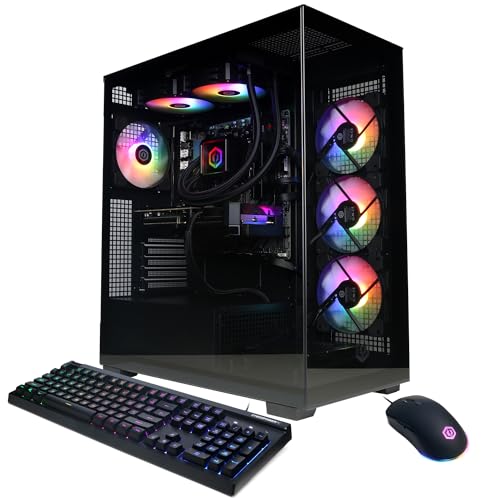
CyberPowerPC Ryzen 9 9900X RTX 5070 Gaming PC
Best for: multitasking gamers needing high-core CPU performance
- Graphics Card
- RTX 5070
- Processor Model
- AMD Ryzen 9 9900X
- System Memory
- 32GB DDR5
- Storage Capacity
- 1TB PCIe 4.0 NVMe SSD
- Operating System
- Windows 11 Home
View on Amazon: CyberPowerPC Ryzen 9 9900X RTX 5070 Gaming PC (paid link)
This CyberPowerPC desktop pairs a 12-core AMD Ryzen 9 9900X processor with an NVIDIA GeForce RTX 5070 12GB graphics card and 32GB of DDR5 memory. It includes liquid CPU cooling and an AMD B850 chipset motherboard inside a tempered glass chassis. If you need heavy multi-core processing power alongside dedicated modern graphics hardware, this prebuilt desktop gives you balanced components right out of the box.
Pros
- 12-core, 4.4GHz AMD Ryzen 9 9900X processor
- Liquid CPU cooling system included
- 32GB DDR5 memory
- Two USB-C 3.2 and four USB-A 3.2 ports
Cons
- 1TB storage capacity fills fast with modern games
- WiFi 6 wireless standard instead of newer WiFi 6E or 7
Good fit if
- You need high multi-core performance for gaming and background workloads.
- You prefer liquid CPU cooling for thermal management.
- You require multiple high-speed USB-C and USB-A connections.
Skip if
- You need 2TB or more of pre-installed internal storage.
- You prefer an Intel-based system architecture.
Verdict: CyberPowerPC Ryzen 9 9900X RTX 5070 Gaming PC combines a 12-core AMD processor with liquid cooling and 32GB of RAM for demanding workloads. It provides a solid foundation for users who balance gaming with heavy CPU tasks.

Cooler Master HAF 5 Pro RTX 5070 Gaming PC
Best for: high-airflow 1440p gaming with bundled peripherals
- Graphics Card
- RTX 5070
- Processor Model
- AMD RYZEN 7 7800X3D
- System Memory
- 32GB DDR5
- Storage Capacity
- 2TB Gen4 M.2 SSD
- Dimensions
- 20.3 × 8.82 × 20.1 inches
- Weight
- 31 pounds
View on Amazon: Cooler Master HAF 5 Pro RTX 5070 Gaming PC (paid link)
This Cooler Master desktop combines an AMD Ryzen 7 7800X3D processor with an Nvidia GeForce RTX 5070 graphics card on a Gigabyte B650 motherboard. You get 32GB of DDR5 6000MHz system memory and a 2TB Gen4 NVMe solid-state drive inside a HAF 500 mid-tower chassis. It suits you if you want high-framerate 1440p gaming backed by dedicated 200mm case fans and an included keyboard and mouse combo.
Pros
- AMD Ryzen 7 7800X3D 8-core processor with Hyper 212 Halo air cooling
- 32GB DDR5 6000MHz RGB RAM and 2TB Gen4 NVMe SSD
- Includes 200mm ARGB intake fans and Devastator 3 keyboard and mouse
- Gigabyte B650 motherboard with built-in Wi-Fi and USB Type-C connectivity
Cons
- 650W power supply leaves limited headroom for higher-tier GPU upgrades
- Air cooling rather than an all-in-one liquid cooling system
- Only two DisplayPort outputs provided on the graphics card
Good fit if
- You want an AMD Ryzen 7 7800X3D paired with 32GB of fast 6000MHz DDR5 RAM.
- You prefer a prebuilt that includes a 2TB Gen4 SSD and bundled peripherals.
Skip if
- You plan to install higher-wattage components that exceed a 650W power supply.
- You require a liquid cooling radiator instead of an air tower heatsink.
Verdict: Cooler Master HAF 5 Pro RTX 5070 Gaming PC delivers strong gaming performance via its Ryzen 7 7800X3D processor, fast 6000MHz DDR5 RAM, and high-airflow design. The 650W power supply limits future component upgrades, but the stock hardware handles demanding 1440p workloads directly out of the box.

ASUS ROG GM700 RTX 5070 Gaming Desktop
Best for: tool-less upgrades and roomy desktop setups
- Graphics Card
- RTX 5070
- Processor Model
- AMD Ryzen 7 8700F
- System Memory
- 32GB
- Storage Capacity
- 1TB M.2 NVMe PCIe 4 SSD
- Operating System
- Windows 11 Home
- Dimensions
- 9.45 × 20.1 × 18.9 inches
View on Amazon: ASUS ROG GM700 RTX 5070 Gaming Desktop (paid link)
The ASUS ROG GM700 is a prebuilt desktop built around the NVIDIA GeForce RTX 5070 graphics card and an AMD Ryzen 7 8700F processor. It pairs those core parts with 32GB of DDR5 system memory and a 1TB PCIe 4.0 NVMe SSD. A 58-liter dual-glass chassis holds a quad-fan cooling layout and allows tool-less internal access. You will find this setup suited for standard gaming and easy component upgrades.
Pros
- NVIDIA GeForce RTX 5070 graphics paired with AMD Ryzen 7 8700F processor
- 32GB DDR5 system memory and 1TB PCIe 4.0 NVMe SSD
- Tool-less chassis access with 58L capacity supporting triple-slot GPUs
- 2.5Gbps Ethernet and WiFi 6 connectivity
Cons
- 1TB storage capacity requires expansion for larger libraries
- Total weight is heavy at 40 pounds
- Large desktop footprint measuring 20.1 by 18.9 inches
Good fit if
- You want 32GB of DDR5 RAM paired with an RTX 5070 GPU.
- You prefer a tool-less case design with room for triple-slot components.
- You need high-speed wired and wireless networking options.
Skip if
- You need more than 1TB of factory storage installed out of the box.
- You have limited desk space for a 40-pound, 58-liter chassis.
Verdict: ASUS ROG GM700 RTX 5070 Gaming Desktop combines current-generation processing hardware with a roomy, tool-less case. It delivers solid specifications if you have the desk space for a 40-pound system.
Specifications side by side
| Spec | Alienware Aurora RTX 5070 Gaming Desktop | MSI Codex Z2 RTX 5070 Gaming Desktop | KOTIN RTX 5070 Ryzen 7 9700X Gaming PC | MSI Codex R2 Core i5 RTX 5070 Gaming PC | ASUS ROG G700 RTX 5070 Gaming Desktop | Lenovo Legion Tower 5i Intel Ultra 7 RTX 5070 | Skytech Azure RTX 5070 Gaming Desktop | STORMCRAFT Skyhawk Pro i9-14900KF RTX 5070 PC | Skytech Azure 3 RTX 5070 Gaming PC | iBUYPOWER Element RTX 5070 Ryzen 9 Gaming PC | Skytech O11 Vision RTX 5070 Gaming PC | STORMCRAFT Falcon RTX 5070 Gaming PC | CyberPowerPC Ryzen 9 9900X RTX 5070 Gaming PC | Cooler Master HAF 5 Pro RTX 5070 Gaming PC | ASUS ROG GM700 RTX 5070 Gaming Desktop |
|---|---|---|---|---|---|---|---|---|---|---|---|---|---|---|---|
| Graphics Card | NVIDIA GeForce RTX 5070 | NVIDIA GeForce RTX 5070 | GeForce RTX 5070 12GB GDDR7 | NVIDIA GeForce RTX 5070 12GB | NVIDIA GeForce RTX 5070 | NVIDIA GeForce RTX 5070 Ti | NVIDIA GeForce RTX 5070 12GB GDDR7 | RTX 5070 12GB GDDR7 | NVIDIA GeForce RTX 5070 12GB GDDR7 | NVIDIA GeForce RTX 5070 12GB | NVIDIA GeForce RTX 5070 12GB GDDR7 | GeForce RTX 5070 12GB GDDR7 | NVIDIA GeForce RTX 5070 12GB | GeForce RTX 5070 16GB | NVIDIA GeForce RTX 5070 |
| Processor Model | Intel Core Ultra 7 265F | AMD Ryzen 7 8700F | AMD Ryzen 7 9700X | Intel Core i5-14400F | Intel Core Ultra 7 265F | Intel Core Ultra 7 265F | AMD Ryzen 5 7600 | i9 14900KF | AMD Ryzen 7 7700X | AMD Ryzen 9 7900X | AMD Ryzen 7 7700X | Intel Core Ultra 7 270K Plus | AMD Ryzen 9 9900X | AMD RYZEN 7 7800X3D | AMD Ryzen 7 8700F |
| System Memory | not specified | 32GB DDR5 | 32GB DDR5 | 32GB | 32 GB | 32 GB | 16 GB | 32GB DDR5 | 24GB | 32GB | 32 GB | 32 GB | 32GB DDR5 | 32GB DDR5 | 32GB |
| Storage Capacity | 1 TB | 2TB SSD | 1TB NVMe SSD | 1TB NVMe SSD | 1 TB SSD | 1 TB | 1 TB NVMe M.2 SSD | 2TB NVMe SSD | 1TB Gen4 NVMe M.2 SSD | 1TB NVMe SSD | 1TB Gen4 NVMe M.2 SSD | 1TB PCIe 4.0 NVMe SSD | 1TB PCIe 4.0 NVMe SSD | 2TB Gen4 M.2 SSD | 1TB M.2 NVMe PCIe 4 SSD |
| Operating System | not specified | Windows 11 Home | Windows 11 Home | Windows 11 Home | Windows 11 Home | not specified | Windows 11 Home | Windows 11 Home | Windows 11 Home | Windows 11 Home | Windows 11 Home 64-bit | Windows 11 Home | Windows 11 Home | not specified | Windows 11 Home |
| Form Factor | not specified | not specified | Mid-tower | not specified | not specified | Tower | not specified | not specified | not specified | not specified | Desktop | not specified | not specified | not specified | not specified |
| Processor | Core Ultra 7 | Ryzen 7 | Ryzen 7 | Core i5 | Core Ultra 7 | Core Ultra 7 | Ryzen 5 | Core i9 | Ryzen 7 | Ryzen 9 | Ryzen 7 | not specified | Ryzen 9 | not specified | Ryzen 7 |
| Memory | not specified | 32GB RAM | 32GB RAM | 32GB RAM | 32GB RAM | not specified | 16GB RAM | 32GB RAM | not specified | 32GB RAM | 32GB RAM | 32GB RAM | not specified | not specified | 32GB RAM |
| Storage | not specified | 2TB SSD | 1TB SSD | 1TB SSD | not specified | not specified | 1TB SSD | 2TB SSD | 1TB SSD | 1TB SSD | not specified | 1TB SSD | not specified | not specified | not specified |
| Use | not specified | not specified | not specified | VR | not specified | not specified | not specified | not specified | not specified | not specified | not specified | not specified | not specified | not specified | not specified |
| Dimensions | 18.1 × 7.76 × 16.5 inches | 16 × 8.38 × 19 inches | 16.8 × 8.66 × 14.3 inches | 16 × 8.38 × 19 inches | 9.45 × 20.1 × 18.9 inches | 19.3 × 8.31 × 16.3 inches | 17.2 × 9.1 × 17.8 inches | 16.9 × 9 × 18.5 inches | 17.2 × 9.1 × 17.8 inches | 20 × 9.1 × 17.4 inches | 18.9 × 12 × 18.3 inches | 17.5 × 11.5 × 16 inches | not specified | 20.3 × 8.82 × 20.1 inches | 9.45 × 20.1 × 18.9 inches |
| Weight | 33.9 pounds | 21.3 pounds | 30 pounds | 21.3 pounds | 40.4 pounds | 33.1 pounds | not specified | not specified | not specified | 36 pounds | not specified | not specified | not specified | 31 pounds | 40 pounds |
| Size | 1 TB | not specified | not specified | not specified | 32GB/1TB | not specified | not specified | not specified | not specified | not specified | O11V | not specified | GXiVR8080A41 | 7800X3D | not specified |
| Color | Black | Black | Black | Black | Black | Eclipse Black | White | Black | Azure 3 Black | White | Black | Black | Black | Black | Black |
| Model | DACT1250-7229BLK-PUS | CodZ2A8NVP436 | KTG60BA797X3250712G | CodR2D14NVP5613 | G700TF-AS776 | 90YA0017US | ST-AZURE3-3244-W-AM | SP149KFCC-570S1 | ST-AZURE3-3091-B-AM | EWA9N5702 | ST-O11V-2679-B-AM | FA270K0CB-570S1 | GXiVR8080A41 | MIY-H5PAGA-B7N57-N1 | GM700TZ-PS776 |
Is an RTX 5070 Desktop Worth It?
An RTX 5070 graphics card introduces Blackwell architecture to handle dedicated 1440p gaming and VR requirements. In everyday use, this GPU runs demanding visual workloads independently from your system processor, pairing effectively with chips ranging from mid-tier options to 24-core processors. Every desktop in this category utilizes dedicated graphics processing to support modern visual titles in 2026. Selecting this GPU tier gives you dependable graphical capabilities for gaming setups, whether configured inside air-cooled cases or paired with 360mm liquid coolers.
Worth it if
- You prioritize dedicated 1440p resolution gaming on modern desktop titles.
- You need dedicated graphics hardware specified for VR applications.
Skip it if
- You only perform basic computing tasks that do not require dedicated graphics hardware.
- You prefer low-power setups that do not need multi-fan air or liquid cooling systems.
If you prioritize portability over desktop upgradeability, evaluate an RTX 5070 gaming laptop to compare mobile graphics wattage and thermals.
How We Picked These Desktops
To select the 15 desktops for this guide, you identify prebuilt models with Amazon listings that explicitly state the RTX 5070 graphics card in the product title or feature list. Only one variant from each product family is included. Every hardware detail comes directly from manufacturer specifications published on the listing, and products are not physically handled.
The selections are ordered with products in stock first, then by Amazon sales rank, placing better-selling products first. Alongside the GPU, key specifications like the processor, system memory, and solid-state storage help you differentiate each build for 2026. Current stock and prices display live on the page and refresh at least daily.
How to Choose an RTX 5070 Desktop
-
Match Processor to Workload
Look closely at the processor tier to ensure your system matches your non-gaming computing demands. A standard six-core or eight-core processor easily handles general 1440p gaming routines alongside an RTX 5070 graphics card. However, if you edit video, compile code, or multitask heavily while streaming, prioritize high-core options. The CyberPowerPC Ryzen 9 9900X RTX 5070 Gaming PC includes a 12-core processor designed for heavy background workloads. Check the core count specification to avoid paying for excess CPU capability you will not utilize during pure gaming sessions.
-
Evaluate Thermal Cooling Hardware
Examine whether a prebuilt desktop relies on traditional air fans or closed-loop liquid cooling. Air-cooled towers utilize multi-fan setups that provide dependable reliability with minimal mechanical complexity. In contrast, higher-wattage processors benefit from liquid cooling setups that distribute thermal loads across larger radiators. The Skytech O11 Vision RTX 5070 Gaming PC pairs its hardware with a 360mm liquid cooler inside a dual-chamber chassis to manage thermal output. Check cooling specifications and radiator sizing if you intend to run intensive simulation titles or sustained gaming sessions that generate considerable heat.
-
Verify Physical Dimensions and Weight
Review the exterior case dimensions and total weight before setting up your gaming space. Compact towers fit comfortably on top of standard workstations, while full-sized enthusiast chassis demand dedicated floor or heavy-duty desk placement. The ASUS ROG G700 RTX 5070 Gaming Desktop weighs over 40 pounds and extends over 20 inches in width, requiring substantial clearance for proper ventilation and access. Measure your available desk area, tabletop load capacity, and surrounding cable pathways beforehand so you can accommodate large gaming chassis without blocking intake vents or rear connectivity ports.
-
Check Networking Adapter Standards
Inspect network adapter specifications to match your home router hardware. While fast wired connections are standard, wireless capabilities vary significantly across builds. The Skytech Harpy RTX 5070 Gaming PC relies on Wi-Fi 5 connectivity, which may limit wireless throughput on newer multi-gigabit wireless networks. If your setup cannot reach an Ethernet cable, verify whether a motherboard includes modern Wi-Fi standards or basic wireless cards. Matching wireless standards to your router ensures lower packet loss and steady latency during online competitive play.
-
Check Long-Term Memory Ceilings
Look beyond the pre-installed RAM capacity to evaluate maximum motherboard memory limits. While 32GB of DDR5 memory handles contemporary gaming titles, content creators and virtual machine users often need future expansion. The Lenovo Legion Tower 5i Intel Ultra 7 RTX 5070 features memory headroom up to 128GB, giving you an upgrade path as software requirements grow over time. Check the motherboard slot count and maximum supported DDR5 gigabytes before purchasing so you can expand system memory down the road without replacing core internal components.
-
Verify Power Supply Capacity
Review the wattage and efficiency certification of the included power supply unit. Modern gaming components generate substantial transient power spikes during demanding graphics scenes. The KOTIN RTX 5070 Ryzen 7 9700X Gaming PC features an 850W Gold power supply, offering stable electrical delivery and ample power headroom. Ensuring your prebuilt desktop provides at least an 850-watt baseline protects your hardware against unexpected shutdowns under heavy loads and gives you necessary wattage margin if you install additional drives or internal accessories later.
Frequently asked questions
What power supply wattage do you need for an RTX 5070 gaming desktop?
You generally need an 850W power supply to support an RTX 5070 graphics card alongside high-performance components. For example, prebuilt systems like the KOTIN gaming desktop feature an 850W Gold power supply to provide stable electrical headroom for an eight-core processor and cooling hardware. Checking the power rating ensures your system handles sudden power spikes.
Can an RTX 5070 gaming desktop run virtual reality headsets?
Yes, an RTX 5070 gaming desktop provides the dedicated rendering power needed for VR headsets. Specific configurations such as the MSI Codex R2 explicitly list virtual reality support alongside an Intel Core i5 processor and 32GB of RAM. High graphics throughput and modern video outputs on the RTX 5070 supply the sustained frame rates required for immersive simulation.
Do RTX 5070 prebuilt desktops require liquid cooling?
Liquid cooling is not strictly mandatory for an RTX 5070 desktop, though it depends on your CPU. Builds such as the MSI Codex Z2 rely on multi-fan air cooling, while the MSI Codex R2 uses four chassis fans. However, configurations like the STORMCRAFT Skyhawk Pro and Skytech Harpy integrate 360mm liquid coolers to manage the thermal output of higher-tier processors.
How much system memory should you choose with an RTX 5070 PC?
You should aim for 32GB of DDR5 RAM to avoid system memory bottlenecks in modern titles. While entry builds like the Skytech Azure feature 16GB, most prebuilts on this list supply 32GB standard. If you anticipate heavy multitasking, models like the Lenovo Legion Tower 5i support memory capacities up to 128GB.
Which desktop chassis designs offer easy component upgrades?
Desktops with tool-less chassis designs offer the most convenient component upgrades. The ASUS ROG G700 and Lenovo Legion Tower 5i specifically feature tool-less cases that let you swap internal parts without specialized equipment. Standard form-factor cases, such as the MSI Codex R2, also simplify maintenance by using standard dimensions and accessible layouts.
How much desk space do you need for an RTX 5070 gaming tower?
You need substantial desk or floor space because many RTX 5070 towers are large and heavy. For instance, the ASUS ROG G700 weighs over 40 pounds and measures roughly 20 inches in length, requiring a reinforced, open surface. If space is limited, compact chassis designs like the Thermaltake Versa fit tighter gaming workstations.
What networking speeds do RTX 5070 gaming desktops support?
Networking speeds vary between standard Wi-Fi 5 and multi-gigabit wired Ethernet across these systems. For example, the Lenovo Legion Tower 5i includes high-speed 2.5G LAN for fast wired connections. Conversely, builds like the Skytech Azure 3 and Skytech O11 Vision rely on Wi-Fi 5 (802.11ac) adapters, meaning you should verify network specs before buying.