10 Best Gaming Desktops Under $4000, Compared
As an Amazon Associate we earn from qualifying purchases. Links on this page are affiliate links.
Finding the right gaming desktop under 4000 requires balancing high-end graphics processing, system memory, and thermal management. This guide compares 10 systems based strictly on the specifications published on their listings. The Skytech Azure 3 RTX 5080 Gaming Desktop takes the top spot because it combines a Ryzen 7 9800X3D processor, an RTX 5080 graphics card, and a 360mm liquid cooler.
This comparison helps you decide which processor tier, storage capacity, and memory configuration align best with your everyday workload demands.
Quick picks
The best fit for you
- You want top-tier 4K gaming with liquid cooling Skytech Azure 3 RTX 5080 Gaming Desktop It includes a Ryzen 7 9800X3D processor, RTX 5080 graphics, and a 360mm liquid cooler.
- You prefer an Intel Core i9 with liquid cooling Corsair Vengeance i7500 RTX 5080 Gaming PC It pairs a liquid-cooled Core i9-14900KF processor with RTX 50 Series graphics.
- You need 64GB of memory and Windows 11 Pro MSI Aegis R2 RTX 5070 Ti Gaming PC It provides 64GB of RAM, an RTX 5070 Ti, and Windows 11 Pro.
- You need enterprise workstation hardware for heavy computational workloads Lenovo ThinkStation P3 Tower Ultra 9 RTX 2000 It features an Intel vPro Ultra 9 processor and 64 GB of DDR5 memory.
Our 10 picks

Skytech Azure 3 RTX 5080 Gaming Desktop
Best for: high-refresh 4K gaming with liquid cooling
- Graphics Card
- NVIDIA GeForce RTX 5080 16GB
- Processor Model
- AMD Ryzen 7 9800X3D
- System Memory
- 32 GB
- Storage Capacity
- 2 TB NVMe SSD
- Operating System
- Windows 11 Home 64-bit
- Dimensions
- 17.2 × 9.1 × 17.8 inches
View on Amazon: Skytech Azure 3 RTX 5080 Gaming Desktop (paid link)
The Skytech Azure 3 is a prebuilt tower built around the AMD Ryzen 7 9800X3D processor and an NVIDIA GeForce RTX 5080 16GB graphics card. It includes 32GB of DDR5-6000 memory, a 2TB NVMe solid-state drive, and a 360mm all-in-one liquid cooler with ARGB fans. If you want high-framerate 4K gaming power with dedicated liquid cooling and fast storage straight out of the box, this configuration covers your core hardware requirements.
Pros
- AMD Ryzen 7 9800X3D CPU and NVIDIA RTX 5080 16GB GPU
- 360mm AIO liquid CPU cooler with ARGB fans
- 2TB NVMe M.2 SSD and 32GB DDR5 6000MHz memory
- Includes gaming keyboard and mouse
Cons
- Wireless connectivity is limited to older 802.11ac Wi-Fi
- Guaranteed display outputs are limited to one HDMI and one DisplayPort
Good fit if
- You prioritize a dedicated 360mm AIO liquid cooling setup for your CPU.
- You want 4K gameplay capability backed by an RTX 5080 and 32GB of DDR5 RAM.
Skip if
- You require modern Wi-Fi 6 or Wi-Fi 7 wireless networking standard out of the box.
- You need a guaranteed multi-display setup requiring more than one DisplayPort and one HDMI.
Verdict: Skytech Azure 3 RTX 5080 Gaming Desktop delivers high-tier gaming performance with its Ryzen 7 9800X3D processor, RTX 5080 graphics card, and 360mm liquid cooler. It provides a balanced, high-spec foundation for demanding titles at high resolutions.

STORMCRAFT Phantom RTX 5080 Gaming PC
Best for: high-end gaming with 360mm liquid cooling
- Graphics Card
- RTX 5080 16 GB GDDR7
- Processor Model
- AMD Ryzen 7 9800X3D
- System Memory
- 32GB DDR5
- Storage Capacity
- 2TB NVMe Gen4 SSD
- Operating System
- Windows 11 Home
- Dimensions
- 18.5 × 9 × 16.9 inches
View on Amazon: STORMCRAFT Phantom RTX 5080 Gaming PC (paid link)
The STORMCRAFT Phantom RTX 5080 Gaming PC is a full-size desktop built for demanding gaming workloads. It pairs an 8-core AMD Ryzen 7 9800X3D processor with an Nvidia GeForce RTX 5080 16GB GDDR7 graphics card. You also get 32GB of DDR5 6000MHz memory, a 2TB NVMe Gen4 SSD, and a 360mm liquid cooler. This setup fits you if you want current-generation gaming hardware with ample storage and high-bandwidth components.
Pros
- AMD Ryzen 7 9800X3D processor with up to 5.2 GHz boost
- Nvidia GeForce RTX 5080 graphics card with 16GB GDDR7 memory
- 360mm AIO liquid cooler with seven ARGB case fans
- 2TB NVMe Gen4 solid-state drive for fast storage
- 850W Gold certified power supply
Cons
- Includes 32GB RAM rather than 64GB or 128GB capacity
- Large desktop footprint measuring 18.5 inches long and 16.9 inches tall
Good fit if
- You want an RTX 5080 graphics card paired with a dedicated 360mm liquid-cooled processor.
- You need 2TB of high-speed NVMe Gen4 storage out of the box.
- You prefer a build with seven pre-installed ARGB fans for airflow.
Skip if
- You need 64GB or more system memory for heavy workstation tasks.
- You prefer a compact mini PC form factor for smaller desks.
Verdict: STORMCRAFT Phantom RTX 5080 Gaming PC combines top-tier components like the Ryzen 7 9800X3D and RTX 5080 with robust 360mm liquid cooling. It delivers high-end gaming specs without sacrificing storage or cooling capacity.

Lenovo ThinkStation P3 Tower Ultra 9 RTX 2000
Best for: hybrid workstation tasks and high-memory workloads
- Graphics Card
- NVIDIA RTX 2000
- Processor Model
- Intel Core Ultra 9 285 vPro
- System Memory
- 64 GB
- Storage Capacity
- 1 TB
- Form Factor
- Tower
View on Amazon: Lenovo ThinkStation P3 Tower Ultra 9 RTX 2000 (paid link)
The Lenovo ThinkStation P3 Tower is a workstation desktop equipped with an Intel Core Ultra 9 285 vPro processor, 64 GB of DDR5 memory, and NVIDIA RTX 2000 graphics. With 1 TB of high-speed storage and dedicated neural processing hardware, it provides substantial computational bandwidth for multi-threaded applications and simulations. It suits you if you need verified enterprise stability, hardware management features, and heavy multitasking capacity alongside your gaming.
Pros
- Intel Core Ultra 9 285 vPro processor with integrated NPU
- 64 GB of high-speed DDR5-5600MT/s system memory
- High-speed front USB-C 20Gbps port alongside four USB-A ports
- ThinkShield protection with discrete TPM hardware encryption
- Dual DisplayPort 1.4 and HDMI 2.1 video outputs
Cons
- NVIDIA RTX 2000 workstation GPU instead of a GeForce gaming card
- Front USB-C port is limited to data transfer only
- Only RJ-45 Ethernet is listed without built-in Wi-Fi
Good fit if
- You need 64 GB of fast DDR5 memory for simulations and large datasets.
- You want Intel vPro remote manageability and discrete TPM security.
- You require fast front-panel ports, including a 20Gbps USB-C connection.
Skip if
- You prioritize a dedicated GeForce gaming graphics card for higher frame rates.
- You need more than 1 TB of internal storage immediately.
- You require integrated Wi-Fi rather than a wired RJ-45 network connection.
Verdict: Lenovo ThinkStation P3 Tower Ultra 9 RTX 2000 combines enterprise-grade Intel vPro processing with 64 GB of DDR5 memory for heavy computational tasks. It provides a reliable workstation alternative for users whose gaming sits alongside intensive simulation or professional analytics workloads.

Corsair Vengeance i7500 RTX 5080 Gaming PC
Best for: Core i9 liquid-cooled RTX 5080 gaming
- Graphics Card
- NVIDIA GeForce RTX 5080
- Processor Model
- Intel Core i9-14900KF
- System Memory
- 32GB DDR5
- Storage Capacity
- 2TB M.2 SSD
- Form Factor
- Mid-Tower
- Dimensions
- 18.1 × 9.4 × 19.9 inches
View on Amazon: Corsair Vengeance i7500 RTX 5080 Gaming PC (paid link)
The Corsair Vengeance i7500 is a mid-tower prebuilt gaming desktop configured with an Intel Core i9-14900KF processor and an NVIDIA GeForce RTX 5080 graphics card. It features a Corsair Nautilus RS ARGB liquid CPU cooler inside a 3500X case with wraparound tempered glass panels and preinstalled side, rear, and roof fans. This setup suits you if you want high-end 14th Gen Intel processing paired with Blackwell-generation graphics and liquid cooling.
Pros
- Intel Core i9-14900KF processor with NVIDIA GeForce RTX 5080 graphics
- Corsair Nautilus RS ARGB liquid CPU cooler
- Corsair 3500X case with wraparound tempered glass panels
- Multi-zone airflow with side, rear, and roof cooling fans
Cons
- Heavy mid-tower chassis weighing 30.78 pounds
- Exact SSD storage capacity and memory speed not detailed in specifications
Good fit if
- You want a 14th Gen Intel Core i9 processor paired with an RTX 5080 graphics card.
- You prefer a build with dedicated liquid CPU cooling and wraparound glass panels.
Skip if
- You need a compact or lightweight desktop rather than a 19.9-inch tall tower.
- You prefer the latest Intel Core Ultra or AMD Ryzen processor platforms.
Verdict: Corsair Vengeance i7500 RTX 5080 Gaming PC combines a liquid-cooled Core i9-14900KF processor with RTX 50 Series graphics inside an airflow-focused glass chassis. It offers a capable hardware foundation for high-demand gaming.

ASUS ROG RTX 5080 Ryzen 7 Desktop
Best for: high-end gaming and easy component expansion
- Graphics Card
- NVIDIA® GeForce RTX™ 5080
- Processor Model
- AMD Ryzen™ 7 9800X3D
- System Memory
- 32GB
- Storage Capacity
- 2TB M.2 NVMe™ PCIe® 4 SSD
- Operating System
- Windows 11 Home
- Dimensions
- 9.45 × 20.1 × 18.9 inches
View on Amazon: ASUS ROG RTX 5080 Ryzen 7 Desktop (paid link)
This full-tower prebuilt pairs AMD's Ryzen 7 9800X3D processor with an NVIDIA GeForce RTX 5080 graphics card. You get 32GB of DDR5 memory and a 2TB PCIe 4.0 solid-state drive inside a 58-liter dual-glass chassis. It features a 240mm liquid cooler, quad-fan system, 2.5Gbps Ethernet, and WiFi 6 connectivity. This desktop suits you if you need top-tier rendering power, high frame rates, and room for hardware upgrades.
Pros
- AMD Ryzen 7 9800X3D processor paired with NVIDIA GeForce RTX 5080 graphics
- 240mm liquid cooler and quad-fan airflow system
- 58-liter chassis with tool-less access and triple-slot GPU clearance
- Includes RGB keyboard, RGB mouse, and Windows 11 Home
Cons
- Large 58-liter footprint requires substantial desk or floor space
- Uses WiFi 6 rather than newer wireless standards like WiFi 6E or WiFi 7
- Liquid cooling radiator size is limited to 240mm
Good fit if
- You want an RTX 5080 paired with a dedicated 240mm liquid-cooled Ryzen 7 9800X3D.
- You need 2TB of fast PCIe 4.0 storage and 32GB of DDR5 memory ready out of the box.
- You prefer a large chassis with tool-less component access for later expansion.
Skip if
- You have limited room for a bulky 20-inch-wide, 58-liter computer case.
- You require more than 32GB of system RAM for your workflow without upgrading.
- You need out-of-the-box WiFi 6E or WiFi 7 networking support.
Verdict: ASUS ROG RTX 5080 Ryzen 7 Desktop delivers elite gaming hardware in a spacious 58-liter chassis designed for easy upgrades. Its combination of an RTX 5080, Ryzen 7 9800X3D, and 2TB SSD handles demanding modern titles with ease.
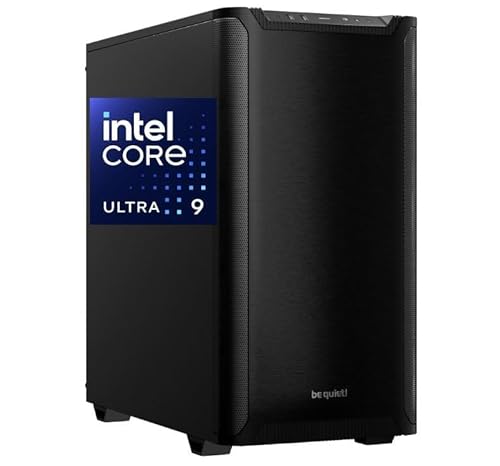
CPU Solutions VidCore Ultra 9 RTX 2000 Ada Desktop
Best for: 3D modeling, video rendering, and hybrid gaming
- Graphics Card
- Quadro RTX 2000 ADA
- Processor Model
- Intel Core Ultra 9 285K
- System Memory
- 64 GB
- Storage Capacity
- 2 TB NVMe SSD
- Operating System
- Windows 11 Pro
- Form Factor
- Tower
View on Amazon: CPU Solutions VidCore Ultra 9 RTX 2000 Ada Desktop (paid link)
The CPU Solutions VidCore brings workstation hardware to your desk. You get a 24-core Intel Core Ultra 9 285K processor paired with 64GB of DDR5 memory and a 2TB NVMe SSD. Its graphics card is a professional-grade Quadro RTX 2000 Ada with 16GB VRAM. This desktop fits you if you split your time between creative rendering tasks, 3D modeling workloads, and gaming across multiple high-resolution displays.
Pros
- Intel Core Ultra 9 285K 24-core processor
- 64GB system memory and 2TB NVMe SSD
- Quadro RTX 2000 Ada GPU with 16GB VRAM
- Liquid cooling system for CPU thermal management
Cons
- 650W power supply limits GPU upgrade options
- Video outputs limited to Mini DisplayPort ports
Good fit if
- You need 64GB memory for heavy productivity and 3D modeling.
- You want professional Quadro drivers alongside everyday gaming.
Skip if
- You prioritize maximum gaming frame rates over workstation certification.
- You require full-size HDMI or DisplayPort connections without adapters.
Verdict: CPU Solutions VidCore Ultra 9 RTX 2000 Ada Desktop delivers professional-grade stability and substantial memory capacity. It suits hybrid power users prioritizing compute and modeling reliability over top-tier gaming frame rates.

MSI Aegis RS Core i7 RTX 4080 Gaming PC
Best for: Core i7 gaming with dedicated RTX graphics
- Graphics Card
- NVIDIA GeForce RTX 4080
- Processor Model
- Intel Core i7-13700KF
- System Memory
- 16 GB
- Storage Capacity
- 2 TB M.2 NVMe
- Operating System
- Windows 11 Home
- Dimensions
- 12.4 × 23.8 × 22.1 inches
View on Amazon: MSI Aegis RS Core i7 RTX 4080 Gaming PC (paid link)
The MSI Aegis RS is a prebuilt tower configured for high-end play. It combines an Intel Core i7-13700KF processor with an NVIDIA GeForce RTX 4080 graphics card to drive ray tracing and demanding titles. You also get a 2TB NVMe solid-state drive and 240mm liquid cooling. This build suits you if you want strong 13th Gen Intel performance, though it includes 16GB of DDR5 RAM.
Pros
- NVIDIA GeForce RTX 4080 graphics card
- Intel Core i7-13700KF processor with 240mm liquid cooling
- Spacious 2TB M.2 NVMe solid-state storage
- Bundled gaming keyboard and mouse
Cons
- Comes with 16GB of RAM instead of higher baseline capacities
- Large chassis footprint measuring over 23 inches wide and 22 inches tall
Good fit if
- You want an Intel Core i7 CPU paired with a GeForce RTX 4080 GPU.
- You need 2TB of NVMe storage ready out of the box.
- You prefer a desktop that includes a keyboard and mouse.
Skip if
- You require 32GB or more of system memory without upgrading components.
- You have limited desk space for a bulky full-sized desktop chassis.
Verdict: MSI Aegis RS Core i7 RTX 4080 Gaming PC pairs dedicated Ada Lovelace graphics with liquid-cooled Intel processing. It provides strong gaming performance if 16GB of baseline memory meets your current workflow.
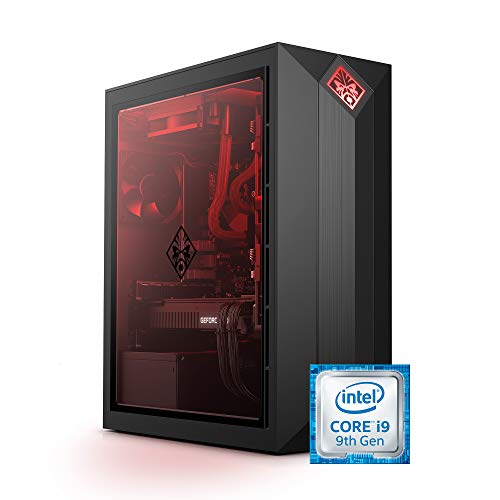
HP OMEN Obelisk RTX 2080 Super Core i9 Desktop
Best for: high-speed 1 TB NVMe solid-state storage
- Graphics Card
- NVIDIA GeForce RTX 2080 Super 8 GB
- Processor Model
- Intel Core i9-9900K
- System Memory
- 32 GB
- Storage Capacity
- 1 TB SSD
- Operating System
- Windows 10 Home
- Use
- VR
View on Amazon: HP OMEN Obelisk RTX 2080 Super Core i9 Desktop (paid link)
The HP OMEN Obelisk is a prebuilt desktop built around an Intel Core i9-9900K processor and an NVIDIA GeForce RTX 2080 Super graphics card with 8 GB of GDDR6 memory. You get a 1 TB NVMe M.2 solid-state drive alongside 32 GB of DDR4 system memory. This system fits you if you want a dedicated gaming rig with solid-state storage, wired peripherals included in the box, and room to upgrade memory to 64 GB.
Pros
- NVIDIA GeForce RTX 2080 Super with 8 GB GDDR6 dedicated memory
- 1 TB PCIe NVMe M.2 solid-state drive
- 32 GB HyperX DDR4 memory, upgradable to 64 GB
- Includes wired keyboard and mouse in the box
Cons
- Features an older 9th-generation Intel Core i9-9900K processor
- Ships with Windows 10 Home rather than a newer operating system
- Memory speed is limited to DDR4-2666
Good fit if
- You need a fast 1 TB PCIe NVMe SSD for your game library.
- You want 32 GB of RAM with the option to expand to 64 GB.
- You prefer a desktop that comes with an included wired keyboard and mouse.
Skip if
- You want a modern platform that supports DDR5 memory.
- You prefer a desktop that comes preinstalled with Windows 11.
Verdict: HP OMEN Obelisk RTX 2080 Super Gaming PC pairs an 8-core Intel Core i9-9900K with a 1 TB NVMe SSD and 32 GB of RAM for responsive gaming. It delivers dependable components and clear interior visibility through its tempered glass side panel.

MSI Aegis ZS2 RTX 5080 Gaming PC
Best for: High-end VR and intensive desktop gaming
- Graphics Card
- NVIDIA GeForce RTX 5080
- Processor Model
- AMD Ryzen R9-7900X
- System Memory
- 32GB DDR5
- Storage Capacity
- 2TB M.2 NVMe SSD
- Operating System
- Windows 11 Home
- Use
- VR
View on Amazon: MSI Aegis ZS2 RTX 5080 Gaming PC (paid link)
The MSI Aegis ZS2 is a prebuilt desktop built around an AMD Ryzen R9-7900X processor and an NVIDIA GeForce RTX 5080 graphics card. You get 32GB of DDR5 memory, a 2TB NVMe SSD for storage, and a 360mm liquid CPU cooler to manage heat. Because MSI uses standardized components, you can upgrade parts easily. It fits your heavy gaming and VR sessions cleanly.
Pros
- NVIDIA GeForce RTX 5080 graphics
- AMD Ryzen R9-7900X processor
- 360mm liquid CPU cooler
- 2TB M.2 NVMe SSD
- Standardized components for straightforward upgrades
Cons
- Comes with Windows 11 Home rather than Windows 11 Pro
- Large footprint weighing 26.9 pounds
- Base system memory is 32GB rather than 64GB
Good fit if
- You want an NVIDIA GeForce RTX 5080 paired with an AMD Ryzen R9-7900X processor.
- You need 2TB of fast NVMe SSD storage and 360mm liquid cooling for VR or demanding games.
- You prefer standard chassis components so you can swap parts in the future.
Skip if
- You require Windows 11 Pro pre-installed for business environments.
- You need 64GB of RAM right out of the box without upgrading.
- You have tight desk space that cannot house a 19.4-inch-tall tower.
Verdict: MSI Aegis ZS2 RTX 5080 Gaming PC delivers high-end processing and graphics performance supported by robust 360mm liquid cooling. Its standardized parts ensure you can expand or modify the build as your gaming and VR demands change.

MSI Aegis R2 RTX 5070 Ti Gaming PC
Best for: high-memory gaming and fast wired networking
- Graphics Card
- NVIDIA GeForce RTX 5070 Ti 16GB
- Processor Model
- Intel 24-core Ultra 9 285
- System Memory
- 64 GB
- Storage Capacity
- 2 TB SSD
- Operating System
- Windows 11 Professional
- Dimensions
- 19.4 × 9.1 × 19 inches
View on Amazon: MSI Aegis R2 RTX 5070 Ti Gaming PC (paid link)
This MSI Aegis R2 desktop pairs an Intel 24-core Ultra 9 285 processor with a 16GB NVIDIA GeForce RTX 5070 Ti graphics card. You get 64GB of RAM and a 2TB SSD for storage. Networking includes 5Gb Ethernet and Wi-Fi 7. It ships with Windows 11 Pro, an air CPU cooler, and a 750W power supply. This setup suits you if you need heavy multitasking headroom and modern connectivity alongside high-end gaming hardware.
Pros
- Intel 24-core Ultra 9 285 processor
- NVIDIA GeForce RTX 5070 Ti 16GB graphics
- 64GB memory and 2TB SSD
- 5Gb Ethernet and Wi-Fi 7 support
Cons
- Uses an air CPU cooler instead of liquid cooling
- 750W power supply provides limited headroom for high-wattage expansions
- Four of the USB ports are USB 2.0
Good fit if
- You want 64GB of RAM pre-installed for memory-heavy tasks.
- You need 5Gb wired Ethernet or Wi-Fi 7 connectivity.
- You require Windows 11 Pro for your workflow.
Skip if
- You prefer liquid cooling for high-core-count processors.
- You plan to run power-hungry upgrades that exceed a 750W power supply.
Verdict: MSI Aegis R2 RTX 5070 Ti Gaming PC combines a 24-core processor, 64GB of RAM, and fast networking for intensive workloads. It relies on standard air cooling and a 750W power supply, but provides ample connectivity and high-tier graphics.
Specifications side by side
| Spec | Skytech Azure 3 RTX 5080 Gaming Desktop | STORMCRAFT Phantom RTX 5080 Gaming PC | Lenovo ThinkStation P3 Tower Ultra 9 RTX 2000 | Corsair Vengeance i7500 RTX 5080 Gaming PC | ASUS ROG RTX 5080 Ryzen 7 Desktop | CPU Solutions VidCore Ultra 9 RTX 2000 Ada Desktop | MSI Aegis RS Core i7 RTX 4080 Gaming PC | HP OMEN Obelisk RTX 2080 Super Core i9 Desktop | MSI Aegis ZS2 RTX 5080 Gaming PC | MSI Aegis R2 RTX 5070 Ti Gaming PC |
|---|---|---|---|---|---|---|---|---|---|---|
| Graphics Card | NVIDIA GeForce RTX 5080 16GB | RTX 5080 16 GB GDDR7 | NVIDIA RTX 2000 | NVIDIA GeForce RTX 5080 | NVIDIA® GeForce RTX™ 5080 | Quadro RTX 2000 ADA | NVIDIA GeForce RTX 4080 | NVIDIA GeForce RTX 2080 Super 8 GB | NVIDIA GeForce RTX 5080 | NVIDIA GeForce RTX 5070 Ti 16GB |
| Processor Model | AMD Ryzen 7 9800X3D | AMD Ryzen 7 9800X3D | Intel Core Ultra 9 285 vPro | Intel Core i9-14900KF | AMD Ryzen™ 7 9800X3D | Intel Core Ultra 9 285K | Intel Core i7-13700KF | Intel Core i9-9900K | AMD Ryzen R9-7900X | Intel 24-core Ultra 9 285 |
| System Memory | 32 GB | 32GB DDR5 | 64 GB | 32GB DDR5 | 32GB | 64 GB | 16 GB | 32 GB | 32GB DDR5 | 64 GB |
| Storage Capacity | 2 TB NVMe SSD | 2TB NVMe Gen4 SSD | 1 TB | 2TB M.2 SSD | 2TB M.2 NVMe™ PCIe® 4 SSD | 2 TB NVMe SSD | 2 TB M.2 NVMe | 1 TB SSD | 2TB M.2 NVMe SSD | 2 TB SSD |
| Operating System | Windows 11 Home 64-bit | Windows 11 Home | not specified | not specified | Windows 11 Home | Windows 11 Pro | Windows 11 Home | Windows 10 Home | Windows 11 Home | Windows 11 Professional |
| Form Factor | not specified | not specified | Tower | Mid-Tower | not specified | Tower | not specified | not specified | not specified | not specified |
| Processor | Ryzen 7 | Ryzen 7 | not specified | Core i9 | Ryzen 7 | not specified | Core i7 | Core i9 | not specified | not specified |
| Memory | 32GB RAM | 32GB RAM | not specified | not specified | 32GB RAM | 64GB RAM | 16GB RAM | 32GB RAM | 32GB RAM | 64GB RAM |
| Storage | 2TB SSD | 2TB SSD | not specified | not specified | not specified | not specified | not specified | 1TB SSD | not specified | 2TB SSD |
| Use | not specified | not specified | not specified | not specified | not specified | not specified | not specified | VR | VR | not specified |
| Dimensions | 17.2 × 9.1 × 17.8 inches | 18.5 × 9 × 16.9 inches | not specified | 18.1 × 9.4 × 19.9 inches | 9.45 × 20.1 × 18.9 inches | 18.2 × 9.09 × 17.7 inches | 12.4 × 23.8 × 22.1 inches | 20.5 × 19.8 × 14.8 inches | 9.1 × 19 × 19.4 inches | 19.4 × 9.1 × 19 inches |
| Weight | 35 pounds | not specified | not specified | 30.8 pounds | not specified | 45 pounds | not specified | 23.2 pounds | 26.9 pounds | 26.9 pounds |
| Color | Azure 3 Black | Black | Tower|Ultra 9|RTX 2000 | Black | Black | Black | Black | black | Black | Black |
| Model | ST-AZURE3-1959-B-AM | PH980XDCC-580S1 | 30HS | CS-9050128-NA | GM700TZ-PS787 | CEV-9085-2852A | AeRS13NUG427 | 5QB56AA#ABA | AeZS2C7NVV1278 | MSI Aegis R2 AI 2nd |
| Size | not specified | not specified | 7.09 x 14.57 x 16.34 inches | 9.4 x 18.1 x 19.9 inches | 13.00 | Ultra 9 285K | RTX 2000ADA | 64GB DDR5 | not specified | 15.6" | 2 TB | 64GB RAM | 2TB SSD |
Specification Trade-Offs in This Desktop Tier
When you evaluate these systems, you find capable processors like the Ryzen 7 9800X3D and Core i9-14900KF paired with GPUs like the RTX 5080. However, configurations vary across memory, storage, and cooling. Storage caps at 2TB SSDs, with older models dropping to a 1TB SSD. System memory ranges between 16GB RAM and 64GB RAM, so not every option maximizes capacity. Thermal setups also split between 360mm liquid coolers and standard air cooling. You must verify whether a build prioritizes gaming frame rates or workstation compute.
- Storage capacity tops out at 2TB SSD, with some options providing 1TB SSD.
- Baseline memory drops to 16GB RAM on select configurations rather than 32GB or 64GB.
- Thermal hardware varies between 360mm liquid coolers and standard air cooling with a 750W power supply.
If you require mobile hardware instead of fixed desktop power, evaluate component specifications for a gaming laptop under 4000.
How We Selected These Desktops
To build this guide, we track configurations fitting the Under $4000 category using published manufacturer specifications. You see only one variant per product family to prevent duplicate listings. We do not physically handle or test the machines. Instead, we assess processor tiers, memory capacities, and storage configurations directly from published technical details.
We list products in stock first, then by Amazon sales rank, placing better-selling products first. Catalog data refreshes at least daily, so desktops move onto or off the guide as availability shifts. This approach ensures you see 10 active systems for 2026 without relying on outdated listings.
How to Choose the Best Gaming Desktop
-
Match RAM to Your Workload
You must evaluate system memory based on your primary tasks. Baseline 16GB RAM supports standard gaming setups. Moving up to 32GB memory offers headroom for modern games and background applications without bottlenecks. Heavy multi-taskers and production users should target 64GB RAM, found on models like the MSI Aegis R2 RTX 5070 Ti Gaming PC. This higher capacity prevents paging during intensive simulation tasks and complex multi-threaded workloads. Choose capacity based on your software requirements.
-
Select the Right Processor Architecture
You should compare processor architectures to match your processing profile. The AMD Ryzen 7 9800X3D focuses on high-efficiency gaming performance with specialized cache design. In contrast, multi-core Intel chips like the Core i9-14900KF inside the Corsair Vengeance i7500 RTX 5080 Gaming PC deliver high core counts suited for mixed gaming and heavy export tasks. If your setup prioritizes pure gaming, an 8-core gaming CPU provides solid output. If your workflow includes heavy computing alongside play, prioritize chips with higher physical core configurations.
-
Evaluate the Cooling Setup
Thermal management directly affects sustained performance during extended gaming sessions. You can choose between closed-loop liquid cooling setups and traditional air heat sinks. High-tier desktop processors generate considerable heat under load. A 360mm liquid cooler, as equipped on the Skytech Azure 3 RTX 5080 Gaming Desktop, disperses heat through a large radiator surface to maintain lower operating temperatures. Air cooling offers simpler mechanical maintenance with fewer moving components. Review your operating environment and thermal preferences before selecting a desktop cooling design.
-
Check Internal SSD Storage Capacity
Storage specifications determine how many modern titles and files you can store without attaching external drives. Desktop options in this tier typically offer 1TB or 2TB solid-state drives. A 1TB NVMe drive, such as the one installed in the HP OMEN Obelisk RTX 2080 Super Core i9 Desktop, holds several contemporary games alongside the operating system. If you maintain a larger library of high-resolution titles, choose a 2TB SSD to avoid managing space frequently. Verify whether the chassis allows adding secondary drives later.
-
Measure Chassis Dimensions and Clearance
You must check physical dimensions before choosing a desktop case. Case volume varies widely across configurations. A large tower like the ASUS ROG RTX 5080 Ryzen 7 Desktop uses a 58-liter enclosure measuring over 20 inches in width and nearly 19 inches in height. Larger cases offer generous internal clearance for airflow and component upgrades, but they require ample desk space. More compact towers fit standard workstations easily but provide tighter working room. Verify your desk space and clearance before selecting an enclosure.
-
Review Operating System Editions
Operating system versions influence software management and network control. Desktops in this category ship with Windows 10 Home, Windows 11 Home, or Windows 11 Pro. Windows 11 Home covers consumer gaming needs and broad hardware feature support. If you require advanced enterprise management, network security tools, or remote desktop capabilities, look for Windows 11 Pro. Choosing the correct pre-installed operating system ensures immediate compatibility with your existing work tools and home network environment right out of the box.
Frequently asked questions
Which operating systems come pre-installed on these gaming desktops?
Most systems in this guide include Windows 11 Home or Windows 11 Pro straight out of the box. For example, the ASUS ROG RTX 5080 runs Windows 11 Home, while the MSI Aegis R2 features Windows 11 Pro. A few legacy configurations, such as the HP OMEN Obelisk, list Windows 10 Home instead. You receive an active operating system ready for modern gaming software and immediate driver updates.
What graphics cards are available across these prebuilt gaming desktops?
You will find GPUs ranging from modern RTX 50 Series cards to specialized enterprise hardware. Systems like the Skytech Azure 3, STORMCRAFT Phantom, and MSI Aegis ZS2 feature the RTX 5080, whereas the MSI Aegis R2 includes an RTX 5070 Ti. Alternatively, systems like the Lenovo ThinkStation P3 and CPU Solutions VidCore feature workstation-oriented RTX 2000 Ada hardware designed for intensive simulation and modeling stability.
Are these prebuilt desktops equipped to run virtual reality headsets?
Yes, several listed options explicitly support virtual reality environments out of the box. Models like the HP OMEN Obelisk and MSI Aegis ZS2 specify VR compatibility in their published configurations. High-performance dedicated graphics cards like the RTX 5080 and RTX 4080 provide sufficient video output and compute capabilities to maintain smooth frame rates for demanding modern tethered headsets.
How much system memory is standard on these gaming desktops?
Memory capacities range from 16GB up to 64GB of RAM across the 10 options. Baseline systems like the MSI Aegis RS offer 16GB, while models like the Skytech Azure 3 provide 32GB of DDR5 memory. Heavy multi-tasking setups like the Lenovo ThinkStation P3 Tower, MSI Aegis R2, and CPU Solutions VidCore double that capacity to 64GB for memory-intensive background workloads and large datasets.
What thermal solutions keep these high-end processors cool?
Configurations split between dedicated closed-loop liquid cooling setups and traditional air cooling. The Skytech Azure 3, STORMCRAFT Phantom, and MSI Aegis ZS2 feature large 360mm liquid coolers to manage processor heat under continuous load. In contrast, systems like the MSI Aegis R2 rely on standard air cooling units paired with high-airflow cases to maintain stable temperatures during long gaming sessions.
What solid-state drive capacities do these desktops include?
Most desktops in this guide offer either 1TB or 2TB of high-speed solid-state storage. Configurations such as the HP OMEN Obelisk include a 1TB NVMe SSD for fast boot times and core game storage. Larger builds, including the ASUS ROG RTX 5080, STORMCRAFT Phantom, and MSI Aegis R2, provide 2TB SSDs, giving you double the local room for expansive modern game installations.
How do workstation desktops differ from the gaming rigs on this list?
Workstation models prioritize compute stability and memory capacity over raw consumer graphics acceleration. The Lenovo ThinkStation P3 and CPU Solutions VidCore equip Intel Ultra 9 processors paired with RTX 2000 Ada GPUs and 64GB of DDR5 memory. While they can handle hybrid gaming workloads, standard gaming models with RTX 5080 graphics cards are engineered specifically for higher frame rates and 4K gaming visual fidelity.