Best HP Gaming Desktops with Windows 11 Home: 4 Spec-Based Picks
As an Amazon Associate we earn from qualifying purchases. Links on this page are affiliate links.
Finding the right HP gaming desktop with Windows 11 Home depends on matching core hardware to your specific needs. We compared 4 models using only the specifications published on the product listings.
The HP Pavilion Gaming Desktop RTX 2060 Core i5 takes the top spot because it delivers dedicated Turing graphics with dual display output and 16GB of memory. This guide helps you decide which model provides the processor power, graphics performance, and storage capacity for your setup.
Quick picks
| # | Product | Best for | Price |
|---|---|---|---|
| 1 | HP Pavilion Gaming Desktop RTX 2060 Core i5 Also great | dedicated RTX graphics on dual displays | Check price of HP Pavilion Gaming Desktop RTX 2060 Core i5 on Amazon |
| 2 | HP Victus 15L Core i7-13700F Gaming Desktop Also great | players seeking bundled peripherals and i7 power | Check price of HP Victus 15L Core i7-13700F Gaming Desktop on Amazon |
| 3 | HP Victus 15L RTX 3050 Gaming Desktop Best rtx 3050 | entry-level RTX 3050 Windows 11 desktop gaming | Check price of HP Victus 15L RTX 3050 Gaming Desktop on Amazon |
| 4 | HP Victus 15L Core i7 Gaming Desktop Also great | dense USB peripheral setups | Check price of HP Victus 15L Core i7 Gaming Desktop on Amazon |
The best fit for you
- You want dedicated graphics for a dual-monitor setup HP Pavilion Gaming Desktop RTX 2060 Core i5 Its RTX 2060 GPU provides dedicated graphics processing alongside dual display support.
- You want high processing power with an RTX 3060 HP Victus 15L Core i7-13700F Gaming Desktop Its Intel Core i7 processor and RTX 3060 deliver higher compute capability for demanding tasks.
- You want entry-level ray tracing with front USB ports HP Victus 15L RTX 3050 Gaming Desktop It features an RTX 3050 graphics card and accessible front-panel USB connectivity.
- You want maximum built-in solid-state storage for games HP Victus 15L Core i7 Gaming Desktop A 2TB SSD provides four times the storage capacity of base 512GB models.
Our 4 picks
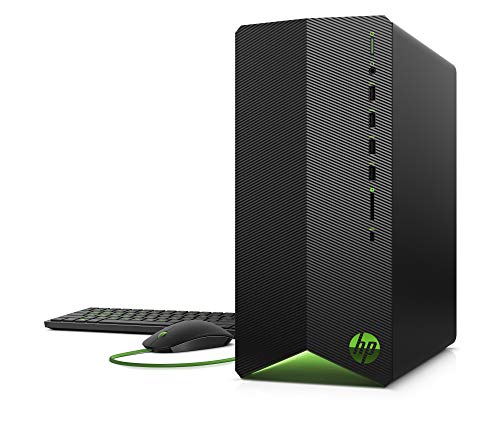
HP Pavilion Gaming Desktop RTX 2060 Core i5
Best for: dedicated RTX graphics on dual displays
- Operating System
- Windows 11 Home (what this guide is about)
- Graphics Card
- NVIDIA GeForce RTX 2060
- Processor Model
- Intel Core i5-10400F
- System Memory
- 16 GB
- Storage Capacity
- 512 GB SSD
- Dimensions
- 12.1 × 6.12 × 13.3 inches
This HP Pavilion Gaming Desktop pairs a 10th Gen Intel Core i5-10400F processor with dedicated NVIDIA GeForce RTX 2060 graphics. You receive 16GB of DDR4 memory alongside a 512GB solid-state drive for system storage and game installations. The compact shadow black tower includes native Windows 11 Home and supports dual display setups. It suits you if you need dedicated ray-tracing graphics in a mid-sized traditional desktop format.
Pros
- NVIDIA GeForce RTX 2060 dedicated graphics
- 16GB DDR4 system memory
- Dual display support
- 512GB solid-state drive storage
Cons
- Older 10th Generation Intel processor architecture
- 512GB base storage space
Good fit if
- You want an NVIDIA GeForce RTX 2060 dedicated graphics card.
- You plan to connect dual displays.
- You need a compact tower running Windows 11 Home.
Skip if
- You need a more recent processor generation than 10th Gen Intel.
- You require more than 512GB of internal storage out of the box.
Verdict: HP Pavilion Gaming Desktop RTX 2060 Core i5 delivers dedicated Turing graphics and 16GB of DDR4 memory in a compact chassis. It provides core gaming capabilities with dual display output for everyday multi-monitor use.

HP Victus 15L Core i7-13700F Gaming Desktop
Best for: players seeking bundled peripherals and i7 power
- Operating System
- Windows 11 Home (what this guide is about)
- Graphics Card
- NVIDIA GeForce RTX 3060
- Processor Model
- Intel Core i7-13700F
- System Memory
- 16 GB
- Storage Capacity
- 512 GB SSD
- Dimensions
- 6.1 × 11.7 × 13.3 inches
This HP Victus 15L is a compact gaming desktop running Windows 11 Home. It features a 13th Generation Intel Core i7-13700F processor, 16 GB of RAM, and a 512 GB SSD. You also get an NVIDIA graphics card alongside a wired HyperX keyboard and mouse bundle. It suits you if you want a ready-to-run setup with high processing power for multitasking and gaming.
Pros
- 13th Generation Intel Core i7-13700F processor
- 16 GB of system memory
- Includes HyperX wired keyboard and mouse
- NVIDIA graphics with ray tracing and G6 memory
Cons
- 512 GB SSD offers limited capacity for multiple large games
- Product specifications omit the specific NVIDIA graphics card model
Good fit if
- You need a 13th Gen Intel Core i7 processor for heavy multitasking.
- You want bundled HyperX peripherals included in the box.
- You prefer a compact chassis under 14 inches tall.
Skip if
- You require 1 TB or more of native storage out of the box.
- You want verified GPU model specifics prior to purchase.
Verdict: HP Victus 15L Core i7-13700F Gaming Desktop delivers strong computing capability and bundled peripherals in a compact chassis. It works well for players who prioritize CPU power and want immediate desktop usability.

HP Victus 15L RTX 3050 Gaming Desktop
Best for: entry-level RTX 3050 Windows 11 desktop gaming
- Operating System
- Windows 11 Home (what this guide is about)
- Graphics Card
- NVIDIA GeForce RTX 3050
- Processor Model
- Intel Core i5-12400F
- System Memory
- 8 GB DDR4-3200 SDRAM
- Storage Capacity
- 512 GB PCIe NVMe M.2 SSD
- Dimensions
- 6.1 × 11.7 × 13.3 inches
This HP Victus 15L desktop pairs a 12th Generation Intel Core i5-12400F processor with dedicated NVIDIA GeForce RTX 3050 graphics and Windows 11 Home. You get 8 GB of DDR4 RAM and a 512 GB NVMe SSD inside a compact tower. Front-facing USB-C and USB-A ports offer convenient connectivity for your peripherals. This setup suits you if you want dedicated ray-tracing graphics and modern Wi-Fi 6 for everyday desktop gaming.
Pros
- NVIDIA GeForce RTX 3050 graphics with ray tracing support
- Intel Core i5-12400F processor with 2.50 GHz base frequency
- Fast Wi-Fi 6 (2x2) and Bluetooth wireless connectivity
- Five front-panel USB ports including one SuperSpeed USB Type-C
- Includes wired keyboard and mouse
Cons
- 8 GB of memory is modest for heavy multitasking
- Rear USB ports are limited to USB 2.0 speeds
- 512 GB SSD fills quickly with large game installs
Good fit if
- You want dedicated NVIDIA GeForce RTX 3050 graphics for gaming.
- You need front-facing USB-C and USB-A ports for quick peripheral access.
- You plan to connect via high-speed Wi-Fi 6 wireless networking.
Skip if
- You need more than 8 GB of RAM out of the box.
- You require high-speed USB 3.0 ports on the rear panel.
Verdict: HP Victus 15L RTX 3050 Gaming Desktop delivers entry-level ray-tracing performance with a capable 12th Gen Intel Core i5 processor. It offers strong wireless connectivity and convenient front-panel USB ports in a compact tower.

HP Victus 15L Core i7 Gaming Desktop
Best for: dense USB peripheral setups
- Operating System
- Windows 11 Home (what this guide is about)
- Graphics Card
- NVIDIA GeForce RTX 3060
- Processor Model
- Intel Core i7-13700
- System Memory
- 24 GB
- Storage Capacity
- 2TB SSD, 1TB HDD
- Form Factor
- Tower
HP Victus 15L Core i7 Gaming Desktop provides desktop computing with Windows 11 Home. You get an Intel Core i7 processor paired with 32 GB DDR4 RAM and fast SSD storage. Hardware connectivity supplies six USB 3.0 ports, four USB 2.0 ports, one USB-C port, and two DisplayPorts. The black chassis weighs 9.99 pounds. This machine serves you when you require high-density peripheral expansion.
Pros
- 32 GB DDR4 RAM
- 11 total USB ports including USB-C
- Dual DisplayPort video connections
- Lightweight 9.99-pound chassis
Cons
- No HDMI display outputs listed
- Unspecified discrete graphics card model
Good fit if
- You connect numerous external USB peripherals.
- You want 32 GB RAM for demanding tasks.
Skip if
- You require native HDMI display connections.
- You need verified GPU details upfront.
Verdict: HP Victus 15L Core i7 Gaming Desktop delivers Core i7 processing and extensive USB connectivity in a 9.99-pound chassis. It handles multi-device desktop gaming configurations.
Specifications side by side
| Spec | HP Pavilion Gaming Desktop RTX 2060 Core i5 | HP Victus 15L Core i7-13700F Gaming Desktop | HP Victus 15L RTX 3050 Gaming Desktop | HP Victus 15L Core i7 Gaming Desktop |
|---|---|---|---|---|
| Graphics Card | NVIDIA GeForce RTX 2060 | NVIDIA GeForce RTX 3060 | NVIDIA GeForce RTX 3050 | NVIDIA GeForce RTX 3060 |
| Processor Model | Intel Core i5-10400F | Intel Core i7-13700F | Intel Core i5-12400F | Intel Core i7-13700 |
| System Memory | 16 GB | 16 GB | 8 GB DDR4-3200 SDRAM | 24 GB |
| Storage Capacity | 512 GB SSD | 512 GB SSD | 512 GB PCIe NVMe M.2 SSD | 2TB SSD, 1TB HDD |
| Operating System | Windows 11 Home | Windows 11 Home | Windows 11 Home | Windows 11 Home |
| Form Factor | not specified | not specified | not specified | Tower |
| Processor | Core i5 | Core i7 | Core i5 | Core i7 |
| Memory | 16GB RAM | 16GB RAM | not specified | not specified |
| Storage | 512GB SSD | 512GB SSD | not specified | 2TB SSD |
| Dimensions | 12.1 × 6.12 × 13.3 inches | 6.1 × 11.7 × 13.3 inches | 6.1 × 11.7 × 13.3 inches | 10.6 × 3.74 × 1.17 inches |
| Weight | 13.1 pounds | 4.84 pounds | not specified | 9.99 pounds |
| Color | shadow black | Silver | Black | Black |
| Model | TG01-1260 | 7L1U0AA#ABA | HP 15L | 600 G3 SFF |
| Size | not specified | 11.71 x 6.1 x 13.27 inches | not specified | not specified |
How to Choose an HP Gaming Desktop
-
Check Physical Chassis Dimensions
You should evaluate physical chassis measurements and weight before selecting a desktop tower for your workspace. Compact models vary significantly in mass, from under 5 pounds up to 13.1 pounds in the HP Pavilion Gaming Desktop RTX 2060 Core i5. Listing dimensions such as 6.12 inches in width, 12.1 inches in length, and 13.3 inches in height helps you determine clearances on your desk. Comparing these specs prevents placement issues, especially if you set the PC inside a dedicated cabinet or have limited open surface area.
-
Review System Memory Capacity
You should review system memory to ensure smooth performance while running current games and background tools. Desktops configured with 16GB of DDR4 RAM deliver the operational headroom required by modern operating systems and demanding game titles. With 16GB installed, you can keep voice communications, browser windows, and game launchers active without causing system sluggishness. If you choose a configuration with less RAM, you might encounter performance bottlenecks during heavy multitasking. Check the specification sheet to ensure the memory capacity matches your everyday multitasking demands.
-
Assess Multi-Device USB Connections
If your gaming station involves multiple external accessories, you should check the overall USB expansion capability of the chassis. Desktops designed for multi-device configurations accommodate extensive arrays of peripherals, including streaming microphones, external drives, flight sticks, and lighting controls. The HP Victus 15L Core i7 Gaming Desktop provides dense USB connectivity to manage complex multi-device configurations without needing an external hub. Reviewing total available USB connectivity ensures you have sufficient dedicated connections for all your gaming equipment without encountering port shortages during setup.
-
Assess Bundled Peripheral Inclusions
You should check whether a gaming desktop package includes essential accessories right in the carton. Certain builds, such as the HP Victus 15L Core i7-13700F Gaming Desktop, come equipped with bundled peripherals for immediate desktop usability. If you already own a dedicated gaming mouse and keyboard, a tower-only configuration is fine. However, if you are setting up an entirely new station, choosing a model that supplies core peripherals prevents you from needing to source input hardware separately before you can complete the initial desktop setup.
-
Verify Wireless Network Support
You should examine the network connectivity options if your gaming desk sits away from a wired ethernet router. Having reliable built-in wireless connectivity lets you place your desktop anywhere in your room without having to run long network cables across floors. The HP Victus 15L RTX 3050 Gaming Desktop highlights strong wireless connectivity alongside its compact tower design. Check the system specifications to ensure internal wireless hardware is included, allowing you to connect directly to your local Wi-Fi network immediately for uninterrupted online gaming and fast game downloads from any room.
Frequently asked questions
Which HP gaming desktops come with an Intel Core i7 processor?
Two models in this lineup include Intel Core i7 processors. The HP Victus 15L Core i7-13700F features a 13th Gen i7 CPU paired with an RTX 3060 GPU and bundled peripherals. The HP Victus 15L Core i7 also includes a Core i7 processor and matches it with 2TB of solid-state storage. These configurations provide extra processing cores for demanding background tasks.
Do these HP gaming desktops come pre-installed with Windows 11 Home?
Yes, every HP model on this list ships with Windows 11 Home pre-installed. This operating system provides native support for PC gaming features such as DirectX 12 Ultimate and Auto HDR. You can set up your desktop immediately without purchasing a separate operating system license. Both the HP Pavilion and HP Victus towers run this environment out of the box.
What dedicated graphics cards are available in HP Victus 15L desktops?
HP Victus 15L configurations feature either NVIDIA GeForce RTX 3050 or RTX 3060 dedicated graphics cards. The entry-level Victus 15L desktop utilizes the RTX 3050 GPU alongside an Intel Core i5 processor. Higher-tier Victus 15L variants step up to the RTX 3060 graphics card, delivering stronger ray tracing capabilities alongside Intel Core i7 processors for graphically intensive gaming sessions.
Which HP gaming desktop offers front-panel USB connectivity?
The HP Victus 15L RTX 3050 Gaming Desktop features dedicated front-panel USB ports for quick peripheral access. This design lets you connect wired game controllers, external flash drives, and headsets without reaching behind the tower. If you manage multiple desktop accessories, the HP Victus 15L Core i7 desktop also emphasizes dense USB peripheral connectivity across its chassis ports.
How much system memory do these HP gaming desktops provide?
Published configurations like the HP Pavilion TG01-1260 and the HP Victus 15L Core i7-13700F supply 16GB of DDR4 RAM. Having 16GB of system memory ensures smooth multitasking when running modern games, voice chat applications, and web browsers simultaneously. This capacity prevents memory bottlenecks during standard 1080p gaming sessions on Windows 11 Home.
What wireless connectivity features are included with HP gaming desktops?
Models such as the HP Victus 15L RTX 3050 include built-in wireless connectivity alongside standard wired options. Integrated Wi-Fi lets you connect to home networks without routing an Ethernet cable to your desk. This setup helps maintain a clean gaming station and ensures reliable network access for online multiplayer games and continuous Windows 11 Home system updates.
Are HP gaming desktops compact enough for small desks?
Yes, these HP gaming desktops use space-saving tower footprints. For example, the HP Victus 15L chassis measures 6.1 inches wide, 11.7 inches long, and 13.3 inches high, weighing as little as 4.84 pounds. The HP Pavilion tower has a similarly narrow 6.12-inch profile. These measurements allow you to position the computer on or under compact desks easily.